<?xml version="1.0" encoding="utf-8"?><feed xmlns="http://www.w3.org/2005/Atom" ><generator uri="https://jekyllrb.com/" version="4.3.2">Jekyll</generator><link href="/feed.xml" rel="self" type="application/atom+xml" /><link href="/" rel="alternate" type="text/html" /><updated>2024-04-02T17:22:49+00:00</updated><id>/feed.xml</id><title type="html">Razieh Behjati’s Blog</title><subtitle>&quot;Writing is nature&apos;s way of letting you know how sloppy your thinking is.&quot;  -- &lt;i&gt;Dick Guindon&lt;/i&gt;</subtitle><author><name>Razieh Behjati</name></author><entry><title type="html">Leaky Abstractions and a Rusty Pin</title><link href="/tech/2024/04/02/Leaky-Abstractions-and-a-Rusty-Pin.html" rel="alternate" type="text/html" title="Leaky Abstractions and a Rusty Pin" /><published>2024-04-02T09:10:00+00:00</published><updated>2024-04-02T09:10:00+00:00</updated><id>/tech/2024/04/02/Leaky-Abstractions-and-a-Rusty-Pin</id><content type="html" xml:base="/tech/2024/04/02/Leaky-Abstractions-and-a-Rusty-Pin.html"><![CDATA[<style>
.remark {
  border: 1px solid black;
  border-radius: 15px;
  background-color: #F0FFFF;
  padding: 15px;
  margin-top: 15px;
  margin-bottom: 15px;
}
</style>

<style>
.summarybox {
  border: 1px solid black;
  border-radius: 15px;
  padding: 15px;
  margin-top: 15px;
  margin-bottom: 15px;
}
</style>

<style>
table.bordered {
   border-collapse: collapse;
}
table.bordered td, table.bordered th {
   border: 1px solid black;
}
</style>

<div class="remark">
<i><b>TL;DR:</b></i> This article is a deep dive into the concept of pinning in Rust. I argue that while ownership and transfer of ownership are powerful abstractions, they are somewhat leaky. This should not come as a surprise, as all non-trivial abstractions are leaky! However, knowing where an abstraction is leaky helps us use it more effectively. I further explain why Pin is such an effective construct for dealing with the leak!</div>

<p>If you have any experience with Async Rust, you must have come across <a href="https://doc.rust-lang.org/std/pin/struct.Pin.html" target="_blank">Pin</a> and <a href="https://rust-lang.github.io/async-book/04_pinning/01_chapter.html" target="_blank">pinning</a>. Pinning is a complex topic and many Rust programmers find it confusing. If you feel uncomfortable around pinning, or like me, have had too many “why” questions about it, this article is for you!</p>

<p>All the articles (e.g., <a href="https://rust-lang.github.io/async-book/04_pinning/01_chapter.html" target="_blank">[1]</a>, <a href="https://fasterthanli.me/articles/pin-and-suffering" target="_blank">[2]</a>, <a href="https://blog.adamchalmers.com/pin-unpin/" target="_blank">[3]</a>) I have read on the topic of pinning state that the need for pinning is due to the existence of self-referential objects. However, that cannot be the only reason, as we see self-referential objects in other programming languages too, but nothing similar to Rust’s pinning.</p>

<p>Some other factor, unique to Rust, must be at play. In this article, we are aiming to understand this other factor. Along the way, we will answer the following questions:</p>

<ol>
  <li>How are mutability, move semantics, and movability related?</li>
  <li>How does Pin work, and what memory safety guarantees does it provide?</li>
  <li>When do you need to use Pin in your API?</li>
  <li>How do other languages deal with self-referential objects?</li>
</ol>

<h2 id="pin-in-a-nutshell">Pin in a nutshell</h2>

<p>Pin is a smart pointer. It is often said that Pin “prevents an object from being moved in memory, unless it is <em>address-insensitive</em>”. This article is all about deciphering this sentence, as it is not quite accurate, or rather, does not give the right impression when you first read it. Pin, alone, does not have a mechanism to keep an object in its place in memory, but is the way to <strong>express a guarantee</strong> about the object’s <em>immovability</em>. You, as the developer, may need to use other language constructs to achieve the stated guarantee.</p>

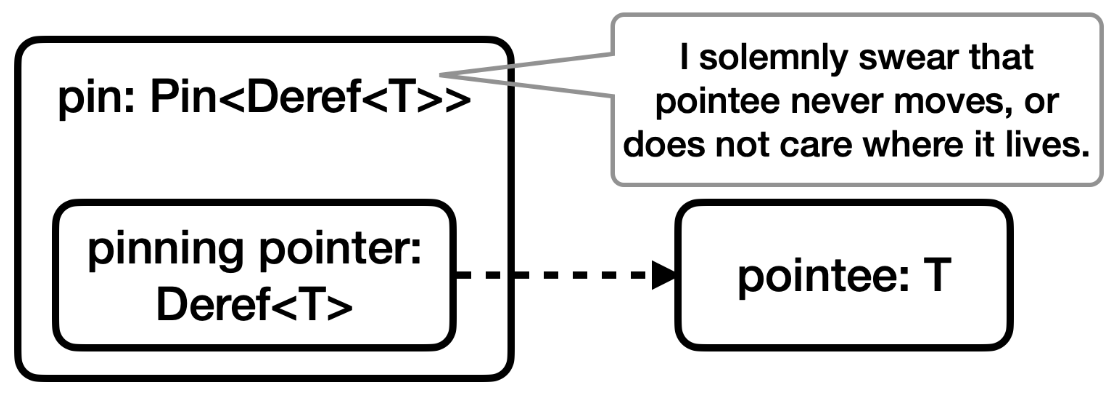
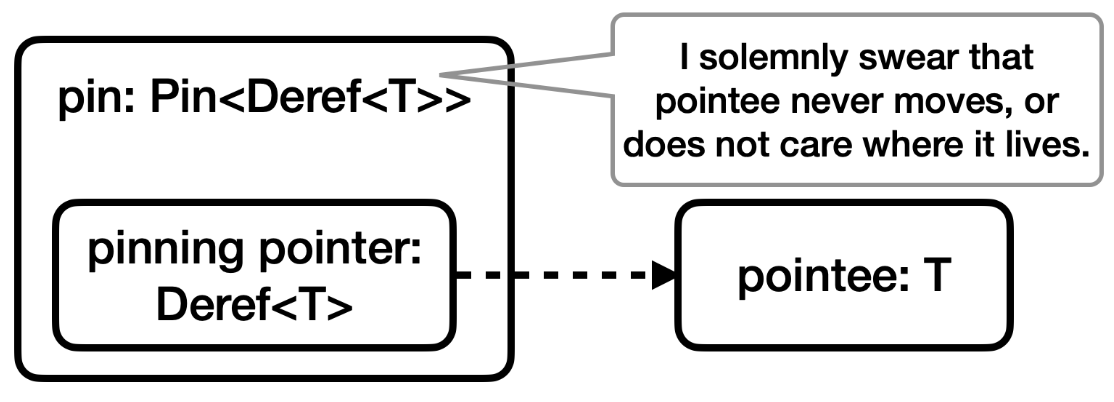
<p>The following diagram shows the structure of a Pin. We will come back to this diagram after clarifying some concepts, and will have a closer look at the three players in it when discussing Pin’s guarantees.</p>

<p><img src="/assets/img/pin/pin.png" alt="Structure of a Pin" /></p>

<h2 id="movability">Movability</h2>

<p>If I ask you what is movability, chances are, you’ll think of Rust’s move semantics and transfer of ownership. Here is a brief summary:</p>

<div class="summarybox">
Rust manages memory through <a href="https://doc.rust-lang.org/book/ch04-01-what-is-ownership.html#:~:text=Rust%20uses%20a%20third%20approach,your%20program%20while%20it%27s%20running." target="_blank" rel="noopener noreferrer">a system of ownership with a set of rules that the compiler checks</a>. Each value (e.g., an object) in a Rust program is owned by a variable. <b>Ownership of a value can be transferred</b> from one variable to another, for instance in an assignment statement. The Rust compiler calls this <a href="https://doc.rust-lang.org/book/ch04-01-what-is-ownership.html#variables-and-data-interacting-with-move" target="_blank" rel="noopener noreferrer"><b>moving out</b> of one variable into another</a>. Ownership transfer is necessary for guaranteeing single ownership, a rule that the compiler relies on for ensuring memory safety. 
</div>

<p><strong><em>Question: Is ownership transfer the type of move that Pin expresses a guarantee about?</em></strong></p>

<p>Not really. In the context of pinning, “move” and “movability” mean that the value has <a href="https://doc.rust-lang.org/nightly/core/pin/index.html#what-is-moving" target="_blank"><strong>moved in the mechanical sense</strong></a> of being located at a new place in memory. In the following, I am going to refer to this as a <strong>mechanical move</strong>.</p>

<h3 id="two-types-of-move">Two types of move</h3>

<p><strong><em>Question: Does a “move”, or transfer of ownership of a value, involve a mechanical move?</em></strong></p>

<p>The short answer is “yes”. The longer answer is “yes, but sometimes only partially”.</p>

<p><strong><em>Question: Can the location of a value in memory change without a transfer of ownership?</em></strong></p>

<p>This one is trickier to answer. This is where the boundaries between transfer of ownership, mechanical move, and even mutability get blurred. To answer this question, it is best to look at some examples.</p>

<p>In the first example (<a href="https://play.rust-lang.org/?version=stable&amp;mode=release&amp;edition=2021&amp;gist=e4372b575bbc610dc74e887357ade2ca" target="_blank">playground</a>), we create a vector with capacity 2, then push 4 elements to it. The elements are of type <code class="language-plaintext highlighter-rouge">SelfPoint</code>:</p>

<div class="language-rust highlighter-rouge"><div class="highlight"><pre class="highlight"><code><span class="c1">// Example 1:</span>

<span class="k">struct</span> <span class="n">SelfPoint</span> <span class="p">{</span>
    <span class="n">data</span><span class="p">:</span> <span class="nb">u32</span><span class="p">,</span>
    <span class="n">ptr</span><span class="p">:</span> <span class="o">*</span><span class="k">const</span> <span class="nb">u32</span><span class="p">,</span>
<span class="p">}</span>

<span class="k">impl</span> <span class="n">SelfPoint</span> <span class="p">{</span>
    <span class="k">fn</span> <span class="nf">new</span><span class="p">(</span><span class="n">data</span><span class="p">:</span> <span class="nb">u32</span><span class="p">)</span> <span class="k">-&gt;</span> <span class="k">Self</span> <span class="p">{</span>
        <span class="n">SelfPoint</span> <span class="p">{</span>
            <span class="n">data</span><span class="p">,</span>
            <span class="n">ptr</span><span class="p">:</span> <span class="nn">std</span><span class="p">::</span><span class="nn">ptr</span><span class="p">::</span><span class="nf">null</span><span class="p">(),</span>
        <span class="p">}</span>
    <span class="p">}</span>

    <span class="k">fn</span> <span class="nf">init</span><span class="p">(</span><span class="o">&amp;</span><span class="k">mut</span> <span class="k">self</span><span class="p">)</span> <span class="p">{</span>
        <span class="k">let</span> <span class="n">ptr</span><span class="p">:</span> <span class="o">*</span><span class="k">const</span> <span class="nb">u32</span> <span class="o">=</span> <span class="o">&amp;</span><span class="k">self</span><span class="py">.data</span><span class="p">;</span>
        <span class="k">self</span><span class="py">.ptr</span> <span class="o">=</span> <span class="n">ptr</span><span class="p">;</span>
    <span class="p">}</span>
<span class="p">}</span>

<span class="k">fn</span> <span class="nf">main</span><span class="p">()</span> <span class="p">{</span>
    <span class="k">let</span> <span class="k">mut</span> <span class="n">v</span> <span class="o">=</span> <span class="nn">Vec</span><span class="p">::</span><span class="nf">with_capacity</span><span class="p">(</span><span class="mi">2</span><span class="p">);</span>

    <span class="k">for</span> <span class="n">i</span> <span class="k">in</span> <span class="mi">0</span><span class="o">..</span><span class="mi">4</span> <span class="p">{</span>
        <span class="k">let</span> <span class="n">x</span> <span class="o">=</span> <span class="nn">SelfPoint</span><span class="p">::</span><span class="nf">new</span><span class="p">(</span><span class="n">i</span><span class="p">);</span>
        <span class="n">v</span><span class="nf">.push</span><span class="p">(</span><span class="n">x</span><span class="p">);</span>
        <span class="n">v</span><span class="nf">.last_mut</span><span class="p">()</span><span class="nf">.expect</span><span class="p">(</span><span class="s">"vec is empty"</span><span class="p">)</span><span class="nf">.init</span><span class="p">();</span>
        <span class="nd">println!</span><span class="p">(</span><span class="s">"Vector addr &amp; cap: {:p}, {}; heap location: {:p}"</span><span class="p">,</span> <span class="o">&amp;</span><span class="n">v</span><span class="p">,</span> <span class="n">v</span><span class="nf">.capacity</span><span class="p">(),</span> <span class="o">&amp;</span><span class="n">v</span><span class="p">[</span><span class="mi">0</span><span class="p">]);</span>
    <span class="p">}</span>
    <span class="o">...</span>
<span class="p">}</span>
</code></pre></div></div>

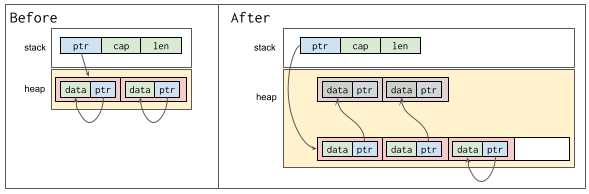
<p>Each time we push an element to the vector, a move happens. This move involves both a transfer of ownership and a mechanical move (from the stack, to the call stack of <code class="language-plaintext highlighter-rouge">push</code>, and finally to the heap). After pushing each element to the vector, we call <code class="language-plaintext highlighter-rouge">init</code> on it to set the value of <code class="language-plaintext highlighter-rouge">ptr</code> to the address of <code class="language-plaintext highlighter-rouge">data</code>. Since we initialized the vector with capacity 2, pushing the third element will result in allocating a larger buffer, and moving the elements to the new buffer. The following diagram shows the memory layout of the vector, before and after pushing the third element to it.</p>

<p align="center">
<img src="/assets/img/pin/ResizeVector.png" alt="Memory layout of resized vector" style="width:90%;" />
</p>

<p>Notice how after the third <code class="language-plaintext highlighter-rouge">push</code>, the <code class="language-plaintext highlighter-rouge">ptr</code> fields of the first two elements of the vector point to memory locations they no longer own. This is exactly the kind of problem that Pin is designed to prevent.</p>

<p>In this example, the memory allocated to the vector on the heap is moved, mechanically, but no explicit transfer of ownership has happened. <a href="https://doc.rust-lang.org/src/alloc/raw_vec.rs.html#401" target="_blank">Deep in the implementation of Vec</a>, the vector’s <code class="language-plaintext highlighter-rouge">ptr</code> is updated and mutated, but even this is not something that I can call a transfer of ownership.</p>

<div class="summarybox">
What happens if you write a similar program in Python or Java? Surely there too new memory has to be allocated as the vector expands, but will <code>SelfPoint</code> instances be relocated? How about in C++?
</div>

<p>In the next example (<a href="https://play.rust-lang.org/?version=stable&amp;mode=release&amp;edition=2021&amp;gist=f0343f6a3a270535bb563b5c8e2400e1" target="_blank">playground</a>), we initialize the vector with a larger capacity to prevent memory reallocation. We also pass the vector to a function causing a transfer of ownership.</p>

<div class="language-rust highlighter-rouge"><div class="highlight"><pre class="highlight"><code><span class="c1">// Example 2:</span>

<span class="k">fn</span> <span class="nf">validate</span><span class="p">(</span><span class="n">v</span><span class="p">:</span> <span class="nb">Vec</span><span class="o">&lt;</span><span class="n">SelfPoint</span><span class="o">&gt;</span><span class="p">)</span> <span class="p">{</span>
    <span class="k">for</span> <span class="n">x</span> <span class="k">in</span> <span class="o">&amp;</span><span class="n">v</span> <span class="p">{</span>
        <span class="k">let</span> <span class="n">data</span> <span class="o">=</span> <span class="o">&amp;</span><span class="n">x</span><span class="py">.data</span> <span class="k">as</span> <span class="o">*</span><span class="k">const</span> <span class="nb">u32</span><span class="p">;</span>
        <span class="nd">assert!</span><span class="p">(</span><span class="n">data</span> <span class="o">==</span> <span class="n">x</span><span class="py">.ptr</span><span class="p">);</span>
    <span class="p">}</span>
    <span class="nd">println!</span><span class="p">(</span><span class="s">"Validated vector at {:p}; buffer at: {:p}"</span><span class="p">,</span> <span class="o">&amp;</span><span class="n">v</span><span class="p">,</span> <span class="n">v</span><span class="nf">.as_ptr</span><span class="p">());</span>
<span class="p">}</span>

<span class="k">fn</span> <span class="nf">main</span><span class="p">()</span> <span class="p">{</span>
    <span class="k">let</span> <span class="k">mut</span> <span class="n">v</span> <span class="o">=</span> <span class="nn">Vec</span><span class="p">::</span><span class="nf">with_capacity</span><span class="p">(</span><span class="mi">4</span><span class="p">);</span>

    <span class="k">for</span> <span class="n">i</span> <span class="k">in</span> <span class="mi">0</span><span class="o">..</span><span class="mi">4</span> <span class="p">{</span>
        <span class="k">let</span> <span class="n">x</span> <span class="o">=</span> <span class="nn">SelfPoint</span><span class="p">::</span><span class="nf">new</span><span class="p">(</span><span class="n">i</span><span class="p">);</span>
        <span class="n">v</span><span class="nf">.push</span><span class="p">(</span><span class="n">x</span><span class="p">);</span>
        <span class="n">v</span><span class="nf">.last_mut</span><span class="p">()</span><span class="nf">.expect</span><span class="p">(</span><span class="s">"vec empty"</span><span class="p">)</span><span class="nf">.init</span><span class="p">();</span>
    <span class="p">}</span>
    
    <span class="nd">println!</span><span class="p">(</span><span class="s">"Created vector</span><span class="se">\t</span><span class="s"> at {:p}; buffer at: {:p}"</span><span class="p">,</span> <span class="o">&amp;</span><span class="n">v</span><span class="p">,</span> <span class="n">v</span><span class="nf">.as_ptr</span><span class="p">());</span>
    <span class="nf">validate</span><span class="p">(</span><span class="n">v</span><span class="p">);</span>
<span class="p">}</span>
</code></pre></div></div>

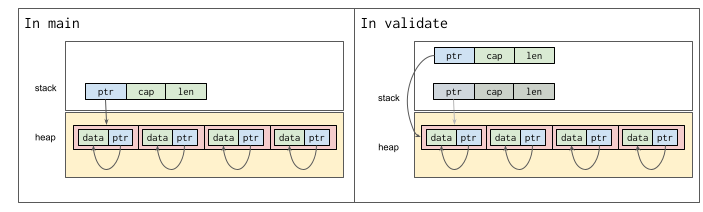
<p>The following diagram shows the memory layout in this case.</p>

<p align="center">
<img src="/assets/img/pin/OwnershipTransfer.png" alt="Memory layout of a moved vector" style="width:90%;" />
</p>

<p>In both of the examples, vector <code class="language-plaintext highlighter-rouge">v</code> is partially moved to a new location in memory. In the first example, only the heap-allocated memory is moved, without any transfer of ownership. In the second example, only the stack-allocated memory is moved, involving a transfer of ownership.</p>

<p>With these examples in mind, we can now answer the question <strong><em>“Can the location of a value in memory change without a transfer of ownership?”</em></strong></p>

<p>The answer is yes. In other words, mechanical move is a broader concept than ownership transfer.</p>
<h3 id="movability-and-mutability">Movability and mutability</h3>

<p>The mechanical move in Example 1 was caused by a mutation. In fact, there is a very close connection between mutability and movability. More specifically, any mutation entails a mechanical move (see the <a href="https://rust-lang.github.io/async-book/04_pinning/01_chapter.html#pinning-in-detail:~:text=Fig%201%3A%20Before%20and%20after%20swap" target="_blank">classic example with mem::swap</a>).</p>

<p><strong>Due to this close connection between mutability and movability, in the description of Pin, we see many references to mutability, despite Pin being all about movability!</strong></p>

<p>Note that mutating a value does not necessarily entail a transfer of ownership. Transfer of ownership involves <a href="https://doc.rust-lang.org/book/ch04-01-what-is-ownership.html#variables-and-data-interacting-with-move:~:text=But%20because%20Rust%20also%20invalidates%20the%20first%20variable%2C%20instead%20of%20being%20called%20a%20shallow%20copy%2C%20it%E2%80%99s%20known%20as%20a%20move." target="_blank">marking a memory location as invalid</a>, but in the case of <code class="language-plaintext highlighter-rouge">mem::swap</code> for instance, both memory locations remain valid after the operation.</p>

<h2 id="leaky-abstractions">Leaky Abstractions</h2>

<p>While ownership and transfer of ownership are powerful abstractions, they are <strong>somewhat leaky</strong>, particularly when it comes to capturing the notion of mechanical moves. This is <a href="https://doc.rust-lang.org/book/ch04-01-what-is-ownership.html#the-stack-and-the-heap:~:text=Once%20you%20understand%20ownership%2C%20you%20won%E2%80%99t%20need%20to%20think%20about%20the%20stack%20and%20the%20heap%20very%20often" target="_blank">hinted at</a> in the explanation of ownership in the Rust book. Moreover, as we saw in the use of <code class="language-plaintext highlighter-rouge">Vec</code> in Example 1, we may need to study the internal details of a type when deciding whether its manipulation can result in a mechanical move or not.</p>
<p>Having a leaky abstraction or only partially hiding details in a programming language is nothing new. Niklaus Wirth, in his 1974 paper “On the Design of Programming Languages”, writes:</p>

<blockquote>
  <p>I found a large number of programs perform poorly because of the language’s tendency to hide “what is going on” with the misguided intention of “not bothering the programmer with details”.</p>
</blockquote>

<p>In my view, Rust programs are anything but “programs that perform poorly”, but knowing that an abstraction is leaky allows us to use it more effectively.</p>

<h2 id="address-sensitivity">Address sensitivity</h2>

<p>So far, we’ve learned that objects in Rust are movable in a mechanical sense, and that this kind of move is different from ownership transfer.</p>

<p>In some cases, the validity of an object’s invariants and the soundness of its behavior depend on its location in memory. We say that such an object is in an address-sensitive state. Self-referential objects (i.e., objects with pointers to themselves, or to fields in themselves) are the archetype of address-sensitivity. In the examples above, calling <code class="language-plaintext highlighter-rouge">init</code> on a <code class="language-plaintext highlighter-rouge">SelfPoint</code> instance made it self-referential and address-sensitive.</p>

<div class="summarybox">
<b>Pointing vs referencing</b>
<br /><br />
The field <code>ptr</code> in <code>SelfPoint</code> is a <b>pointer, not a reference!</b> If we change <code>ptr</code> to be a reference, we get a compiler error (<a href="https://play.rust-lang.org/?version=stable&amp;mode=release&amp;edition=2021&amp;gist=54c7cf7ed7fad9ee607ed98253b92148" target="_blank" rel="noopener noreferrer">playground</a>)! Moving a truly self-referential (as opposed to a self-pointing!) object violates Rust’s borrow-checking rules.
</div>

<p>Strictly speaking, address-sensitivity is a state of an object, not necessarily a property that can be specified via its type (e.g., instances of <code class="language-plaintext highlighter-rouge">SelfPoint</code> are not address-sensitive before calling <code class="language-plaintext highlighter-rouge">init</code> on them). However, it is often a good practice to associate a different type to each state of a stateful entity. Following this practice, a self-referential object becomes address-sensitive early at the beginning of its lifetime, and remains address-sensitive until the end of its lifetime. In other words, once your object is no longer address-sensitive, it is a good practice to consume it and convert it into an instance of another type.</p>

<p><strong>As a result, in practice, address-sensitivity can be specified via types. This allows the compiler to reason about the address-sensitivity of objects at compile time.</strong></p>

<h2 id="why-is-pinning-needed">Why is pinning needed?</h2>

<p>Once an object is in an address-sensitive state, the compiler can guarantee memory-safe interaction with it, <strong>only</strong> if the object stays in its location in memory. If an object is not address-sensitive, it can freely move around in memory, without violating any of the compiler’s safety guarantees.</p>

<p>To tell the compiler that instances of a <strong>type</strong> will not be address-sensitive, we implement the <a href="https://doc.rust-lang.org/std/marker/trait.Unpin.html" target="_blank">Unpin</a> auto trait for that type. By default, all types are <code class="language-plaintext highlighter-rouge">Unpin</code>. To announce potential address-sensitivity of instances of a type, we implement <code class="language-plaintext highlighter-rouge">!Unpin</code> for it. We will learn more about <code class="language-plaintext highlighter-rouge">Unpin</code> below.</p>

<p>To <strong>promise to the compiler</strong> that an <strong>object</strong> has a fixed location in memory, or otherwise is address-insensitive, we wrap a pointer (i.e., pinning pointer) to that object (i.e., pointee) in a <code class="language-plaintext highlighter-rouge">Pin</code>. As we will see below, <code class="language-plaintext highlighter-rouge">Pin</code> restricts mutable access to a pointee that  is <code class="language-plaintext highlighter-rouge">!Unpin</code>.</p>

<p>In short, pinning (i.e., the use of <code class="language-plaintext highlighter-rouge">Pin</code> and <code class="language-plaintext highlighter-rouge">Unpin</code>), are the means that you as a developer use to help the compiler provide its memory-safety guarantees, and avoid undefined behavior when it comes to address-sensitive types and objects.</p>

<h2 id="the-unpin-trait">The Unpin Trait</h2>

<p><code class="language-plaintext highlighter-rouge">Unpin</code> is a marker trait, and is automatically implemented for almost all types. It is implemented even for type <code class="language-plaintext highlighter-rouge">SelfPoint</code> in Example 1. This is because the compiler has no reason to assume that at runtime you are going to set <code class="language-plaintext highlighter-rouge">SelfPoint.ptr</code> to point to <code class="language-plaintext highlighter-rouge">SelfPoint.data</code>.</p>

<p>To tell the compiler that instances of <code class="language-plaintext highlighter-rouge">SelfPoint</code> will be self-referential and address-sensitive, you have to explicitly implement <code class="language-plaintext highlighter-rouge">!Unpin</code> for it. The conventional way of doing this is to add a field of type <a href="https://doc.rust-lang.org/std/marker/struct.PhantomPinned.html" target="_blank">PhantomPinned</a> to your type. <code class="language-plaintext highlighter-rouge">PhantomPinned</code> is <code class="language-plaintext highlighter-rouge">!Unpin</code>, and a type that contains a <code class="language-plaintext highlighter-rouge">PhantomPinned</code> does not get a default <code class="language-plaintext highlighter-rouge">Unpin</code> implementation. We change <code class="language-plaintext highlighter-rouge">SelfPoint</code> as follows:</p>

<div class="language-rust highlighter-rouge"><div class="highlight"><pre class="highlight"><code><span class="c1">// Example 3:</span>

<span class="k">use</span> <span class="nn">std</span><span class="p">::</span><span class="nn">marker</span><span class="p">::</span><span class="n">PhantomPinned</span><span class="p">;</span>

<span class="k">struct</span> <span class="n">SelfPoint</span> <span class="p">{</span>
    <span class="n">data</span><span class="p">:</span> <span class="nb">u32</span><span class="p">,</span>
    <span class="n">ptr</span><span class="p">:</span> <span class="o">*</span><span class="k">const</span> <span class="nb">u32</span><span class="p">,</span>
    <span class="n">_pinned</span><span class="p">:</span> <span class="n">PhantomPinned</span><span class="p">,</span>
<span class="p">}</span>
</code></pre></div></div>

<p>If your type has a field that is <code class="language-plaintext highlighter-rouge">!Unpin</code> (e.g., a <a href="https://docs.rs/tokio/latest/tokio/time/struct.Sleep.html" target="_blank">tokio::time::Sleep</a> field), and you want to make your type <code class="language-plaintext highlighter-rouge">Unpin</code>, you have to explicitly implement <code class="language-plaintext highlighter-rouge">Unpin</code> for it. Doing so is as simple as writing a single line of code.</p>

<div class="language-rust highlighter-rouge"><div class="highlight"><pre class="highlight"><code><span class="k">impl</span> <span class="nb">Unpin</span> <span class="k">for</span> <span class="n">MyType</span> <span class="p">{}</span>
</code></pre></div></div>

<p>But you have to be very careful, because when you implement <code class="language-plaintext highlighter-rouge">Unpin</code>, you are promising to the compiler that instances of your type will be address-insensitive and freely movable.</p>

<h2 id="pin-and-its-guarantees">Pin and its guarantees</h2>

<p>Now that we know why pinning is needed, we can take a closer look at <a href="https://doc.rust-lang.org/nightly/core/pin/struct.Pin.html" target="_blank">Pin</a>, its API, and its guarantees.</p>

<h3 id="the-structure-of-a-pin">The structure of a Pin</h3>

<p>As mentioned above, to promise to the compiler that an object either has a fixed location in memory (i.e, is immovable) or is address-insensitive (i.e., is <code class="language-plaintext highlighter-rouge">Unpin</code>), we wrap a pointer to it in a <code class="language-plaintext highlighter-rouge">Pin</code>. This is shown in the diagram below (repeated from above).</p>

<p><img src="/assets/img/pin/pin.png" alt="Structure of a Pin" /></p>

<ul>
  <li>The object that we want to express the promise about is called the <strong>pointee</strong>.</li>
  <li>The pointer to <strong>pointee</strong> is called the <strong>pinning pointer</strong>.</li>
  <li>The <strong>pin</strong> itself is a smart pointer that wraps around the <strong>pinning pointer</strong>, and takes ownership of it.
We say that <strong>pin</strong> pins the <strong>pointee</strong>.</li>
</ul>

<h3 id="mutability-movability-and-pins-guarantees">Mutability, Movability, and Pin’s guarantees</h3>

<p>Once you express your promise about the immovability or address-insensitivity of an object, by pinning it, <strong>Pin guarantees that it will maintain your promise</strong>. To achieve this, Pin won’t easily give mutable access to the pointee. This is important, because as we saw above, mutable access to a value can result in moving it in memory. For address-sensitive objects, this may violate the invariant of the object, or cause memory-safety issues.</p>

<p>APIs utilizing Pin, with <code class="language-plaintext highlighter-rouge">Future::poll</code> being a prominent example, are concerned with integrity and validity of the pointee’s invariants rather than its specific memory location. These APIs need to mutate the pointee, and need to know that doing so won’t result in undefined behaviors or a violation of the pointee’s invariants. To establish this proposition, immovability is used as an <strong>overapproximation</strong> – a <strong>sufficient</strong> and easier-to-verify condition that ensures the object’s integrity as it is being mutated.</p>

<p>By relying on immovability, Pin provides a simple and generic API that allows safe interaction with address-sensitive objects in arbitrary contexts without having to make any additional assumptions about the internal invariants of those objects.</p>

<h3 id="pinning-address-insensitive-objects">Pinning address-insensitive objects</h3>

<p>Instances of an <code class="language-plaintext highlighter-rouge">Unpin</code> type are promised to be address-insensitive, and therefore allowed to move freely in memory. <code class="language-plaintext highlighter-rouge">Pin</code> has a safe API for working with <code class="language-plaintext highlighter-rouge">Unpin</code> objects. The following table lists the methods in <code class="language-plaintext highlighter-rouge">Pin</code>’s safe API. Those in green require the pointee to be <code class="language-plaintext highlighter-rouge">Unpin</code>. The table shows the API from stable Rust 1.77.0.</p>

<table class="bordered">
<thead>
<tr class="header">
<th></th>
<th>Method name</th>
<th>Requires Unpin?</th>
<th>Return type</th>
</tr>
</thead>
<tbody>
<tr style="background-color:#d9ead3"><td>1</td><td>new</td><td>yes</td><td>Pin&lt;Ptr&gt;</td></tr>
<tr style="background-color:#d9ead3"><td>2</td><td>into_inner</td><td>yes</td><td>Ptr</td></tr>
<tr style="background-color:#d9ead3"><td>3</td><td>get_mut</td><td>yes</td><td>&amp;'a mut T</td></tr>

<tr style="background-color:#cfe2f3"><td>4</td><td>as_ref</td><td>no</td><td>Pin&lt;&amp;Ptr::Target&gt;</td></tr>
<tr style="background-color:#cfe2f3"><td>5</td><td>get_ref</td><td>no</td><td>&amp;'a T</td></tr>
<tr style="background-color:#cfe2f3"><td>6</td><td>into_ref</td><td>no</td><td>Pin&lt;&amp;'a T&gt;</td></tr>
<tr style="background-color:#cfe2f3"><td>7</td><td>as_mut</td><td>no</td><td>Pin&lt;&amp;mut Ptr::Target&gt;</td></tr>
<tr style="background-color:#cfe2f3"><td>8</td><td>set</td><td>no</td><td>()</td></tr>
<tr style="background-color:#cfe2f3"><td>9</td><td>static_ref</td><td>no</td><td>Pin&lt;&amp;'static T&gt;</td></tr>
<tr style="background-color:#cfe2f3"><td>10</td><td>static_mut</td><td>no</td><td>Pin&lt;&amp;'static mut T&gt;</td></tr>
</tbody>
</table>

<p>If the pointee is <code class="language-plaintext highlighter-rouge">Unpin</code>, you can easily wrap it in a <code class="language-plaintext highlighter-rouge">Pin</code>, using the <code class="language-plaintext highlighter-rouge">new</code> method, without any additional restrictions. Moreover, if the pointee is <code class="language-plaintext highlighter-rouge">Unpin</code>, you can use the <code class="language-plaintext highlighter-rouge">get_mut</code> method to get mutable access to it. Mutating the pointee is safe because it is address-insensitive, and can move and mutate freely.</p>

<p>The methods in blue do not give direct mutable access to pointee, and cannot be used to mutate or move the object, without additional, possibly unsafe, code. Therefore they are safe.</p>

<h3 id="pinning-address-sensitive-objects">Pinning address-sensitive objects</h3>

<p>If instances of a type can enter an address-sensitive state, then that type must be declared <code class="language-plaintext highlighter-rouge">!Unpin</code>.</p>

<p>To soundly <code class="language-plaintext highlighter-rouge">Pin</code> instances of an <code class="language-plaintext highlighter-rouge">!Unpin</code> type, <strong>you have to promise that the pointee’s data will not be moved nor have its storage invalidated until it gets dropped</strong>. The compiler cannot check these promises, so when working with <code class="language-plaintext highlighter-rouge">!Unpin</code> types, you have to write unsafe code. <code class="language-plaintext highlighter-rouge">Pin</code> offers a number of unsafe methods particularly for working with <code class="language-plaintext highlighter-rouge">!Unpin</code> types.</p>

<table class="bordered">
<thead>
<tr class="header">
<th></th>
<th>Method name</th>
<th>Requires Unpin?</th>
<th>Return type</th>
</tr>
</thead>
<tbody>
<tr style="background-color:#f4cccc"><td>11</td><td>new_unchecked</td><td>no</td><td>Pin&lt;Ptr&gt;</td></tr>
<tr style="background-color:#f4cccc"><td>12</td><td>into_inner_unchecked</td><td>no</td><td>Ptr</td></tr>
<tr style="background-color:#f4cccc"><td>13</td><td>map_unchecked</td><td>no</td><td>Pin&lt;&amp;'a U&gt;</td></tr>
<tr style="background-color:#f4cccc"><td>14</td><td>map_unchecked_mut</td><td>no</td><td>Pin&lt;&amp;'a mut U&gt;</td></tr>
<tr style="background-color:#f4cccc"><td>15</td><td>get_unchecked_mut</td><td>no</td><td>&amp;'a mut T</td></tr>
</tbody>
</table>

<p>To create an instance of <code class="language-plaintext highlighter-rouge">Pin</code> in this case, you have to use the unsafe <a href="https://doc.rust-lang.org/nightly/core/pin/struct.Pin.html#method.new_unchecked" target="_blank">new_unchecked</a> method. The documentation for this method states a few additional promises that you have to make. These promises allow <code class="language-plaintext highlighter-rouge">Pin</code> to guarantee that your use of its safe API (colored in blue in the previous table) will be sound.</p>

<p>These additional promises are about the <strong>pinning pointer</strong>, which is the argument to <code class="language-plaintext highlighter-rouge">new_unchecked</code>. Needless to say, the pinning pointer must be <code class="language-plaintext highlighter-rouge">Deref</code>. You have to promise that in your implementation of <code class="language-plaintext highlighter-rouge">Deref::deref</code>, you do not “move [any data] out of <code class="language-plaintext highlighter-rouge">self</code>” (even a partial move violates this promise). You have to make a similar promise about your implementation of <code class="language-plaintext highlighter-rouge">DerefMut</code> if you have it. This is because <code class="language-plaintext highlighter-rouge">Pin</code> relies on <code class="language-plaintext highlighter-rouge">Deref::deref</code> and <code class="language-plaintext highlighter-rouge">DerefMut::deref_mut</code> in the implementation of some of its safe methods (e.g., <code class="language-plaintext highlighter-rouge">as_ref</code> and <code class="language-plaintext highlighter-rouge">as_mut</code>), and can only maintain the immovability promise, if <code class="language-plaintext highlighter-rouge">Deref::deref</code> and <code class="language-plaintext highlighter-rouge">DerefMut::deref_mut</code> guarantee it.</p>

<p>Note that inside <code class="language-plaintext highlighter-rouge">DerefMut::deref_mut</code>, you have mutable access to pointee. A malicious implementation could simply use swap to move a value out of self.</p>

<p>The methods <code class="language-plaintext highlighter-rouge">map_unchecked</code> and <code class="language-plaintext highlighter-rouge">map_unchecked_mut</code> are consuming methods that, among other things, are particularly useful for converting the pointee to an <code class="language-plaintext highlighter-rouge">Unpin</code> type, signaling its transition to an address-insensitive state. As an example, we could map instances of <code class="language-plaintext highlighter-rouge">SelfPoint</code> to address-insensitive <code class="language-plaintext highlighter-rouge">u32</code> values holding only the content of the field <code class="language-plaintext highlighter-rouge">data</code>.</p>

<h3 id="putting-it-all-together">Putting it all together</h3>

<p>We can use <code class="language-plaintext highlighter-rouge">Pin</code> and <code class="language-plaintext highlighter-rouge">Unpin</code> to fix the problem that we faced in Example 1. Here are the changes we have to make for the fix:</p>

<ol>
  <li>Change <code class="language-plaintext highlighter-rouge">SelfPoint</code> to be <code class="language-plaintext highlighter-rouge">!Unpin</code> as in Example 3.</li>
  <li>Change <code class="language-plaintext highlighter-rouge">init</code> to take <code class="language-plaintext highlighter-rouge">Pin&lt;&amp;mut Self&gt;</code> as its receiver. It only makes sense to make an instance of <code class="language-plaintext highlighter-rouge">SelfPoint</code> self-referential if we can guarantee that it is immovable. One way to do this is to move instances of <code class="language-plaintext highlighter-rouge">SelfPoint</code> to the heap.</li>
  <li>Change the vector to store pinned <strong>references</strong> to <code class="language-plaintext highlighter-rouge">SelfPoint</code> instances.</li>
</ol>

<p>Here is the final code, with these changes applied (<a href="https://play.rust-lang.org/?version=stable&amp;mode=debug&amp;edition=2021&amp;gist=01bc52f323efa556d2a092250006f8e1" target="_blank">playground</a>).</p>

<div class="language-rust highlighter-rouge"><div class="highlight"><pre class="highlight"><code><span class="c1">// Example 4:</span>

<span class="k">use</span> <span class="nn">std</span><span class="p">::</span><span class="nn">marker</span><span class="p">::</span><span class="n">PhantomPinned</span><span class="p">;</span>
<span class="k">use</span> <span class="nn">std</span><span class="p">::</span><span class="nn">pin</span><span class="p">::</span><span class="nb">Pin</span><span class="p">;</span>

<span class="k">struct</span> <span class="n">SelfPoint</span> <span class="p">{</span>
    <span class="n">data</span><span class="p">:</span> <span class="nb">u32</span><span class="p">,</span>
    <span class="n">ptr</span><span class="p">:</span> <span class="o">*</span><span class="k">const</span> <span class="nb">u32</span><span class="p">,</span>
    <span class="n">_pinned</span><span class="p">:</span> <span class="n">PhantomPinned</span><span class="p">,</span>
<span class="p">}</span>

<span class="k">impl</span> <span class="n">SelfPoint</span> <span class="p">{</span>
    <span class="k">fn</span> <span class="nf">new</span><span class="p">(</span><span class="n">data</span><span class="p">:</span> <span class="nb">u32</span><span class="p">)</span> <span class="k">-&gt;</span> <span class="k">Self</span> <span class="p">{</span>
        <span class="n">SelfPoint</span> <span class="p">{</span>
            <span class="n">data</span><span class="p">,</span>
            <span class="n">ptr</span><span class="p">:</span> <span class="nn">std</span><span class="p">::</span><span class="nn">ptr</span><span class="p">::</span><span class="nf">null</span><span class="p">(),</span>
            <span class="n">_pinned</span><span class="p">:</span> <span class="n">PhantomPinned</span><span class="p">,</span>
        <span class="p">}</span>
    <span class="p">}</span>

    <span class="k">fn</span> <span class="nf">init</span><span class="p">(</span><span class="k">self</span><span class="p">:</span> <span class="nb">Pin</span><span class="o">&lt;&amp;</span><span class="k">mut</span> <span class="k">Self</span><span class="o">&gt;</span><span class="p">)</span> <span class="p">{</span>
        <span class="k">let</span> <span class="n">ptr</span><span class="p">:</span> <span class="o">*</span><span class="k">const</span> <span class="nb">u32</span> <span class="o">=</span> <span class="o">&amp;</span><span class="k">self</span><span class="py">.data</span><span class="p">;</span>
        <span class="k">let</span> <span class="n">this</span> <span class="o">=</span> <span class="k">unsafe</span> <span class="p">{</span> <span class="k">self</span><span class="nf">.get_unchecked_mut</span><span class="p">()</span> <span class="p">};</span>
        <span class="n">this</span><span class="py">.ptr</span> <span class="o">=</span> <span class="n">ptr</span><span class="p">;</span>
    <span class="p">}</span>
<span class="p">}</span>

<span class="k">fn</span> <span class="nf">validate</span><span class="p">(</span><span class="n">v</span><span class="p">:</span> <span class="nb">Vec</span><span class="o">&lt;</span><span class="nb">Pin</span><span class="o">&lt;</span><span class="nb">Box</span><span class="o">&lt;</span><span class="n">SelfPoint</span><span class="o">&gt;&gt;&gt;</span><span class="p">)</span> <span class="p">{</span>
    <span class="k">for</span> <span class="n">x</span> <span class="k">in</span> <span class="o">&amp;</span><span class="n">v</span> <span class="p">{</span>
        <span class="k">let</span> <span class="n">data</span> <span class="o">=</span> <span class="o">&amp;</span><span class="n">x</span><span class="py">.data</span> <span class="k">as</span> <span class="o">*</span><span class="k">const</span> <span class="nb">u32</span><span class="p">;</span>
        <span class="nd">assert!</span><span class="p">(</span><span class="n">data</span> <span class="o">==</span> <span class="n">x</span><span class="py">.ptr</span><span class="p">);</span>
    <span class="p">}</span>
    <span class="nd">println!</span><span class="p">(</span><span class="s">"Validated vec:</span><span class="se">\t</span><span class="s">{:p}; buffer addr: {:p}; v[0] addr: {:p}"</span><span class="p">,</span> <span class="o">&amp;</span><span class="n">v</span><span class="p">,</span> <span class="n">v</span><span class="nf">.as_ptr</span><span class="p">(),</span> <span class="n">v</span><span class="p">[</span><span class="mi">0</span><span class="p">]);</span>
<span class="p">}</span>

<span class="k">fn</span> <span class="nf">main</span><span class="p">()</span> <span class="p">{</span>
    <span class="k">let</span> <span class="k">mut</span> <span class="n">v</span> <span class="o">=</span> <span class="nn">Vec</span><span class="p">::</span><span class="nf">with_capacity</span><span class="p">(</span><span class="mi">2</span><span class="p">);</span>

    <span class="k">for</span> <span class="n">i</span> <span class="k">in</span> <span class="mi">0</span><span class="o">..</span><span class="mi">4</span> <span class="p">{</span>
        <span class="k">let</span> <span class="k">mut</span> <span class="n">x</span> <span class="o">=</span> <span class="nn">Box</span><span class="p">::</span><span class="nf">pin</span><span class="p">(</span><span class="nn">SelfPoint</span><span class="p">::</span><span class="nf">new</span><span class="p">(</span><span class="n">i</span><span class="p">));</span>
        <span class="n">x</span><span class="nf">.as_mut</span><span class="p">()</span><span class="nf">.init</span><span class="p">();</span>
        <span class="n">v</span><span class="nf">.push</span><span class="p">(</span><span class="n">x</span><span class="p">);</span>
        <span class="nd">println!</span><span class="p">(</span><span class="s">"{i} Vector addr:</span><span class="se">\t</span><span class="s">{:p}; buffer addr: {:p}; v[0] addr: {:p}"</span><span class="p">,</span> <span class="o">&amp;</span><span class="n">v</span><span class="p">,</span> <span class="o">&amp;</span><span class="n">v</span><span class="p">[</span><span class="mi">0</span><span class="p">],</span> <span class="n">v</span><span class="p">[</span><span class="mi">0</span><span class="p">]);</span>
    <span class="p">}</span>
    
    <span class="nf">validate</span><span class="p">(</span><span class="n">v</span><span class="p">);</span>
<span class="p">}</span>
</code></pre></div></div>

<h2 id="do-i-need-to-use-pin-in-my-api">Do I need to use Pin in my API?</h2>

<p>When I started digging into pinning, I wanted to be able to comfortably decide whether to use <code class="language-plaintext highlighter-rouge">Pin</code> in my APIs or not. This decision becomes relevant when designing generic APIs or traits, where we don’t know the exact types of the objects that will interact with the API.</p>

<p>In these cases, you might want to use <code class="language-plaintext highlighter-rouge">Pin</code>, if:</p>

<ol>
  <li>Your API is likely to work with address-sensitive types and objects.
    <ol>
      <li>For instance, types that implement the <code class="language-plaintext highlighter-rouge">Future</code> trait are likely to be self-referential, and therefore address-sensitive. APIs that work with a <code class="language-plaintext highlighter-rouge">Future</code> need to <code class="language-plaintext highlighter-rouge">Pin</code> it.</li>
      <li>On the other hand, elements stored in a <code class="language-plaintext highlighter-rouge">Vec</code> don’t have that tendency, and more often than not are address-insensitive.</li>
    </ol>
  </li>
  <li>Your API needs to mutate objects.
    <ol>
      <li>For instance, <code class="language-plaintext highlighter-rouge">Future::poll</code> is called to make progress on a <code class="language-plaintext highlighter-rouge">Future</code> object. This requires changing, or mutating, the state of the <code class="language-plaintext highlighter-rouge">Future</code> object.</li>
      <li>On the other hand, in its implementation, <code class="language-plaintext highlighter-rouge">Vec</code> does not mutate the elements in its buffer.</li>
    </ol>
  </li>
  <li>The safety of your API depends on the object’s integrity and the validity of its invariants.
    <ol>
      <li>For instance, as a safe method, calls to <code class="language-plaintext highlighter-rouge">Future::poll</code> <a href="https://doc.rust-lang.org/std/future/trait.Future.html#panics:~:text=must%20never%20cause%20undefined%20behavior%20(memory%20corruption%2C%20incorrect%20use%20of%20unsafe%20functions%2C%20or%20the%20like)%2C%20regardless%20of%20the%20future%E2%80%99s%20state." target="_blank">“must never cause undefined behavior (memory corruption, incorrect use of unsafe functions, or the like), regardless of the future’s state.”</a></li>
      <li>On the other hand, while most of the <code class="language-plaintext highlighter-rouge">Vec</code>’s methods are safe, its contract is not affected by the invariants of the elements in its buffer. The presence of address-sensitive objects in a <code class="language-plaintext highlighter-rouge">Vec</code> does not cause undefined behavior when invoking any of its methods.</li>
    </ol>
  </li>
</ol>

<p>If your API passes all these checks, you’ll need <code class="language-plaintext highlighter-rouge">Pin</code> in your API. Passing these checks implies that your API depends tightly on the inner working of the types that it interacts with. Using <code class="language-plaintext highlighter-rouge">Pin</code> hides these details behind an immovability promise. This promise, although possibly more conservative than what you want, is easier to reason about.</p>

<p>Otherwise, even if you have a general purpose API like <code class="language-plaintext highlighter-rouge">Vec</code>, you won’t need <code class="language-plaintext highlighter-rouge">Pin</code> in your API; and your API will work just fine with pinned objects too.</p>

<p>Before wrapping up this section, I want to emphasize again that <code class="language-plaintext highlighter-rouge">Pin</code> does not force the pointee to stay in its location. It merely expresses an immovability promise about it. While all objects in Rust are movable, most objects never leave their original locations in memory throughout their lifetimes. For instance, most heap-allocated objects never move, as we saw in Example 4.</p>

<h2 id="how-do-other-languages-deal-with-self-referential-objects">How do other languages deal with self-referential objects?</h2>

<p>To answer this question, let’s start with Java, as a representative of garbage-collected languages.</p>

<p>In Java, <a href="https://docs.oracle.com/cd/E13150_01/jrockit_jvm/jrockit/geninfo/diagnos/garbage_collect.html" target="_blank">all objects are heap-allocated</a>. In your programs, you work with references to these objects, and can easily make self-referential objects. Consider the following example, which declares class <code class="language-plaintext highlighter-rouge">SelfRef</code>.</p>

<div class="language-java highlighter-rouge"><div class="highlight"><pre class="highlight"><code><span class="c1">// Example 5:</span>
<span class="kd">class</span> <span class="nc">SelfRef</span> <span class="o">{</span>
   <span class="nc">SelfRef</span> <span class="n">self</span><span class="o">;</span>

   <span class="kt">void</span> <span class="nf">init</span><span class="o">()</span> <span class="o">{</span>
       <span class="k">this</span><span class="o">.</span><span class="na">self</span> <span class="o">=</span> <span class="k">this</span><span class="o">;</span>
   <span class="o">}</span>
<span class="o">}</span>
</code></pre></div></div>

<p>You can make instances of <code class="language-plaintext highlighter-rouge">SelfRef</code> self-referential by calling <code class="language-plaintext highlighter-rouge">init</code> on them. But how about moving instances of <code class="language-plaintext highlighter-rouge">SelfRef</code> in memory? Well, the language does not provide you with a mechanism to do that. The notion of movability, in the sense of manually relocating objects in memory, does not exist in Java or similar garbage-collected languages. In these languages, objects reside safely in the heap, each hiding behind a reference. However, this does not mean that objects in these languages never relocate in the memory. The runtime, more specifically the garbage collector, does move objects around. This happens specifically when defragmenting or compacting the heap after removing the garbage collected objects. The garbage collector manages this process by tracking references to ensure their validity.</p>

<p>The same is true for other garbage-collected languages, such as <a href="https://docs.python.org/3/c-api/memory.html" target="_blank">Python</a>.
An exception worth mentioning is Golang, which (as opposed to Java and Python) allows pointer types. In Golang, you can declare a type similar to <code class="language-plaintext highlighter-rouge">SelfPoint</code> in Example 1, create self-referential instances of it, and move them around in memory. I am not aware of any mechanism in Golang for preventing undefined behaviors in these situations.</p>

<p>In C++, as far as I understand, you can move objects around. However, the language allows you to custom-implement move constructors. I suppose, move constructors are where you can ensure that invariants of your type are maintained as your objects move around in memory.</p>

<h2 id="conclusion">Conclusion</h2>

<p>In my quest for understanding <code class="language-plaintext highlighter-rouge">Pin</code>, I came to the conclusion that it is a construct that sits at the intersection of a few leaky abstractions, and provides a simple and generic mechanism for expressing invariants about address-sensitive objects without depending on their internal details.</p>

<p>The main leaky abstraction is the concept of moving a value. You want to think of it as a transfer of ownership, but it is more complex than that. Sometimes you don’t have an explicit transfer of ownership, but parts of the value move to another location in memory. Sometimes you have an explicit transfer of ownership, but parts of the value (e.g., the heap-allocated parts) stay in their memory location.</p>

<p>These subtleties become important when working with address-sensitive objects, whose invariants may be violated if their location in memory changes.</p>

<p>It is important to note that it is not the location of these objects that we care about, but their integrity and the validity of their invariants. However, it is generally easier to reason about the movability of an object rather than its invariants. <code class="language-plaintext highlighter-rouge">Pin</code> and <code class="language-plaintext highlighter-rouge">Unpin</code> are the constructs that we use for expressing movability guarantees.</p>

<p>Despite some <a href="https://internals.rust-lang.org/t/unsoundness-in-pin/11311" target="_blank">unsoundness issues in earlier versions of <code class="language-plaintext highlighter-rouge">Pin</code></a>, in my assessment, <code class="language-plaintext highlighter-rouge">Pin</code> and <code class="language-plaintext highlighter-rouge">Unpin</code> form a neat and effective abstraction that conceals the complexities of memory management that are leaked via the concepts of ownership and move semantics. I am curious about their origin and evolution. The story is certainly somewhere in the <a href="https://internals.rust-lang.org/" target="_blank">discussions</a> or on <a href="https://github.com/rust-lang/rust" target="_blank">Github</a>, if you go looking!</p>

<p><em>This article is a follow up on my earlier article titled <a href="https://www.blog.rbehjati.net/tech/2024/02/06/AsyncWrite-Tale.html" target="_blank">AsyncWrite and a Tale of Four Implementations</a>, which goes into an in-depth discussion of the decisions you have to make when working with async and Futures.</em></p>

<h2 id="references">References</h2>

<ol>
  <li><a href="https://rust-lang.github.io/async-book/04_pinning/01_chapter.html" target="_blank">Pinning in the Async Rust book</a></li>
  <li><a href="https://fasterthanli.me/articles/pin-and-suffering" target="_blank">Pin and Suffering</a></li>
  <li><a href="https://blog.adamchalmers.com/pin-unpin/" target="_blank">Pin, Unpin, and why Rust needs them</a></li>
  <li><a href="https://blog.rust-lang.org/inside-rust/2023/11/15/spec-vision.html" target="_blank">The vision for Rust specification</a> from the Inside Rust Blog</li>
  <li><a href="https://doc.rust-lang.org/nightly/core/pin/index.html#" target="_blank">Nightly Rust documentation of pinning</a></li>
  <li><a href="https://internals.rust-lang.org/" target="_blank">Rust internals</a></li>
</ol>]]></content><author><name>Razieh Behjati</name></author><category term="Tech" /><summary type="html"><![CDATA[What is pinning in Rust? Why is pinning is needed in Rust? What guarantees do Pin and Unpin provide.]]></summary></entry><entry><title type="html">From Helen Keller to Today’s Internet</title><link href="/shorts/2024/02/16/Helen.html" rel="alternate" type="text/html" title="From Helen Keller to Today’s Internet" /><published>2024-02-16T09:10:00+00:00</published><updated>2024-02-16T09:10:00+00:00</updated><id>/shorts/2024/02/16/Helen</id><content type="html" xml:base="/shorts/2024/02/16/Helen.html"><![CDATA[<p>Helen Keller, in <a href="https://www.amazon.co.uk/Story-Life-Dover-Thrift-Editions/dp/0486292495/" target="_blank">her autobiography</a>, writes about an incident that for a long time left her “in doubt, anxiety and fear”. At the age of 11, she wrote a story titled “The Frost King”, believing it to be her original creation. However, it was later found that her story was closely similar, in thought and language, to a story written by another author. She was alleged of plagiarism. She writes “I have ever since been tortured by the fear that what I write is not my own”.</p>

<p>What is fascinating is that Helen, being deafblind, communicated primarily through touch. She could not remember reading the original story herself, in braille. So somebody must have “read” it to her, by spelling the words on her fingers.</p>

<p>Following the incident, Helen’s teacher, Miss Sullivan, with the assistance of Alexander Graham Bell, finds out that the original story must have been “read” to Helen, by a friend, 3-4 years earlier, in 1888, during a vacation. At that time, Helen had been “learning the spelling of strange words”, and stories did not have much meaning to her.</p>

<p>Later, Helen’s own analysis of her letters and writings revealed to her that her mind was saturated with the story and other ideas of the original author, Miss Canby.</p>

<p><a href="https://www.nytimes.com/2023/12/27/business/media/new-york-times-open-ai-microsoft-lawsuit.html" target="_blank">The New York Times lawsuit against OpenAI and Microsoft</a> reminded me of this story.</p>

<p>I wonder what the lawsuit means in today’s ethical landscape. Occasionally, I come across articles on the internet that seem to be instances of intentional plagiarism. Between that and the mysteries of how our brains work, how can one tell what the original source of an idea is?</p>]]></content><author><name>Razieh Behjati</name></author><category term="Shorts" /><summary type="html"><![CDATA[From Helen Keller to Today’s Internet]]></summary></entry><entry><title type="html">AsyncWrite: A Tale of Four Implementations</title><link href="/tech/2024/02/06/AsyncWrite-Tale.html" rel="alternate" type="text/html" title="AsyncWrite: A Tale of Four Implementations" /><published>2024-02-06T09:10:00+00:00</published><updated>2024-02-06T09:10:00+00:00</updated><id>/tech/2024/02/06/AsyncWrite-Tale</id><content type="html" xml:base="/tech/2024/02/06/AsyncWrite-Tale.html"><![CDATA[<style>
.remark {
  border: 1px solid black;
  border-radius: 15px;
  background-color: #F0FFFF;
  padding: 15px;
  margin-top: 15px;
  margin-bottom: 15px;
}
</style>

<div class="remark">
<i><b>TL;DR:</b></i> When designing async APIs, you have a number of decisions to make. See Section <a href="#when-to-use-pin_project">"When to use pin_project?"</a> for a summary of your choices in the form of a decision tree. Following that is <a href="#summary-of-errors-and-fixes">a summary</a> of common compiler errors when working with futures, and their potential fixes.</div>

<div class="remark">
<i><b>Intended audience:</b></i> I assume that you are familiar with Async Rust, async runtimes, futures, polling, and pinning, and know, roughly, what happens with async programs under the hood. If you are new to all this, I have included a short list of related articles at the end of this post.</div>

<p>In Rust, we often don’t need to work directly with futures or implement low-level async APIs, but sometimes they are inevitable. In this post, I report and reflect on my experience implementing an async API. I am going to compare four different implementations, and walk you through the use of futures in a non-trivial example. I will discuss the “when” and “why” of using <a href="https://docs.rs/pin-project/latest/pin_project/" target="_blank">pin_project</a>.</p>

<p>The following table summarizes the four alternative implementations, and includes references to the corresponding code in the associated <a href="https://github.com/rbehjati/allasyncwrites" target="_blank">GitHub repository</a>.</p>

<table>
  <thead>
    <tr>
      <th>Variant</th>
      <th>Path</th>
      <th>Is struct stateful?</th>
      <th>Calls an async function?</th>
      <th>Custom Future?</th>
      <th>Pinning of the nested Future</th>
    </tr>
  </thead>
  <tbody>
    <tr>
      <td>Impl-1</td>
      <td><a href="https://github.com/rbehjati/allasyncwrites/blob/main/src/bin/pinned.rs" target="_blank">pinned.rs</a></td>
      <td>No</td>
      <td>Yes</td>
      <td>No</td>
      <td>Pinned field</td>
    </tr>
    <tr>
      <td>Impl-2</td>
      <td><a href="https://github.com/rbehjati/allasyncwrites/blob/main/src/bin/stateful.rs" target="_blank">stateful.rs</a></td>
      <td>Yes</td>
      <td>Yes</td>
      <td>No</td>
      <td>Pinned field</td>
    </tr>
    <tr>
      <td>Impl-3</td>
      <td><a href="https://github.com/rbehjati/allasyncwrites/blob/main/src/bin/pinless.rs" target="_blank">pinless.rs</a></td>
      <td>Yes</td>
      <td>No</td>
      <td>Yes (<code class="language-plaintext highlighter-rouge">Unpin</code>)</td>
      <td>Safe on-the-fly pinning</td>
    </tr>
    <tr>
      <td>Impl-4</td>
      <td><a href="https://github.com/rbehjati/allasyncwrites/blob/main/src/bin/asyncless.rs" target="_blank">asyncless.rs</a></td>
      <td>No (but could be)</td>
      <td>No</td>
      <td>Yes (<code class="language-plaintext highlighter-rouge">!Unpin</code>)</td>
      <td><code class="language-plaintext highlighter-rouge">pin_project</code> or unsafe</td>
    </tr>
    <tr>
      <td>🚫</td>
      <td><span style="color:red">-</span></td>
      <td><span style="color:red">-</span></td>
      <td><span style="color:red">Yes</span></td>
      <td><span style="color:red">-</span></td>
      <td><span style="color:red">pin_project</span></td>
    </tr>
  </tbody>
</table>

<p>In each alternative, we will implement <a href="https://docs.rs/tokio/latest/tokio/io/trait.AsyncWrite.html" target="_blank">AsyncWrite</a> for a struct.
In the first alternative, the struct does not hold any internal state.
Inside the <code class="language-plaintext highlighter-rouge">AsyncWrite</code> implementation, we call an async function, which, as we will see, requires pinning.
In the second implementation, we do the same for a struct that maintains internal state.
We will see how some refactoring can help us address a class of lifetime issues.
The third variant wraps the async call inside a custom <code class="language-plaintext highlighter-rouge">Future</code>.
Thus, the AsyncWrite implementation does not have to deal directly with the async call.
Here, we will observe the difference between <code class="language-plaintext highlighter-rouge">Unpin</code> and <code class="language-plaintext highlighter-rouge">!Unpin</code> types.
Finally, in the fourth variant, we will completely remove the async call, and will additionally discuss the use of <code class="language-plaintext highlighter-rouge">pin_project</code>.</p>

<p>These four scenarios are not the only imaginable combinations.
However, not all combinations are interesting or feasible.
For example, the last row in the table represents a combination that won’t work without resorting to unsafe code, potentially introducing unsoundness.</p>

<h2 id="why-custom-implement-asyncwrite">Why custom implement AsyncWrite?</h2>

<div class="remark">
This section explains a scenario where implementing `AsyncWrite` is inevitable. Skip this section if you already have a convincing use case for implementing an async API.
</div>

<p>Having a rough idea about how futures work is different from actually using them to build a complex working system!
A while ago, I had to work with futures at a low level for the first time.
With a lot of cursory readings here and there, particularly about <a href="https://rust-lang.github.io/async-book/04_pinning/01_chapter.html" target="_blank">pinning</a>, I ended up with a working solution 🎉
Looking at that solution now, after a few months, I see that my solution could have been simplified, if I had a deeper understanding of some concepts.
Notably, in my solution, I had used <code class="language-plaintext highlighter-rouge">pin_project</code> unnecessarily!</p>

<p>Before diving into implementing <code class="language-plaintext highlighter-rouge">AsyncWrite</code>, let me tell you about my use case.
In my project, I needed to compress large amounts of data and upload the compressed content to AWS S3.
For S3, I used the <a href="http://aws_sdk_s3" target="_blank">aws_sdk_s3</a> crate, which is async and relies on <a href="https://docs.rs/tokio/1.35.1/tokio/" target="_blank">tokio</a>.
For compression, I used <code class="language-plaintext highlighter-rouge">ZstdEncoder</code>`, from <a href="https://docs.rs/async-compression/latest/async_compression/tokio/write/struct.ZstdEncoder.html" target="_blank">async_compression</a>.</p>

<p>Async was chosen first and foremost to achieve better performance, but also because I could not find a reliable alternative for <code class="language-plaintext highlighter-rouge">aws_sdk_s3</code>.</p>

<p><code class="language-plaintext highlighter-rouge">ZstdEncoder</code> has a suspiciously simple API. It took me a while to understand how it works.
Looking at <a href="https://github.com/Nullus157/async-compression/blob/main/examples/zlib_tokio_write.rs" target="_blank">the examples</a> was necessary for an <em>aha</em> moment!</p>

<p>The API for <code class="language-plaintext highlighter-rouge">ZstdEncoder</code> says:</p>
<blockquote>
  <p>This structure implements an AsyncWrite interface and will take in uncompressed data and write it compressed to an underlying stream.</p>
</blockquote>

<p><code class="language-plaintext highlighter-rouge">ZstdEncoder</code> provides a few methods for creating instances of it (e.g., <code class="language-plaintext highlighter-rouge">new</code>).
These methods take an <code class="language-plaintext highlighter-rouge">AsyncWrite</code> object (<code class="language-plaintext highlighter-rouge">inner</code>) as input! This is the underlying stream that the compressed data is written into.</p>

<p>To feed uncompressed data into an instance of <code class="language-plaintext highlighter-rouge">ZstdEncoder</code>, the most convenient and efficient way is to wrap it in a <a href="https://docs.rs/tokio/latest/tokio/io/struct.BufWriter.html" target="_blank">BufWriter</a> and call <code class="language-plaintext highlighter-rouge">write_all</code>, or any other method from <a href="https://docs.rs/tokio/latest/tokio/io/trait.AsyncWriteExt.html" target="_blank">tokio::io::AsyncWriteExt</a> on it.</p>

<p>To retrieve the compressed data from <code class="language-plaintext highlighter-rouge">ZstdEncoder</code>, you must find a way to access the underlying inner stream that you provided at the creation time. <code class="language-plaintext highlighter-rouge">ZstdEncoder</code> takes ownership of the inner stream, and during the operation, only gives you immutable access to it. With this restricted access, and considering the available <code class="language-plaintext highlighter-rouge">AsyncWrite</code> types (e.g., <code class="language-plaintext highlighter-rouge">Vec</code>) as the underlying stream, you cannot consume the compressed data, in chunks, during the operation. In other words, to consume the compressed data, you have to wait until the end of the operation, and call <code class="language-plaintext highlighter-rouge">into_inner</code> on the <code class="language-plaintext highlighter-rouge">ZstdEncoder</code> instance, to gain ownership of the inner stream and access the compressed data. The following snippet shows this scenario.</p>

<div class="language-rust highlighter-rouge"><div class="highlight"><pre class="highlight"><code><span class="k">async</span> <span class="k">fn</span> <span class="nf">compress</span><span class="p">(</span><span class="n">in_data</span><span class="p">:</span> <span class="o">&amp;</span><span class="p">[</span><span class="nb">u8</span><span class="p">])</span> <span class="k">-&gt;</span> <span class="nb">Result</span><span class="o">&lt;</span><span class="nb">Vec</span><span class="o">&lt;</span><span class="nb">u8</span><span class="o">&gt;&gt;</span> <span class="p">{</span>
    <span class="k">let</span> <span class="k">mut</span> <span class="n">encoder</span> <span class="o">=</span> <span class="nn">ZstdEncoder</span><span class="p">::</span><span class="nf">new</span><span class="p">(</span><span class="nn">Vec</span><span class="p">::</span><span class="nf">new</span><span class="p">());</span>
    <span class="n">encoder</span><span class="nf">.write_all</span><span class="p">(</span><span class="n">in_data</span><span class="p">)</span><span class="k">.await</span><span class="o">?</span><span class="p">;</span>
    <span class="n">encoder</span><span class="nf">.shutdown</span><span class="p">()</span><span class="k">.await</span><span class="o">?</span><span class="p">;</span>
    <span class="nf">Ok</span><span class="p">(</span><span class="n">encoder</span><span class="nf">.into_inner</span><span class="p">())</span>
<span class="p">}</span>
</code></pre></div></div>

<p>For a small example this works fine, but if you are using async, particularly in a streaming manner, you are most likely working with large amounts of data. You cannot simply wait until the end of the process to examine or use the results.</p>

<p>This was exactly the case in my project. I was processing terabytes of data, and needed to upload the compressed results to S3. More specifically, I wanted an end-to-end in-memory streaming solution. As the input stream of uncompressed data came in, it would be compressed, split into chunks and uploaded to S3 (using its multi-part upload API,
with <a href="https://docs.rs/aws-sdk-s3/latest/aws_sdk_s3/client/struct.Client.html#method.create_multipart_upload" target="_blank">create</a>,
<a href="https://docs.rs/aws-sdk-s3/latest/aws_sdk_s3/client/struct.Client.html#method.upload_part" target="_blank">upload</a>,
and <a href="https://docs.rs/aws-sdk-s3/latest/aws_sdk_s3/client/struct.Client.html#method.complete_multipart_upload" target="_blank">complete</a> methods).</p>

<p>Despite my best efforts to avoid implementing <code class="language-plaintext highlighter-rouge">AsyncWrite</code>, it proved inevitable as no combination of existing structs and APIs could fulfill the task.</p>

<h2 id="implementing-asyncwrite">Implementing AsyncWrite</h2>

<p>Let’s start with a quick look at <code class="language-plaintext highlighter-rouge">AsyncWrite</code>’s API:</p>

<div class="language-rust highlighter-rouge"><div class="highlight"><pre class="highlight"><code><span class="k">pub</span> <span class="k">trait</span> <span class="n">AsyncWrite</span> <span class="p">{</span>
    <span class="c1">// Required methods</span>
    <span class="k">fn</span> <span class="nf">poll_write</span><span class="p">(</span>
        <span class="k">self</span><span class="p">:</span> <span class="nb">Pin</span><span class="o">&lt;&amp;</span><span class="k">mut</span> <span class="k">Self</span><span class="o">&gt;</span><span class="p">,</span>
        <span class="n">cx</span><span class="p">:</span> <span class="o">&amp;</span><span class="k">mut</span> <span class="n">Context</span><span class="o">&lt;</span><span class="nv">'_</span><span class="o">&gt;</span><span class="p">,</span>
        <span class="n">buf</span><span class="p">:</span> <span class="o">&amp;</span><span class="p">[</span><span class="nb">u8</span><span class="p">]</span>
    <span class="p">)</span> <span class="k">-&gt;</span> <span class="n">Poll</span><span class="o">&lt;</span><span class="nb">Result</span><span class="o">&lt;</span><span class="nb">usize</span><span class="p">,</span> <span class="n">Error</span><span class="o">&gt;&gt;</span><span class="p">;</span>

   <span class="k">fn</span> <span class="nf">poll_flush</span><span class="p">(</span>
        <span class="k">self</span><span class="p">:</span> <span class="nb">Pin</span><span class="o">&lt;&amp;</span><span class="k">mut</span> <span class="k">Self</span><span class="o">&gt;</span><span class="p">,</span>
        <span class="n">cx</span><span class="p">:</span> <span class="o">&amp;</span><span class="k">mut</span> <span class="n">Context</span><span class="o">&lt;</span><span class="nv">'_</span><span class="o">&gt;</span>
    <span class="p">)</span> <span class="k">-&gt;</span> <span class="n">Poll</span><span class="o">&lt;</span><span class="nb">Result</span><span class="o">&lt;</span><span class="p">(),</span> <span class="n">Error</span><span class="o">&gt;&gt;</span><span class="p">;</span>

   <span class="k">fn</span> <span class="nf">poll_shutdown</span><span class="p">(</span>
        <span class="k">self</span><span class="p">:</span> <span class="nb">Pin</span><span class="o">&lt;&amp;</span><span class="k">mut</span> <span class="k">Self</span><span class="o">&gt;</span><span class="p">,</span>
        <span class="n">cx</span><span class="p">:</span> <span class="o">&amp;</span><span class="k">mut</span> <span class="n">Context</span><span class="o">&lt;</span><span class="nv">'_</span><span class="o">&gt;</span>
    <span class="p">)</span> <span class="k">-&gt;</span> <span class="n">Poll</span><span class="o">&lt;</span><span class="nb">Result</span><span class="o">&lt;</span><span class="p">(),</span> <span class="n">Error</span><span class="o">&gt;&gt;</span><span class="p">;</span>

    <span class="c1">// Provided methods</span>
    <span class="k">fn</span> <span class="nf">poll_write_vectored</span><span class="p">(</span>
        <span class="k">self</span><span class="p">:</span> <span class="nb">Pin</span><span class="o">&lt;&amp;</span><span class="k">mut</span> <span class="k">Self</span><span class="o">&gt;</span><span class="p">,</span>
        <span class="n">cx</span><span class="p">:</span> <span class="o">&amp;</span><span class="k">mut</span> <span class="n">Context</span><span class="o">&lt;</span><span class="nv">'_</span><span class="o">&gt;</span><span class="p">,</span>
        <span class="n">bufs</span><span class="p">:</span> <span class="o">&amp;</span><span class="p">[</span><span class="n">IoSlice</span><span class="o">&lt;</span><span class="nv">'_</span><span class="o">&gt;</span><span class="p">]</span>
    <span class="p">)</span> <span class="k">-&gt;</span> <span class="n">Poll</span><span class="o">&lt;</span><span class="nb">Result</span><span class="o">&lt;</span><span class="nb">usize</span><span class="p">,</span> <span class="n">Error</span><span class="o">&gt;&gt;</span> <span class="p">{</span> <span class="o">...</span> <span class="p">}</span>

   <span class="k">fn</span> <span class="nf">is_write_vectored</span><span class="p">(</span><span class="o">&amp;</span><span class="k">self</span><span class="p">)</span> <span class="k">-&gt;</span> <span class="nb">bool</span> <span class="p">{</span> <span class="o">...</span> <span class="p">}</span>
<span class="p">}</span>
</code></pre></div></div>

<p>The first thing you notice about this API is that you need to work with pinned objects!
A large part of this post is dedicated to discussing pinning options. From this API, methods that need to be implemented are <code class="language-plaintext highlighter-rouge">poll_write</code>, <code class="language-plaintext highlighter-rouge">poll_flush</code>, and <code class="language-plaintext highlighter-rouge">poll_shutdown</code>.
My focus will be on <code class="language-plaintext highlighter-rouge">poll_write</code>.</p>

<p>In this article, I am using <code class="language-plaintext highlighter-rouge">tokio::io::AsyncWrite</code>; <code class="language-plaintext highlighter-rouge">futures::io::AsyncWrite</code> is very similar.</p>

<h2 id="asyncwrite-for-a-stateless-struct">AsyncWrite for a stateless struct</h2>

<div class="remark">
This section presents the first variant from the summary table above. We will implement `AsyncWrite` for a stateless struct, and will call an async function in the implementation of `AsyncWrite`. We’ll talk about `Pin` and its function.
See the <a href="https://github.com/rbehjati/allasyncwrites/blob/main/src/bin/pinned.rs" target="_blank" rel="noopener noreferrer">complete code</a> on GitHub.
</div>

<p>Let’s say we have an <code class="language-plaintext highlighter-rouge">AsyncUploader</code> struct that can asynchronously upload content to a remote server.
We want to use this uploader in contexts where an <code class="language-plaintext highlighter-rouge">AsyncWrite</code> is needed, and will implement <code class="language-plaintext highlighter-rouge">AsyncWrite</code> for it.
This uploader could be as simple as the following struct:</p>

<div class="language-rust highlighter-rouge"><div class="highlight"><pre class="highlight"><code><span class="c1">// Impl-1.a: pinned.rs</span>

<span class="k">struct</span> <span class="n">AsyncUploader</span> <span class="p">{}</span>

<span class="k">impl</span> <span class="n">AsyncUploader</span> <span class="p">{</span>
   <span class="k">fn</span> <span class="nf">new</span><span class="p">()</span> <span class="k">-&gt;</span> <span class="k">Self</span> <span class="p">{</span>
       <span class="k">Self</span> <span class="p">{}</span>
   <span class="p">}</span>

   <span class="k">async</span> <span class="k">fn</span> <span class="nf">upload</span><span class="p">(</span><span class="o">&amp;</span><span class="k">self</span><span class="p">,</span> <span class="n">_data</span><span class="p">:</span> <span class="o">&amp;</span><span class="p">[</span><span class="nb">u8</span><span class="p">]){</span>
       <span class="c1">// TODO: Upload the given bytes.</span>
   <span class="p">}</span>
<span class="p">}</span>
</code></pre></div></div>

<p>Inside <code class="language-plaintext highlighter-rouge">upload</code>, I am going to call some async functions (for instance, functions from <code class="language-plaintext highlighter-rouge">aws_sdk_s3</code>), so it has to be async. But for now, we will leave the body of <code class="language-plaintext highlighter-rouge">upload</code> empty.</p>

<p>To see <code class="language-plaintext highlighter-rouge">AsyncUploader</code> in action, I will use the following simple caller code.</p>

<div class="language-rust highlighter-rouge"><div class="highlight"><pre class="highlight"><code><span class="c1">// Impl-1.b: pinned.rs</span>

<span class="nd">#[tokio::main]</span>
<span class="k">async</span> <span class="k">fn</span> <span class="nf">main</span><span class="p">()</span> <span class="p">{</span>
   <span class="k">let</span> <span class="k">mut</span> <span class="n">uploader</span> <span class="o">=</span> <span class="nn">AsyncUploader</span><span class="p">::</span><span class="nf">new</span><span class="p">();</span>

   <span class="c1">// In reality, we will read from an input stream instead of this for loop!</span>
   <span class="k">for</span> <span class="n">i</span> <span class="k">in</span> <span class="mi">0</span><span class="o">..</span><span class="mi">10</span> <span class="p">{</span>
       <span class="k">let</span> <span class="n">msg</span> <span class="o">=</span> <span class="nd">format!</span><span class="p">(</span><span class="s">"{i}: Hello, world!</span><span class="se">\n</span><span class="s">"</span><span class="p">);</span>
       <span class="n">uploader</span><span class="nf">.write_all</span><span class="p">(</span><span class="n">msg</span><span class="nf">.as_bytes</span><span class="p">())</span><span class="k">.await</span><span class="nf">.unwrap</span><span class="p">();</span>
   <span class="p">}</span>
   <span class="n">uploader</span><span class="nf">.shutdown</span><span class="p">()</span><span class="k">.await</span><span class="nf">.unwrap</span><span class="p">();</span>
<span class="p">}</span>
</code></pre></div></div>

<h3 id="futures-under-the-hood">Futures under the hood</h3>

<p>The most important part of the code above is the call to <code class="language-plaintext highlighter-rouge">write_all</code> (from <code class="language-plaintext highlighter-rouge">AsyncWriteExt</code>).
Internally, <code class="language-plaintext highlighter-rouge">write_all</code> calls <code class="language-plaintext highlighter-rouge">poll_write</code> (from <code class="language-plaintext highlighter-rouge">AsyncWrite</code>).
The following sequence diagram shows the objects that are involved in executing <code class="language-plaintext highlighter-rouge">write_all</code>, including <code class="language-plaintext highlighter-rouge">uploader</code> and a <code class="language-plaintext highlighter-rouge">Future</code> on which <code class="language-plaintext highlighter-rouge">poll_write</code> and <code class="language-plaintext highlighter-rouge">poll</code> are called, respectively.</p>

<p><img src="/assets/img/asyncwrite/seq-1.png" alt="Sequence diagram" /></p>

<p>This diagram is simplified and not very accurate.
I have left out the details of tokio workers, and tasks.
This is because in our simple example, we have only one task, and one worker.
Adding them to the diagram is not worth the added clutter.
The sequence diagram does not cover all different paths corresponding to the return value of <code class="language-plaintext highlighter-rouge">poll_write</code>, or the termination condition for the loop.
But I hope it helps with understanding the big picture.</p>

<p>As shown in the diagram, in the main function, the call to <code class="language-plaintext highlighter-rouge">write_all</code> on the <code class="language-plaintext highlighter-rouge">uploader</code> results in the creation of a <code class="language-plaintext highlighter-rouge">Future</code> of type <code class="language-plaintext highlighter-rouge">WriteAll</code>.
This <code class="language-plaintext highlighter-rouge">Future</code> is then executed by a worker in the <code class="language-plaintext highlighter-rouge">tokio</code> runtime.
The runtime periodically calls <code class="language-plaintext highlighter-rouge">poll</code> on the <code class="language-plaintext highlighter-rouge">Future</code>, until it is ready.
Each call to <code class="language-plaintext highlighter-rouge">poll</code> on <code class="language-plaintext highlighter-rouge">WriteAll</code> results in a call to <code class="language-plaintext highlighter-rouge">poll_write</code> (in more general cases where a buffer is involved, it may result in multiple calls to <code class="language-plaintext highlighter-rouge">poll_write</code>).
This continues until <code class="language-plaintext highlighter-rouge">poll_write</code> returns <code class="language-plaintext highlighter-rouge">Ready</code>.
This completes one iteration of the for loop in the main function. Note that the call to <code class="language-plaintext highlighter-rouge">poll_write</code> may sometimes return <code class="language-plaintext highlighter-rouge">Ready</code> immediately.
In that case, we don’t really enter the loop in the sequence diagram.</p>

<p>Now that we’ve seen the big picture, let’s implement <code class="language-plaintext highlighter-rouge">AsyncWrite</code> for <code class="language-plaintext highlighter-rouge">AsyncUploader</code>, with a focus on <code class="language-plaintext highlighter-rouge">poll_write</code>.
Inside <code class="language-plaintext highlighter-rouge">poll_write</code>, one way or another, we have to call <code class="language-plaintext highlighter-rouge">AsyncUploader::upload</code>, which is an async function.
Normally, we’d call <code class="language-plaintext highlighter-rouge">.await</code> on an async function (e.g., <code class="language-plaintext highlighter-rouge">self.upload(buf).await</code>), but <code class="language-plaintext highlighter-rouge">poll_write</code> is not an async function.
So inside it, we cannot use <code class="language-plaintext highlighter-rouge">.await</code>! Instead, we have to create a <code class="language-plaintext highlighter-rouge">Future</code> from the call to <code class="language-plaintext highlighter-rouge">upload</code>, and call <code class="language-plaintext highlighter-rouge">poll</code> on it.
This is possible, because the call to an async function (in this case <code class="language-plaintext highlighter-rouge">upload</code>) returns a <code class="language-plaintext highlighter-rouge">Future</code>.</p>

<h3 id="futures-and-pinning">Futures and pinning</h3>

<p>Recall that <code class="language-plaintext highlighter-rouge">Future</code> is a trait with the following API:</p>

<div class="language-rust highlighter-rouge"><div class="highlight"><pre class="highlight"><code><span class="k">pub</span> <span class="k">trait</span> <span class="n">Future</span> <span class="p">{</span>
    <span class="k">type</span> <span class="n">Output</span><span class="p">;</span>

    <span class="c1">// Required method</span>
    <span class="k">fn</span> <span class="nf">poll</span><span class="p">(</span><span class="k">self</span><span class="p">:</span> <span class="nb">Pin</span><span class="o">&lt;&amp;</span><span class="k">mut</span> <span class="k">Self</span><span class="o">&gt;</span><span class="p">,</span> <span class="n">cx</span><span class="p">:</span> <span class="o">&amp;</span><span class="k">mut</span> <span class="n">Context</span><span class="o">&lt;</span><span class="nv">'_</span><span class="o">&gt;</span><span class="p">)</span> <span class="k">-&gt;</span> <span class="n">Poll</span><span class="o">&lt;</span><span class="k">Self</span><span class="p">::</span><span class="n">Output</span><span class="o">&gt;</span><span class="p">;</span>
<span class="p">}</span>
</code></pre></div></div>

<p>Note that <code class="language-plaintext highlighter-rouge">poll</code> takes a pinned mutable pointer to <code class="language-plaintext highlighter-rouge">Self</code> as its receiver.
<a href="https://doc.rust-lang.org/std/pin/struct.Pin.html" target="_blank">Pin</a> is a smart pointer that wraps another pointer in itself, and expresses a guarantee about the immovability of the object (pointee in the following diagram) that the inner pointer points to. <code class="language-plaintext highlighter-rouge">Pin</code> also restricts mutable access to the pointee.</p>

<p align="center">
<img src="/assets/img/asyncwrite/pin.png" alt="Pin's guarantee" style="width:500px;" />
</p>

<p>To be able to call <code class="language-plaintext highlighter-rouge">poll</code> on the <code class="language-plaintext highlighter-rouge">Future</code> returned from the call to <code class="language-plaintext highlighter-rouge">upload</code>, we have to first pin a pointer to that <code class="language-plaintext highlighter-rouge">Future</code>. Here is an attempt at it:</p>

<div class="language-rust highlighter-rouge"><div class="highlight"><pre class="highlight"><code><span class="c1">// Impl-1.c: pinned.rs</span>

<span class="k">impl</span> <span class="n">AsyncWrite</span> <span class="k">for</span> <span class="n">AsyncUploader</span> <span class="p">{</span>
   <span class="k">fn</span> <span class="nf">poll_write</span><span class="p">(</span>
       <span class="k">self</span><span class="p">:</span> <span class="nn">std</span><span class="p">::</span><span class="nn">pin</span><span class="p">::</span><span class="nb">Pin</span><span class="o">&lt;&amp;</span><span class="k">mut</span> <span class="k">Self</span><span class="o">&gt;</span><span class="p">,</span>
       <span class="n">cx</span><span class="p">:</span> <span class="o">&amp;</span><span class="k">mut</span> <span class="n">Context</span><span class="o">&lt;</span><span class="nv">'_</span><span class="o">&gt;</span><span class="p">,</span>
       <span class="n">buf</span><span class="p">:</span> <span class="o">&amp;</span><span class="p">[</span><span class="nb">u8</span><span class="p">],</span>
   <span class="p">)</span> <span class="k">-&gt;</span> <span class="n">Poll</span><span class="o">&lt;</span><span class="nb">Result</span><span class="o">&lt;</span><span class="nb">usize</span><span class="p">,</span> <span class="n">Error</span><span class="o">&gt;&gt;</span> <span class="p">{</span>
       <span class="n">Let</span> <span class="k">mut</span> <span class="n">fut</span>  <span class="o">=</span> <span class="k">self</span><span class="nf">.upload</span><span class="p">(</span><span class="n">buf</span><span class="p">);</span>
       <span class="k">let</span> <span class="k">mut</span> <span class="n">future</span> <span class="o">=</span> <span class="nn">Pin</span><span class="p">::</span><span class="nf">new</span><span class="p">(</span><span class="o">&amp;</span><span class="k">mut</span> <span class="n">fut</span><span class="p">);</span>
       <span class="c1">// TODO: Use the future.</span>
       <span class="nn">Poll</span><span class="p">::</span><span class="n">Pending</span> 
   <span class="p">}</span>
<span class="p">}</span>
</code></pre></div></div>

<p>Compiling this results in the following error:</p>

<div class="language-plaintext highlighter-rouge"><div class="highlight"><pre class="highlight"><code>error[E0277]: `{async fn body@src/bin/main.rs:20:41: 22:6}` cannot be unpinned
   --&gt; src/bin/pinned.rs:45:35
    |
20  |     async fn upload(&amp;self, _buf: &amp;[u8]) {
    |     ----------------------------------- within this `impl futures::Future&lt;Output = ()&gt;`
...
45  |         let mut future = Pin::new(&amp;mut fut);
    |                          -------- ^^^^^^^^ within `impl futures::Future&lt;Output = ()&gt;`, the trait `Unpin` is not implemented for `{async fn body@src/bin/pinned.rs:20:41: 22:6}`
    |                          |
    |                          required by a bound introduced by this call
    |
    = note: consider using the `pin!` macro
            consider using `Box::pin` if you need to access the pinned value outside of the current scope
note: required because it appears within the type `impl Future&lt;Output = ()&gt;`
   --&gt; src/bin/pinned.rs:20:5
    |
20  |     async fn upload(&amp;self, _buf: &amp;[u8]) {
    |     ^^^^^^^^^^^^^^^^^^^^^^^^^^^^^^^^^^^
note: required by a bound in `Pin::&lt;P&gt;::new`
   --&gt; /Users/razieh/.rustup/toolchains/nightly-x86_64-apple-darwin/lib/rustlib/src/rust/library/core/src/pin.rs:484:23
    |
484 | impl&lt;P: Deref&lt;Target: Unpin&gt;&gt; Pin&lt;P&gt; {
    |                       ^^^^^ required by this bound in `Pin::&lt;P&gt;::new`
...
503 |     pub const fn new(pointer: P) -&gt; Pin&lt;P&gt; {
    |                  --- required by a bound in this associated function
</code></pre></div></div>

<p>The compiler is telling us that the <code class="language-plaintext highlighter-rouge">Future</code> created from the call to <code class="language-plaintext highlighter-rouge">upload</code> cannot be unpinned!
Meaning that this <code class="language-plaintext highlighter-rouge">Future</code> does not implement <code class="language-plaintext highlighter-rouge">Unpin</code>.
<code class="language-plaintext highlighter-rouge">Unpin</code> is a marker trait that tells the compiler that an object does not care about its location in memory.
Most types are <code class="language-plaintext highlighter-rouge">Unpin</code>.
A prominent exception are <code class="language-plaintext highlighter-rouge">Future</code> types created from calling async functions.</p>

<p>We are getting this compiler error because the input to <code class="language-plaintext highlighter-rouge">Pin::new</code> has to be a pointer to a pointee that is <code class="language-plaintext highlighter-rouge">Unpin</code>, but the <code class="language-plaintext highlighter-rouge">Future</code> we have is not <code class="language-plaintext highlighter-rouge">Unpin</code>.</p>

<p>We have a few solutions here.
If we look at <code class="language-plaintext highlighter-rouge">Pin</code>’s documentation, we see another method, <code class="language-plaintext highlighter-rouge">new_unchecked</code>, for creating <code class="language-plaintext highlighter-rouge">Pin</code> that does not require <code class="language-plaintext highlighter-rouge">Unpin</code>.
However, this method is unsafe. Let’s avoid that for now.
The other alternative is <code class="language-plaintext highlighter-rouge">Box::pin</code>, which is suggested by the compiler.</p>

<div class="language-rust highlighter-rouge"><div class="highlight"><pre class="highlight"><code><span class="c1">// Impl-1.d: pinned.rs</span>

<span class="k">use</span> <span class="nn">futures</span><span class="p">::</span><span class="n">Future</span><span class="p">;</span>
<span class="o">...</span>   
<span class="k">impl</span> <span class="n">AsyncWrite</span> <span class="k">for</span> <span class="n">AsyncUploader</span> <span class="p">{</span>
   <span class="k">fn</span> <span class="nf">poll_write</span><span class="p">(</span>
       <span class="k">self</span><span class="p">:</span> <span class="nn">std</span><span class="p">::</span><span class="nn">pin</span><span class="p">::</span><span class="nb">Pin</span><span class="o">&lt;&amp;</span><span class="k">mut</span> <span class="k">Self</span><span class="o">&gt;</span><span class="p">,</span>
       <span class="n">cx</span><span class="p">:</span> <span class="o">&amp;</span><span class="k">mut</span> <span class="n">Context</span><span class="o">&lt;</span><span class="nv">'_</span><span class="o">&gt;</span><span class="p">,</span>
       <span class="n">buf</span><span class="p">:</span> <span class="o">&amp;</span><span class="p">[</span><span class="nb">u8</span><span class="p">],</span>
   <span class="p">)</span> <span class="k">-&gt;</span> <span class="n">Poll</span><span class="o">&lt;</span><span class="nb">Result</span><span class="o">&lt;</span><span class="nb">usize</span><span class="p">,</span> <span class="n">Error</span><span class="o">&gt;&gt;</span> <span class="p">{</span>
       <span class="k">let</span> <span class="k">mut</span> <span class="n">fut</span> <span class="o">=</span> <span class="nn">Box</span><span class="p">::</span><span class="nf">pin</span><span class="p">(</span><span class="k">self</span><span class="nf">.upload</span><span class="p">(</span><span class="n">buf</span><span class="p">));</span>


       <span class="k">match</span> <span class="n">fut</span><span class="nf">.as_mut</span><span class="p">()</span><span class="nf">.poll</span><span class="p">(</span><span class="n">cx</span><span class="p">)</span> <span class="p">{</span>
           <span class="nn">Poll</span><span class="p">::</span><span class="n">Pending</span> <span class="k">=&gt;</span> <span class="nn">Poll</span><span class="p">::</span><span class="n">Pending</span><span class="p">,</span>
           <span class="nn">Poll</span><span class="p">::</span><span class="nf">Ready</span><span class="p">(</span><span class="n">_</span><span class="p">)</span> <span class="k">=&gt;</span> <span class="nn">Poll</span><span class="p">::</span><span class="nf">Ready</span><span class="p">(</span><span class="nf">Ok</span><span class="p">(</span><span class="n">buf</span><span class="nf">.len</span><span class="p">())),</span>
       <span class="p">}</span>
   <span class="p">}</span>
<span class="p">}</span>
</code></pre></div></div>
<p>Now that we have a pinned <code class="language-plaintext highlighter-rouge">Future</code>, we can call <code class="language-plaintext highlighter-rouge">poll</code> on it.
Note that we have to call <a href="https://doc.rust-lang.org/std/pin/struct.Pin.html#method.as_mut" target="_blank">as_mut</a> to get a pinned mutable reference to the <code class="language-plaintext highlighter-rouge">Future</code> object.
This is because <code class="language-plaintext highlighter-rouge">fut</code> is a <code class="language-plaintext highlighter-rouge">Pin&lt;Box&lt;...&gt;&gt;</code>; not exactly the type we can call <code class="language-plaintext highlighter-rouge">poll</code> on.</p>

<p>This implementation creates a new <code class="language-plaintext highlighter-rouge">Future</code> every time <code class="language-plaintext highlighter-rouge">poll_write</code> is invoked.
This is not at all useful! For a <code class="language-plaintext highlighter-rouge">Future</code> to advance, one must regularly invoke <code class="language-plaintext highlighter-rouge">poll</code> on it.
In this setup, however, we only call <code class="language-plaintext highlighter-rouge">poll</code> once on each <code class="language-plaintext highlighter-rouge">Future</code> created inside <code class="language-plaintext highlighter-rouge">poll_write</code>!
These <code class="language-plaintext highlighter-rouge">Future</code>s go out of scope and get destroyed when we return from <code class="language-plaintext highlighter-rouge">poll_write</code>.
We never get to <code class="language-plaintext highlighter-rouge">poll</code> on them again or make any progress with them!</p>

<p>In fact, if you try this implementation with an <code class="language-plaintext highlighter-rouge">upload</code> function that implements a long-running task (as below), you will see that the program never terminates, and never produces any output!</p>

<div class="language-rust highlighter-rouge"><div class="highlight"><pre class="highlight"><code><span class="c1">// Impl-1.e: pinned.rs</span>

<span class="k">struct</span> <span class="n">AsyncUploader</span> <span class="p">{}</span>

<span class="k">impl</span> <span class="n">AsyncUploader</span> <span class="p">{</span>
   <span class="o">...</span>
   <span class="k">async</span> <span class="k">fn</span> <span class="nf">upload</span><span class="p">(</span><span class="o">&amp;</span><span class="k">self</span><span class="p">,</span> <span class="n">data</span><span class="p">:</span> <span class="o">&amp;</span><span class="p">[</span><span class="nb">u8</span><span class="p">])</span> <span class="k">-&gt;</span> <span class="nb">Result</span><span class="o">&lt;</span><span class="p">(),</span> <span class="n">Error</span><span class="o">&gt;</span> <span class="p">{</span>
      <span class="c1">// Sleep for a bit to simulate a long-running operation.</span>
      <span class="nn">tokio</span><span class="p">::</span><span class="nn">time</span><span class="p">::</span><span class="nf">sleep</span><span class="p">(</span><span class="nn">tokio</span><span class="p">::</span><span class="nn">time</span><span class="p">::</span><span class="nn">Duration</span><span class="p">::</span><span class="nf">from_secs</span><span class="p">(</span><span class="mi">1</span><span class="p">))</span><span class="k">.await</span><span class="p">;</span>
      <span class="nd">println!</span><span class="p">(</span>
         <span class="s">"Uploaded {}"</span><span class="p">,</span>
         <span class="nn">String</span><span class="p">::</span><span class="nf">from_utf8</span><span class="p">(</span><span class="n">data</span><span class="nf">.to_vec</span><span class="p">())</span>
           <span class="nf">.map_err</span><span class="p">(|</span><span class="n">e</span><span class="p">|</span> <span class="nn">Error</span><span class="p">::</span><span class="nf">new</span><span class="p">(</span><span class="nn">ErrorKind</span><span class="p">::</span><span class="n">Other</span><span class="p">,</span> <span class="nd">format!</span><span class="p">(</span><span class="s">"{e}"</span><span class="p">)))</span><span class="o">?</span>
     <span class="p">);</span>
     <span class="nf">Ok</span><span class="p">(())</span>
   <span class="p">}</span>
<span class="p">}</span>
</code></pre></div></div>

<p>For simplicity, and to avoid getting into complications of interacting with a remote server, in this implementation of <code class="language-plaintext highlighter-rouge">upload</code>, I have used sleep (the non-blocking version from <code class="language-plaintext highlighter-rouge">tokio</code>) to simulate a long-running task.</p>

<p>The execution of <code class="language-plaintext highlighter-rouge">main</code> gets stuck, because with this implementation of <code class="language-plaintext highlighter-rouge">upload</code>, <code class="language-plaintext highlighter-rouge">poll_write</code> never returns anything other than <code class="language-plaintext highlighter-rouge">Poll::Pending</code>!</p>

<h3 id="a-long-living-future">A long-living Future</h3>

<p>To fix this, we have to change our design to give the <code class="language-plaintext highlighter-rouge">Future</code> created from the call to <code class="language-plaintext highlighter-rouge">upload</code> a longer lifetime, so that we can keep track of its progress, and repeatedly call <code class="language-plaintext highlighter-rouge">poll</code> on it.
To do this, we have to bind the <code class="language-plaintext highlighter-rouge">Future</code> to the <code class="language-plaintext highlighter-rouge">AsyncUploader</code> instance, by declaring the <code class="language-plaintext highlighter-rouge">Future</code> as a field.
The following is the updated sequence diagram.</p>

<p><img src="/assets/img/asyncwrite/seq-2.png" alt="Sequence diagram" /></p>

<p>This diagram is again not very precise. It only shows the scenario where the first call to <code class="language-plaintext highlighter-rouge">poll_write</code> returns <code class="language-plaintext highlighter-rouge">Poll::Pending</code>, which is not always the case. In some cases, the call to <code class="language-plaintext highlighter-rouge">write_all</code> may complete with a single call to <code class="language-plaintext highlighter-rouge">poll_write</code> that immediately returns <code class="language-plaintext highlighter-rouge">Poll::Ready</code>.</p>

<p>To implement this design, we have to add a new field (which we call <code class="language-plaintext highlighter-rouge">fut</code>) to <code class="language-plaintext highlighter-rouge">AsyncUploader</code>. 
But what exactly should be the type of this field?</p>

<p>We know the following:</p>

<ol>
  <li>It is a <code class="language-plaintext highlighter-rouge">Future</code>, and <code class="language-plaintext highlighter-rouge">poll</code> will be called on it. Since <code class="language-plaintext highlighter-rouge">poll</code>’s receiver is a <code class="language-plaintext highlighter-rouge">Pin</code>, one way or another, we have to pin this <code class="language-plaintext highlighter-rouge">Future</code>.</li>
  <li>The <code class="language-plaintext highlighter-rouge">Future</code> is the result of calling an async function. We don’t know the concrete type of this <code class="language-plaintext highlighter-rouge">Future</code>, and have to refer to it as <code class="language-plaintext highlighter-rouge">dyn Future&lt;Output = T&gt;</code>, where <code class="language-plaintext highlighter-rouge">T</code> is the return type of the <code class="language-plaintext highlighter-rouge">upload</code> method.</li>
  <li>When we create an instance of <code class="language-plaintext highlighter-rouge">AsyncUploader</code>, we don’t yet have an instance of this <code class="language-plaintext highlighter-rouge">Future</code>. To handle this case, <code class="language-plaintext highlighter-rouge">fut</code> has to be an <code class="language-plaintext highlighter-rouge">Option</code>.</li>
  <li>Since <code class="language-plaintext highlighter-rouge">dyn Future&lt;Output = T&gt;</code> is not sized, we have to keep a pointer to it. It is more convenient, and more ergonomic to use <code class="language-plaintext highlighter-rouge">Box</code> and keep the <code class="language-plaintext highlighter-rouge">Future</code> on the heap.</li>
</ol>

<p>There is a type alias for <code class="language-plaintext highlighter-rouge">Pin&lt;Box&lt;dyn Future&lt;Output = T&gt;&gt;&gt;</code>, called <a href="https://docs.rs/futures/latest/futures/future/type.BoxFuture.html" target="_blank">BoxFuture</a>, which is exactly the type we need here. In addition to <code class="language-plaintext highlighter-rouge">T</code>, <code class="language-plaintext highlighter-rouge">BoxFuture</code> takes a lifetime parameter, which we can set to <code class="language-plaintext highlighter-rouge">‘static</code>.</p>

<p>Putting all this together, we update <code class="language-plaintext highlighter-rouge">AsyncUploader</code> as follows:</p>

<div class="language-rust highlighter-rouge"><div class="highlight"><pre class="highlight"><code><span class="c1">// Impl-1.f: pinned.rs</span>

<span class="k">struct</span> <span class="n">AsyncUploader</span> <span class="p">{</span>
   <span class="n">fut</span><span class="p">:</span> <span class="nb">Option</span><span class="o">&lt;</span><span class="n">BoxFuture</span><span class="o">&lt;</span><span class="k">'static</span><span class="p">,</span> <span class="nb">Result</span><span class="o">&lt;</span><span class="p">(),</span> <span class="n">Error</span><span class="o">&gt;&gt;&gt;</span><span class="p">,</span>
<span class="p">}</span>
</code></pre></div></div>

<p>With this new field, inside <code class="language-plaintext highlighter-rouge">poll_write</code>, we first check if <code class="language-plaintext highlighter-rouge">self.fut</code> is <code class="language-plaintext highlighter-rouge">None</code>. If that is the case, we (1) call <code class="language-plaintext highlighter-rouge">upload</code>, passing the content of the input <code class="language-plaintext highlighter-rouge">buf</code> to it, (2) update the value of <code class="language-plaintext highlighter-rouge">self.fut</code> with the resulting <code class="language-plaintext highlighter-rouge">Future</code>, and (3) return <code class="language-plaintext highlighter-rouge">Poll::Ready</code>. Since we have consumed the incoming bytes in <code class="language-plaintext highlighter-rouge">buf</code>, it is important to return <code class="language-plaintext highlighter-rouge">Poll::Ready</code>. If we already have a <code class="language-plaintext highlighter-rouge">Future</code> in <code class="language-plaintext highlighter-rouge">fut</code>, then we poll on it. If the result of <code class="language-plaintext highlighter-rouge">poll</code> is <code class="language-plaintext highlighter-rouge">Poll::Ready</code> with success, we do as we did above: call <code class="language-plaintext highlighter-rouge">upload</code> again, update <code class="language-plaintext highlighter-rouge">fut</code>, and return <code class="language-plaintext highlighter-rouge">Poll::Ready</code>. Otherwise, we either return <code class="language-plaintext highlighter-rouge">Poll::Pending</code>, or <code class="language-plaintext highlighter-rouge">Poll::Ready</code> with an error. This implementation is shown below.</p>

<div class="language-rust highlighter-rouge"><div class="highlight"><pre class="highlight"><code><span class="c1">// Impl-1.g: pinned.rs</span>

<span class="k">impl</span> <span class="n">AsyncWrite</span> <span class="k">for</span> <span class="n">AsyncUploader</span> <span class="p">{</span>
   <span class="k">fn</span> <span class="nf">poll_write</span><span class="p">(</span>
       <span class="k">mut</span> <span class="k">self</span><span class="p">:</span> <span class="nn">std</span><span class="p">::</span><span class="nn">pin</span><span class="p">::</span><span class="nb">Pin</span><span class="o">&lt;&amp;</span><span class="k">mut</span> <span class="k">Self</span><span class="o">&gt;</span><span class="p">,</span>
       <span class="n">cx</span><span class="p">:</span> <span class="o">&amp;</span><span class="k">mut</span> <span class="n">Context</span><span class="o">&lt;</span><span class="nv">'_</span><span class="o">&gt;</span><span class="p">,</span>
       <span class="n">buf</span><span class="p">:</span> <span class="o">&amp;</span><span class="p">[</span><span class="nb">u8</span><span class="p">],</span>
   <span class="p">)</span> <span class="k">-&gt;</span> <span class="n">Poll</span><span class="o">&lt;</span><span class="nb">Result</span><span class="o">&lt;</span><span class="nb">usize</span><span class="p">,</span> <span class="n">Error</span><span class="o">&gt;&gt;</span> <span class="p">{</span>
       <span class="k">if</span> <span class="k">self</span><span class="py">.fut</span><span class="nf">.is_none</span><span class="p">()</span> <span class="p">{</span>
           <span class="k">self</span><span class="py">.fut</span> <span class="o">=</span> <span class="nf">Some</span><span class="p">(</span><span class="nn">Box</span><span class="p">::</span><span class="nf">pin</span><span class="p">(</span><span class="k">self</span><span class="nf">.upload</span><span class="p">(</span><span class="n">buf</span><span class="p">)));</span>
           <span class="c1">// The future we created is not necessarily completed yet, but</span>
           <span class="c1">// we successfully used all the input bytes, and are now ready</span>
           <span class="c1">// to accept new bytes. The poll_write contract requires us to</span>
           <span class="c1">// return Ready.</span>
           <span class="k">return</span> <span class="nn">Poll</span><span class="p">::</span><span class="nf">Ready</span><span class="p">(</span><span class="nf">Ok</span><span class="p">(</span><span class="n">buf</span><span class="nf">.len</span><span class="p">()));</span>
       <span class="p">}</span>

       <span class="c1">// We have an on-going Future. We can only upload the given bytes</span>
       <span class="c1">// in buf, and create a new Future, if the previous one is</span>
       <span class="c1">// complete. Otherwise, we return Pending or Ready with an error.</span>
       <span class="k">match</span> <span class="k">self</span><span class="py">.fut</span><span class="nf">.as_mut</span><span class="p">()</span><span class="nf">.unwrap</span><span class="p">()</span><span class="nf">.as_mut</span><span class="p">()</span><span class="nf">.poll</span><span class="p">(</span><span class="n">cx</span><span class="p">)</span> <span class="p">{</span>
           <span class="nn">Poll</span><span class="p">::</span><span class="n">Pending</span> <span class="k">=&gt;</span> <span class="nn">Poll</span><span class="p">::</span><span class="n">Pending</span><span class="p">,</span>
           <span class="nn">Poll</span><span class="p">::</span><span class="nf">Ready</span><span class="p">(</span><span class="nf">Ok</span><span class="p">(()))</span> <span class="k">=&gt;</span> <span class="p">{</span>
               <span class="k">self</span><span class="py">.fut</span> <span class="o">=</span> <span class="nf">Some</span><span class="p">(</span><span class="nn">Box</span><span class="p">::</span><span class="nf">pin</span><span class="p">(</span><span class="k">self</span><span class="nf">.upload</span><span class="p">(</span><span class="n">buf</span><span class="p">)));</span>
               <span class="nn">Poll</span><span class="p">::</span><span class="nf">Ready</span><span class="p">(</span><span class="nf">Ok</span><span class="p">(</span><span class="n">buf</span><span class="nf">.len</span><span class="p">()))</span>
           <span class="p">}</span>
           <span class="nn">Poll</span><span class="p">::</span><span class="nf">Ready</span><span class="p">(</span><span class="nf">Err</span><span class="p">(</span><span class="n">err</span><span class="p">))</span> <span class="k">=&gt;</span> <span class="p">{</span>
               <span class="k">let</span> <span class="n">_</span> <span class="o">=</span> <span class="k">self</span><span class="py">.fut</span><span class="nf">.take</span><span class="p">();</span>
               <span class="nn">Poll</span><span class="p">::</span><span class="nf">Ready</span><span class="p">(</span><span class="nf">Err</span><span class="p">(</span><span class="n">err</span><span class="p">))</span>
           <span class="p">}</span>
       <span class="p">}</span>
   <span class="p">}</span>
<span class="p">}</span>
</code></pre></div></div>

<p>If we run this, we get the following error:</p>

<div class="language-plaintext highlighter-rouge"><div class="highlight"><pre class="highlight"><code>error: future cannot be sent between threads safely
  --&gt; src/bin/pinned.rs:61:29
   |
61 |             self.fut = Some(Box::pin(self.upload(buf)));
   |                             ^^^^^^^^^^^^^^^^^^^^^^^^^^^ future returned by `upload` is not `Send`
   |
   = help: the trait `Sync` is not implemented for `(dyn futures::Future&lt;Output = Result&lt;(), std::io::Error&gt;&gt; + std::marker::Send + 'static)`
note: captured value is not `Send` because `&amp;` references cannot be sent unless their referent is `Sync`
  --&gt; src/bin/pinned.rs:35:9
   |
35 |         &amp;self,
   |         ^^^^^ has type `&amp;AsyncUploader` which is not `Send`, because `AsyncUploader` is not `Sync`
   = note: required for the cast from `Pin&lt;Box&lt;impl futures::Future&lt;Output = Result&lt;(), std::io::Error&gt;&gt;&gt;&gt;` to `Pin&lt;Box&lt;dyn futures::Future&lt;Output = Result&lt;(), std::io::Error&gt;&gt; + std::marker::Send&gt;&gt;`
</code></pre></div></div>

<p>The error says that the <code class="language-plaintext highlighter-rouge">Future</code> that we have wrapped inside <code class="language-plaintext highlighter-rouge">BoxFuture</code> is not <code class="language-plaintext highlighter-rouge">Send</code>. One might be tempted to fix this by declaring a new type based on <code class="language-plaintext highlighter-rouge">BoxFuture</code>, but without the <code class="language-plaintext highlighter-rouge">Send</code> trait bound:</p>

<div class="language-rust highlighter-rouge"><div class="highlight"><pre class="highlight"><code><span class="k">pub</span> <span class="k">type</span> <span class="n">BoxFut</span><span class="o">&lt;</span><span class="nv">'a</span><span class="p">,</span> <span class="n">T</span><span class="o">&gt;</span> <span class="o">=</span> <span class="nb">Pin</span><span class="o">&lt;</span><span class="nb">Box</span><span class="o">&lt;</span><span class="k">dyn</span> <span class="n">Future</span><span class="o">&lt;</span><span class="n">Output</span> <span class="o">=</span> <span class="n">T</span><span class="o">&gt;</span> <span class="o">+</span> <span class="nv">'a</span><span class="o">&gt;&gt;</span><span class="p">;</span>
</code></pre></div></div>

<p>If we replace <code class="language-plaintext highlighter-rouge">BoxFuture</code> with <code class="language-plaintext highlighter-rouge">BoxFut</code> in the declaration of <code class="language-plaintext highlighter-rouge">fut</code>, we make the compiler very unhappy:</p>

<div class="language-plaintext highlighter-rouge"><div class="highlight"><pre class="highlight"><code>error[E0502]: cannot borrow `self` as mutable because it is also borrowed as immutable
  --&gt; src/bin/pinned.rs:61:13
   |
61 |             self.fut = Some(Box::pin(self.upload(buf)));
   |             ^^^^            ---------------------------
   |             |               |        |
   |             |               |        immutable borrow occurs here
   |             |               cast requires that `self` is borrowed for `'static`
   |             mutable borrow occurs here

error: lifetime may not live long enough
  --&gt; src/bin/pinned.rs:61:29
   |
53 |         mut self: std::pin::Pin&lt;&amp;mut Self&gt;,
   |                                 - let's call the lifetime of this reference `'1`
...
61 |             self.fut = Some(Box::pin(self.upload(buf)));
   |                             ^^^^^^^^^^^^^^^^^^^^^^^^^^^ cast requires that `'1` must outlive `'static`

error[E0597]: `self` does not live long enough
  --&gt; src/bin/pinned.rs:61:38
   |
53 |         mut self: std::pin::Pin&lt;&amp;mut Self&gt;,
   |         -------- binding `self` declared here
...
61 |             self.fut = Some(Box::pin(self.upload(buf)));
   |                             ---------^^^^--------------
   |                             |        |
   |                             |        borrowed value does not live long enough
   |                             cast requires that `self` is borrowed for `'static`
...
84 |     }
   |      - `self` dropped here while still borrowed

error[E0502]: cannot borrow `self` as mutable because it is also borrowed as immutable
  --&gt; src/bin/pinned.rs:76:17
   |
76 |                 self.fut = Some(Box::pin(self.upload(buf)));
   |                 ^^^^            ---------------------------
   |                 |               |        |
   |                 |               |        immutable borrow occurs here
   |                 |               cast requires that `self` is borrowed for `'static`
   |                 mutable borrow occurs here

error[E0597]: `self` does not live long enough
  --&gt; src/bin/pinned.rs:76:42
   |
53 |         mut self: std::pin::Pin&lt;&amp;mut Self&gt;,
   |         -------- binding `self` declared here
...
76 |                 self.fut = Some(Box::pin(self.upload(buf)));
   |                                 ---------^^^^--------------
   |                                 |        |
   |                                 |        borrowed value does not live long enough
   |                                 cast requires that `self` is borrowed for `'static`
...
84 |     }
   |      - `self` dropped here while still borrowed
</code></pre></div></div>

<p>The main problem is that in our implementation, we are violating one of Rust’s most important memory management rules. We are borrowing <code class="language-plaintext highlighter-rouge">self</code>, simultaneously, as both mutable and immutable. Additionally, we have a lifetime issue. This comes from the fact that (1) we declared <code class="language-plaintext highlighter-rouge">fut</code> to have a static lifetime, then (2) bound its lifetime to that of <code class="language-plaintext highlighter-rouge">self</code> (by setting it to be the result of <code class="language-plaintext highlighter-rouge">self.upload</code>), which (3) is dropped at the end of <code class="language-plaintext highlighter-rouge">poll_write</code>.</p>

<p>Let’s backtrack the change from <code class="language-plaintext highlighter-rouge">BoxFuture</code> to <code class="language-plaintext highlighter-rouge">BoxFut</code>. In fact, the <code class="language-plaintext highlighter-rouge">Send</code> trait bound is required on <code class="language-plaintext highlighter-rouge">BoxFuture</code> because in a multithreaded context, calls to <code class="language-plaintext highlighter-rouge">Future::poll</code> may run on different threads. But the borrowing and lifetime issues are genuine problems that we have to fix.</p>

<h3 id="refactoring-to-the-rescue">Refactoring to the rescue</h3>

<p>We are getting the <strong>“future cannot be sent between threads safely”</strong> error because the <code class="language-plaintext highlighter-rouge">Future</code> we are creating by the call to <code class="language-plaintext highlighter-rouge">upload</code> is capturing a reference to <code class="language-plaintext highlighter-rouge">self</code>, which is not <code class="language-plaintext highlighter-rouge">Sync</code>.
Luckily, inside <code class="language-plaintext highlighter-rouge">upload</code>, we never use <code class="language-plaintext highlighter-rouge">self</code>. So we can make <code class="language-plaintext highlighter-rouge">upload</code> an ordinary function, and remove <code class="language-plaintext highlighter-rouge">self</code> from its signature.
Let’s do this for now, and call the new function <code class="language-plaintext highlighter-rouge">upload_bytes</code>.
I’ve also changed the type of <code class="language-plaintext highlighter-rouge">data</code> from <code class="language-plaintext highlighter-rouge">&amp;[u8]</code> to <code class="language-plaintext highlighter-rouge">Vec&lt;u8&gt;</code> to solve a similar lifetime problem.
Note that this kind of refactoring might not be as straightforward in more complex situations, but is often the cleanest way to address <a href="https://rust-lang.github.io/async-book/03_async_await/01_chapter.html?highlight=Send#async-lifetimes" target="_blank">lifetime issues</a> when working with <code class="language-plaintext highlighter-rouge">Future</code>s from async calls.</p>

<p>Here is our <code class="language-plaintext highlighter-rouge">upload_bytes</code> function:</p>

<div class="language-rust highlighter-rouge"><div class="highlight"><pre class="highlight"><code><span class="c1">// Impl-1.h: pinned.rs</span>

<span class="cd">/// This is the slow upload function, which we want to use inside the</span>
<span class="cd">/// AsyncWrite implementation.</span>
<span class="k">async</span> <span class="k">fn</span> <span class="nf">upload_bytes</span><span class="p">(</span><span class="n">data</span><span class="p">:</span> <span class="nb">Vec</span><span class="o">&lt;</span><span class="nb">u8</span><span class="o">&gt;</span><span class="p">)</span> <span class="k">-&gt;</span> <span class="nb">Result</span><span class="o">&lt;</span><span class="p">(),</span> <span class="n">Error</span><span class="o">&gt;</span> <span class="p">{</span>
   <span class="c1">// Sleep for a bit to simulate a long-running operation.</span>
   <span class="nn">tokio</span><span class="p">::</span><span class="nn">time</span><span class="p">::</span><span class="nf">sleep</span><span class="p">(</span><span class="nn">tokio</span><span class="p">::</span><span class="nn">time</span><span class="p">::</span><span class="nn">Duration</span><span class="p">::</span><span class="nf">from_secs</span><span class="p">(</span><span class="mi">1</span><span class="p">))</span><span class="k">.await</span><span class="p">;</span>
   <span class="nd">println!</span><span class="p">(</span>
       <span class="s">"Uploaded {}"</span><span class="p">,</span>
       <span class="nn">String</span><span class="p">::</span><span class="nf">from_utf8</span><span class="p">(</span><span class="n">data</span><span class="p">)</span>
           <span class="nf">.map_err</span><span class="p">(|</span><span class="n">e</span><span class="p">|</span> <span class="nn">Error</span><span class="p">::</span><span class="nf">new</span><span class="p">(</span><span class="nn">ErrorKind</span><span class="p">::</span><span class="n">Other</span><span class="p">,</span> <span class="nd">format!</span><span class="p">(</span><span class="s">"{e}"</span><span class="p">)))</span><span class="o">?</span>
   <span class="p">);</span>
   <span class="nf">Ok</span><span class="p">(())</span>
<span class="p">}</span>
</code></pre></div></div>

<p>With this change, we can implement <code class="language-plaintext highlighter-rouge">poll_write</code> as follows.</p>

<div class="language-rust highlighter-rouge"><div class="highlight"><pre class="highlight"><code><span class="c1">// Impl-1.i: pinned.rs</span>

<span class="k">impl</span> <span class="n">AsyncWrite</span> <span class="k">for</span> <span class="n">AsyncUploader</span> <span class="p">{</span>
   <span class="k">fn</span> <span class="nf">poll_write</span><span class="p">(</span>
       <span class="k">mut</span> <span class="k">self</span><span class="p">:</span> <span class="nn">std</span><span class="p">::</span><span class="nn">pin</span><span class="p">::</span><span class="nb">Pin</span><span class="o">&lt;&amp;</span><span class="k">mut</span> <span class="k">Self</span><span class="o">&gt;</span><span class="p">,</span>
       <span class="n">cx</span><span class="p">:</span> <span class="o">&amp;</span><span class="k">mut</span> <span class="n">Context</span><span class="o">&lt;</span><span class="nv">'_</span><span class="o">&gt;</span><span class="p">,</span>
       <span class="n">buf</span><span class="p">:</span> <span class="o">&amp;</span><span class="p">[</span><span class="nb">u8</span><span class="p">],</span>
   <span class="p">)</span> <span class="k">-&gt;</span> <span class="n">Poll</span><span class="o">&lt;</span><span class="nb">Result</span><span class="o">&lt;</span><span class="nb">usize</span><span class="p">,</span> <span class="n">Error</span><span class="o">&gt;&gt;</span> <span class="p">{</span>
       <span class="k">if</span> <span class="k">self</span><span class="py">.fut</span><span class="nf">.is_none</span><span class="p">()</span> <span class="p">{</span>
           <span class="c1">// We need a vec to avoid lifetime issues.</span>
           <span class="k">let</span> <span class="n">data</span> <span class="o">=</span> <span class="n">buf</span><span class="nf">.to_vec</span><span class="p">();</span>
           <span class="k">self</span><span class="py">.fut</span> <span class="o">=</span> <span class="nf">Some</span><span class="p">(</span><span class="nn">Box</span><span class="p">::</span><span class="nf">pin</span><span class="p">(</span><span class="nf">upload_bytes</span><span class="p">(</span><span class="n">data</span><span class="p">)));</span>
           <span class="c1">// The future we created is not necessarily completed yet, but</span>
           <span class="c1">// we successfully used all the input bytes, and are now ready</span>
           <span class="c1">// to accept new bytes. The poll_write contract requires us to</span>
           <span class="c1">// return Ready.</span>
           <span class="k">return</span> <span class="nn">Poll</span><span class="p">::</span><span class="nf">Ready</span><span class="p">(</span><span class="nf">Ok</span><span class="p">(</span><span class="n">buf</span><span class="nf">.len</span><span class="p">()));</span>
       <span class="p">}</span>

       <span class="c1">// We have an on-going Future. We can only upload the given bytes</span>
       <span class="c1">// in buf, and create a new Future, if the previous one is</span>
       <span class="c1">// complete. Otherwise, we return Pending or Ready with an error.</span>
       <span class="k">match</span> <span class="k">self</span><span class="py">.fut</span><span class="nf">.as_mut</span><span class="p">()</span><span class="nf">.unwrap</span><span class="p">()</span><span class="nf">.as_mut</span><span class="p">()</span><span class="nf">.poll</span><span class="p">(</span><span class="n">cx</span><span class="p">)</span> <span class="p">{</span>
           <span class="nn">Poll</span><span class="p">::</span><span class="n">Pending</span> <span class="k">=&gt;</span> <span class="nn">Poll</span><span class="p">::</span><span class="n">Pending</span><span class="p">,</span>
           <span class="nn">Poll</span><span class="p">::</span><span class="nf">Ready</span><span class="p">(</span><span class="nf">Ok</span><span class="p">(()))</span> <span class="k">=&gt;</span> <span class="p">{</span>
               <span class="k">self</span><span class="py">.fut</span> <span class="o">=</span> <span class="nf">Some</span><span class="p">(</span><span class="nn">Box</span><span class="p">::</span><span class="nf">pin</span><span class="p">(</span><span class="nf">upload_bytes</span><span class="p">(</span><span class="n">buf</span><span class="nf">.to_vec</span><span class="p">())));</span>
               <span class="nn">Poll</span><span class="p">::</span><span class="nf">Ready</span><span class="p">(</span><span class="nf">Ok</span><span class="p">(</span><span class="n">buf</span><span class="nf">.len</span><span class="p">()))</span>
           <span class="p">}</span>
           <span class="nn">Poll</span><span class="p">::</span><span class="nf">Ready</span><span class="p">(</span><span class="nf">Err</span><span class="p">(</span><span class="n">err</span><span class="p">))</span> <span class="k">=&gt;</span> <span class="p">{</span>
               <span class="c1">// Clean up fut to avoid a "resumed after completion"</span>
               <span class="c1">// panic, if for whatever reason the caller decides to</span>
               <span class="c1">// ignore this error and proceed with another write or a</span>
               <span class="c1">// call to shutdown.</span>
               <span class="k">let</span> <span class="n">_</span> <span class="o">=</span> <span class="k">self</span><span class="py">.fut</span><span class="nf">.take</span><span class="p">();</span>
               <span class="nn">Poll</span><span class="p">::</span><span class="nf">Ready</span><span class="p">(</span><span class="nf">Err</span><span class="p">(</span><span class="n">err</span><span class="p">))</span>
           <span class="p">}</span>
       <span class="p">}</span>
   <span class="p">}</span>
<span class="p">}</span>
</code></pre></div></div>

<p>Note that I have made the first argument of <code class="language-plaintext highlighter-rouge">poll_write</code> (<code class="language-plaintext highlighter-rouge">self: std::pin::Pin&lt;&amp;mut Self&gt;</code>) mut! This is allowed, and not a violation of the <code class="language-plaintext highlighter-rouge">AsyncWrite::poll_write</code>’s signature, because we are consuming <code class="language-plaintext highlighter-rouge">self</code>, and can mutate it anyway.
Equivalently, we could redeclare <code class="language-plaintext highlighter-rouge">self</code> as mutable in the body of the method.
We need <code class="language-plaintext highlighter-rouge">self</code> to be mutable, because, we are modifying its <code class="language-plaintext highlighter-rouge">fut</code>, and polling on it, which requires mutable access to <code class="language-plaintext highlighter-rouge">fut</code> and therefore <code class="language-plaintext highlighter-rouge">self</code>.</p>

<p>For this implementation to work correctly, we need a similar code in <code class="language-plaintext highlighter-rouge">poll_shutdown</code>, except that in <code class="language-plaintext highlighter-rouge">poll_shutdown</code>, we don’t call <code class="language-plaintext highlighter-rouge">upload_bytes</code>, as we don’t have any bytes to upload! See the final code on github.</p>

<p>If we run the main function, we can see that it prints out ten “Uploaded {i}: Hello World!” messages, with one-second delays between them!</p>

<p>Now that we have this simple <code class="language-plaintext highlighter-rouge">AsyncUploader</code> working, let’s make it more interesting.
Specifically, the <code class="language-plaintext highlighter-rouge">AsyncUploader</code> currently does not have any internal state. In reality, we need to work with structs that have some internal state.</p>

<h2 id="asyncwrite-for-a-stateful-struct">AsyncWrite for a stateful struct</h2>

<div class="remark">
This section presents the second variant from the summary table above. The struct has an internal state, and calls an async function in its `AsyncWrite` implementation. As before, we have to be careful with lifetimes.
See the <a href="https://github.com/rbehjati/allasyncwrites/blob/main/src/bin/stateful.rs" target="_blank" rel="noopener noreferrer">complete code</a> on GitHub.
</div>

<p>In my project, I had to upload content to S3.
To speed up the process, I used S3’s multi-part upload API, which allows splitting a file (or object) into parts, and uploading them concurrently.
S3 multipart upload requires each part to be at least 5M bytes, except for the last part.
Addressing this requirement in the implementation can be achieved in various ways.
One approach is to task <code class="language-plaintext highlighter-rouge">AsyncUploader</code> with ensuring that this condition is met.
In such a case, <code class="language-plaintext highlighter-rouge">AsyncUploader</code> will invoke the <code class="language-plaintext highlighter-rouge">upload_bytes</code> method only if it has a minimum number of bytes to upload.
Otherwise, it will simply append the bytes to an internal buffer, which is the internal state we are going to add to <code class="language-plaintext highlighter-rouge">AsyncUploader</code>:</p>

<div class="language-rust highlighter-rouge"><div class="highlight"><pre class="highlight"><code><span class="c1">// Impl-2.a: stateful.rs</span>

<span class="k">struct</span> <span class="n">AsyncUploader</span> <span class="p">{</span>
   <span class="cd">/// Minimum size of the chunks to upload.</span>
   <span class="n">min_size</span><span class="p">:</span> <span class="nb">usize</span><span class="p">,</span>
   <span class="cd">/// Internal buffer.</span>
   <span class="n">buf</span><span class="p">:</span> <span class="nb">Vec</span><span class="o">&lt;</span><span class="nb">u8</span><span class="o">&gt;</span><span class="p">,</span>
   <span class="cd">/// Future corresponding to the long-running upload operation.</span>
   <span class="n">fut</span><span class="p">:</span> <span class="nb">Option</span><span class="o">&lt;</span><span class="n">BoxFuture</span><span class="o">&lt;</span><span class="k">'static</span><span class="p">,</span> <span class="nb">Result</span><span class="o">&lt;</span><span class="p">(),</span> <span class="n">Error</span><span class="o">&gt;&gt;&gt;</span><span class="p">,</span>
<span class="p">}</span>


<span class="k">impl</span> <span class="n">AsyncUploader</span> <span class="p">{</span>
   <span class="k">fn</span> <span class="nf">new</span><span class="p">(</span><span class="n">min_size</span><span class="p">:</span> <span class="nb">usize</span><span class="p">)</span> <span class="k">-&gt;</span> <span class="k">Self</span> <span class="p">{</span>
       <span class="k">Self</span> <span class="p">{</span>
           <span class="n">min_size</span><span class="p">,</span>
           <span class="n">buf</span><span class="p">:</span> <span class="nn">Vec</span><span class="p">::</span><span class="nf">with_capacity</span><span class="p">(</span><span class="mi">2</span> <span class="o">*</span> <span class="n">min_size</span><span class="p">),</span>
           <span class="n">fut</span><span class="p">:</span> <span class="nb">None</span><span class="p">,</span>
       <span class="p">}</span>
   <span class="p">}</span>
   <span class="o">...</span>
<span class="p">}</span>
</code></pre></div></div>

<p>I’ve initialized the buffer with a capacity twice the minimum size. This is just a heuristic to avoid reallocating the buffer too many times, as we add bytes to it.</p>

<p>To make <code class="language-plaintext highlighter-rouge">poll_write</code> more readable after this change, I refactored it slightly, and moved the main logic to an <code class="language-plaintext highlighter-rouge">upload</code> method, which (1) adds the incoming bytes to the inner buffer if it does not have enough bytes, (2) calls <code class="language-plaintext highlighter-rouge">uploade_bytes</code> if it has enough bytes, and (3) updates <code class="language-plaintext highlighter-rouge">fut</code>.</p>

<div class="language-rust highlighter-rouge"><div class="highlight"><pre class="highlight"><code><span class="c1">// Impl-2.b: stateful.rs</span>

<span class="k">impl</span> <span class="n">AsyncUploader</span> <span class="p">{</span>
   <span class="o">...</span>
   <span class="cd">/// Precondition: This method should only be called if self.fut is None</span>
   <span class="cd">/// or contains a completed future.</span>
   <span class="k">fn</span> <span class="nf">upload</span><span class="p">(</span><span class="o">&amp;</span><span class="k">mut</span> <span class="k">self</span><span class="p">,</span> <span class="n">buf</span><span class="p">:</span> <span class="o">&amp;</span><span class="p">[</span><span class="nb">u8</span><span class="p">])</span> <span class="k">-&gt;</span> <span class="nb">usize</span> <span class="p">{</span>
       <span class="c1">// Here we could check that the stated precondition about self.fut</span>
       <span class="c1">// holds. Checking the completion of the Future in self.fut is only</span>
       <span class="c1">// possible via a call to poll, which requires passing to it a</span>
       <span class="c1">// Context object. Doing that requires changing the signature of</span>
       <span class="c1">// the method, and passing to it an additional Context object.</span>

       <span class="k">let</span> <span class="k">mut</span> <span class="n">size</span> <span class="o">=</span> <span class="mi">0</span><span class="p">;</span>
       <span class="k">if</span> <span class="k">self</span><span class="py">.buf</span><span class="nf">.len</span><span class="p">()</span> <span class="o">&lt;</span> <span class="k">self</span><span class="py">.min_size</span> <span class="p">{</span>
           <span class="k">self</span><span class="py">.buf</span><span class="nf">.extend_from_slice</span><span class="p">(</span><span class="n">buf</span><span class="p">);</span>
           <span class="n">size</span> <span class="o">=</span> <span class="n">buf</span><span class="nf">.len</span><span class="p">();</span>
       <span class="p">}</span>

       <span class="k">if</span> <span class="k">self</span><span class="py">.buf</span><span class="nf">.len</span><span class="p">()</span> <span class="o">&gt;=</span> <span class="k">self</span><span class="py">.min_size</span> <span class="p">{</span>
           <span class="k">let</span> <span class="n">data</span> <span class="o">=</span> <span class="k">self</span><span class="py">.buf</span><span class="nf">.drain</span><span class="p">(</span><span class="o">..</span><span class="p">)</span><span class="nf">.collect</span><span class="p">();</span>
           <span class="k">self</span><span class="py">.fut</span> <span class="o">=</span> <span class="nf">Some</span><span class="p">(</span><span class="nn">Box</span><span class="p">::</span><span class="nf">pin</span><span class="p">(</span><span class="nf">upload_bytes</span><span class="p">(</span><span class="n">data</span><span class="p">)));</span>
       <span class="p">}</span> <span class="k">else</span> <span class="p">{</span>
           <span class="c1">// It is safe to set self.fut to None because of the</span>
           <span class="c1">// precondition. Without setting fut to none, we'd continue</span>
           <span class="c1">// polling on it after completion, which results in a panic.</span>
           <span class="k">self</span><span class="py">.fut</span> <span class="o">=</span> <span class="nb">None</span><span class="p">;</span>
       <span class="p">}</span>

       <span class="n">size</span>
   <span class="p">}</span>
<span class="p">}</span>
</code></pre></div></div>

<p>There are a few things to note about this implementation:</p>

<ol>
  <li>The receiver of <code class="language-plaintext highlighter-rouge">upload</code> is <code class="language-plaintext highlighter-rouge">&amp;mut self</code>; as simple as that! We did not have to pin it, because we are not calling <code class="language-plaintext highlighter-rouge">poll</code> in this method.</li>
  <li>There is a precondition for calling <code class="language-plaintext highlighter-rouge">upload</code>, as stated in the doc comment. According to this precondition, <code class="language-plaintext highlighter-rouge">upload</code> can only be called if <code class="language-plaintext highlighter-rouge">self.fut</code> is <code class="language-plaintext highlighter-rouge">None</code>, or its inner <code class="language-plaintext highlighter-rouge">Future</code> is <code class="language-plaintext highlighter-rouge">Ready</code>. I added this condition to keep the logic simple, without violating the contract of <code class="language-plaintext highlighter-rouge">poll_write</code>.</li>
</ol>

<p>The interested reader is encouraged to modify the code, remove the precondition, and make the implementation more performant. But make sure not to violate the contract of <code class="language-plaintext highlighter-rouge">poll_write</code> when you call <code class="language-plaintext highlighter-rouge">self.upload</code>. Namely, if bytes are used and added to the inner buffer, <code class="language-plaintext highlighter-rouge">poll_write</code> must not return <code class="language-plaintext highlighter-rouge">Pending</code>.</p>

<p>Here is the updated <code class="language-plaintext highlighter-rouge">poll_write</code>, which calls <code class="language-plaintext highlighter-rouge">self.upload</code>, after checking that the precondition holds:</p>

<div class="language-rust highlighter-rouge"><div class="highlight"><pre class="highlight"><code><span class="c1">// Impl-2.c: stateful.rs</span>

<span class="k">impl</span> <span class="n">AsyncWrite</span> <span class="k">for</span> <span class="n">AsyncUploader</span> <span class="p">{</span>
   <span class="k">fn</span> <span class="nf">poll_write</span><span class="p">(</span>
       <span class="k">mut</span> <span class="k">self</span><span class="p">:</span> <span class="nn">std</span><span class="p">::</span><span class="nn">pin</span><span class="p">::</span><span class="nb">Pin</span><span class="o">&lt;&amp;</span><span class="k">mut</span> <span class="k">Self</span><span class="o">&gt;</span><span class="p">,</span>
       <span class="n">cx</span><span class="p">:</span> <span class="o">&amp;</span><span class="k">mut</span> <span class="n">Context</span><span class="o">&lt;</span><span class="nv">'_</span><span class="o">&gt;</span><span class="p">,</span>
       <span class="n">buf</span><span class="p">:</span> <span class="o">&amp;</span><span class="p">[</span><span class="nb">u8</span><span class="p">],</span>
   <span class="p">)</span> <span class="k">-&gt;</span> <span class="n">Poll</span><span class="o">&lt;</span><span class="nb">Result</span><span class="o">&lt;</span><span class="nb">usize</span><span class="p">,</span> <span class="n">Error</span><span class="o">&gt;&gt;</span> <span class="p">{</span>
       <span class="k">if</span> <span class="k">self</span><span class="py">.fut</span><span class="nf">.is_none</span><span class="p">()</span> <span class="p">{</span>
           <span class="k">let</span> <span class="n">size</span> <span class="o">=</span> <span class="k">self</span><span class="nf">.upload</span><span class="p">(</span><span class="n">buf</span><span class="p">);</span>
           <span class="c1">// We successfully added all input bytes to the inner buffer,</span>
           <span class="c1">// and are now ready to accept new bytes. The poll_write</span>
           <span class="c1">// contract requires us to return Ready.</span>
           <span class="k">return</span> <span class="nn">Poll</span><span class="p">::</span><span class="nf">Ready</span><span class="p">(</span><span class="nf">Ok</span><span class="p">(</span><span class="n">size</span><span class="p">));</span>
       <span class="p">}</span>

       <span class="c1">// We have an on-going future. We can only upload the given bytes</span>
       <span class="c1">// in buf, and create a new Future, if the previous future</span>
       <span class="c1">// is complete. Otherwise, we return Pending or an error.</span>
       <span class="k">match</span> <span class="k">self</span><span class="py">.fut</span><span class="nf">.as_mut</span><span class="p">()</span><span class="nf">.unwrap</span><span class="p">()</span><span class="nf">.as_mut</span><span class="p">()</span><span class="nf">.poll</span><span class="p">(</span><span class="n">cx</span><span class="p">)</span> <span class="p">{</span>
           <span class="nn">Poll</span><span class="p">::</span><span class="n">Pending</span> <span class="k">=&gt;</span> <span class="p">{</span>
               <span class="c1">// For simplicity, we don't use the incoming bytes if we</span>
               <span class="c1">// have an on-going future. For a more performant</span>
               <span class="c1">// implementation, one should add incoming bytes to the</span>
               <span class="c1">// inner buffer as long as its capacity allows, and only</span>
               <span class="c1">// return Pending if the buffer is full, and the Future in</span>
               <span class="c1">// fut is not yet complete.</span>
               <span class="nn">Poll</span><span class="p">::</span><span class="n">Pending</span>
           <span class="p">}</span>
           <span class="nn">Poll</span><span class="p">::</span><span class="nf">Ready</span><span class="p">(</span><span class="nf">Ok</span><span class="p">(()))</span> <span class="k">=&gt;</span> <span class="p">{</span>
               <span class="k">let</span> <span class="n">size</span> <span class="o">=</span> <span class="k">self</span><span class="nf">.upload</span><span class="p">(</span><span class="n">buf</span><span class="p">);</span>
               <span class="nn">Poll</span><span class="p">::</span><span class="nf">Ready</span><span class="p">(</span><span class="nf">Ok</span><span class="p">(</span><span class="n">size</span><span class="p">))</span>
           <span class="p">}</span>
           <span class="nn">Poll</span><span class="p">::</span><span class="nf">Ready</span><span class="p">(</span><span class="nf">Err</span><span class="p">(</span><span class="n">err</span><span class="p">))</span> <span class="k">=&gt;</span> <span class="p">{</span>
               <span class="c1">// Clean up fut to avoid a "resumed after completion"</span>
               <span class="c1">// panic, if for whatever reason the caller decides to</span>
               <span class="c1">// ignore this error and proceed with another write or a</span>
               <span class="c1">// call to shutdown.</span>
               <span class="k">let</span> <span class="n">_</span> <span class="o">=</span> <span class="k">self</span><span class="py">.fut</span><span class="nf">.take</span><span class="p">();</span>
               <span class="nn">Poll</span><span class="p">::</span><span class="nf">Ready</span><span class="p">(</span><span class="nf">Err</span><span class="p">(</span><span class="n">err</span><span class="p">))</span>
           <span class="p">}</span>
       <span class="p">}</span>
   <span class="p">}</span>
<span class="p">}</span>
</code></pre></div></div>

<p>In this version, we are invoking <code class="language-plaintext highlighter-rouge">self.upload</code> inside <code class="language-plaintext highlighter-rouge">poll_write</code> without a problem.
Inside <code class="language-plaintext highlighter-rouge">self.upload</code>, the <code class="language-plaintext highlighter-rouge">Future</code> in <code class="language-plaintext highlighter-rouge">self.fut</code> is updated, but without holding a reference to <code class="language-plaintext highlighter-rouge">self</code>.
We achieved this by draining the inner buffer to a separate vector before calling <code class="language-plaintext highlighter-rouge">upload_bytes</code>.
This way, we removed the restriction on the lifetime of <code class="language-plaintext highlighter-rouge">self</code> imposed by that of the <code class="language-plaintext highlighter-rouge">Future</code> inside <code class="language-plaintext highlighter-rouge">self.fut</code>.</p>

<p>Now that we have an inner buffer, we have to update <code class="language-plaintext highlighter-rouge">poll_shutdown</code> to upload any remaining bytes in the internal buffer, before termination.
Normally, with an inner buffer, you’d have to flush the buffer in <code class="language-plaintext highlighter-rouge">poll_flush</code> too.
But in our case, flushing the inner buffer, if we don’t have enough bytes, will violate the minimum upload size condition.
So we leave the implementation of <code class="language-plaintext highlighter-rouge">poll_flush</code> empty.</p>

<p>If we again run the main function after these changes, we see that this time our “Uploaded {i}: Hello world!” messages are written in batches of 8, due to the internal buffering.</p>

<h2 id="custom-future-to-hide-future-from-async">Custom Future to hide Future from async</h2>

<div class="remark">
This section presents the third variant from the summary table above. We will implement `AsyncWrite` for a stateful struct, but will wrap the call to the async function in a custom `Future` type. We’ll talk about `Unpin` and pinning futures on-the-fly.
See the <a href="https://github.com/rbehjati/allasyncwrites/blob/main/src/bin/pinless.rs" target="_blank" rel="noopener noreferrer">complete code</a> on GitHub.
</div>

<p>In both of the examples above, the main logic happens inside an async function (i.e., <code class="language-plaintext highlighter-rouge">upload_bytes</code>).
The difficulty with async functions is that they result in unnamed <code class="language-plaintext highlighter-rouge">Future</code> types, whereas it is often easier to work with concrete known types.
In this example, we are going to introduce a custom <code class="language-plaintext highlighter-rouge">Future</code> type, and push the async function call away from our <code class="language-plaintext highlighter-rouge">AsyncUploader</code>!</p>

<h3 id="a-custom-future-type">A custom Future type</h3>

<p>In the following snippet, I have changed <code class="language-plaintext highlighter-rouge">upload_bytes</code> to return a custom <code class="language-plaintext highlighter-rouge">Future</code> named <code class="language-plaintext highlighter-rouge">UploadFuture</code>:</p>

<div class="language-rust highlighter-rouge"><div class="highlight"><pre class="highlight"><code><span class="c1">// Impl-3.a: pinless.rs</span>

<span class="k">struct</span> <span class="n">UploadFuture</span> <span class="p">{</span>
   <span class="cd">/// Inner Future, resulted from an async call.</span>
   <span class="n">fut</span><span class="p">:</span> <span class="n">BoxFuture</span><span class="o">&lt;</span><span class="k">'static</span><span class="p">,</span> <span class="nb">Result</span><span class="o">&lt;</span><span class="p">(),</span> <span class="n">Error</span><span class="o">&gt;&gt;</span><span class="p">,</span>
<span class="p">}</span>

<span class="k">impl</span> <span class="n">Future</span> <span class="k">for</span> <span class="n">UploadFuture</span> <span class="p">{</span>
   <span class="k">type</span> <span class="n">Output</span> <span class="o">=</span> <span class="nb">Result</span><span class="o">&lt;</span><span class="p">(),</span> <span class="n">Error</span><span class="o">&gt;</span><span class="p">;</span>
   <span class="k">fn</span> <span class="nf">poll</span><span class="p">(</span><span class="o">...</span><span class="p">)</span> <span class="k">-&gt;</span> <span class="n">Poll</span><span class="o">&lt;</span><span class="k">Self</span><span class="p">::</span><span class="n">Output</span><span class="o">&gt;</span> <span class="p">{</span><span class="o">...</span><span class="p">}</span>
<span class="p">}</span>

<span class="cd">/// This is the slow upload function, which we want to use inside the</span>
<span class="cd">/// AsyncWrite implementation.</span>
<span class="k">fn</span> <span class="nf">upload_bytes</span><span class="p">(</span><span class="n">data</span><span class="p">:</span> <span class="nb">Vec</span><span class="o">&lt;</span><span class="nb">u8</span><span class="o">&gt;</span><span class="p">)</span> <span class="k">-&gt;</span> <span class="n">UploadFuture</span> <span class="p">{</span>
   <span class="k">let</span> <span class="n">fut</span> <span class="o">=</span> <span class="k">async</span> <span class="p">{</span>
       <span class="c1">// Sleep for a bit to simulate a long-running operation.</span>
       <span class="nn">tokio</span><span class="p">::</span><span class="nn">time</span><span class="p">::</span><span class="nf">sleep</span><span class="p">(</span><span class="nn">tokio</span><span class="p">::</span><span class="nn">time</span><span class="p">::</span><span class="nn">Duration</span><span class="p">::</span><span class="nf">from_secs</span><span class="p">(</span><span class="mi">1</span><span class="p">))</span><span class="k">.await</span><span class="p">;</span>
       <span class="nd">println!</span><span class="p">(</span>
            <span class="s">"Uploaded {}"</span><span class="p">,</span>
           <span class="nn">String</span><span class="p">::</span><span class="nf">from_utf8</span><span class="p">(</span><span class="n">data</span><span class="p">)</span><span class="nf">.map_err</span><span class="p">(|</span><span class="n">e</span><span class="p">|</span> <span class="p">{</span>
               <span class="nn">Error</span><span class="p">::</span><span class="nf">new</span><span class="p">(</span><span class="nn">ErrorKind</span><span class="p">::</span><span class="n">Other</span><span class="p">,</span> <span class="nd">format!</span><span class="p">(</span><span class="s">"{e}"</span><span class="p">))</span>
           <span class="p">})</span><span class="o">?</span>
       <span class="p">);</span>
       <span class="nf">Ok</span><span class="p">(())</span>
   <span class="p">};</span>

   <span class="n">UploadFuture</span> <span class="p">{</span> <span class="n">fut</span><span class="p">:</span> <span class="nn">Box</span><span class="p">::</span><span class="nf">pin</span><span class="p">(</span><span class="n">fut</span><span class="p">)</span> <span class="p">}</span>
<span class="p">}</span>
</code></pre></div></div>

<p>I have simply wrapped the entire logic in an async-block, and have wrapped the <code class="language-plaintext highlighter-rouge">Future</code> from the async-block in an instance of <code class="language-plaintext highlighter-rouge">UploadFuture</code>, which is what is returned from  <code class="language-plaintext highlighter-rouge">upload_bytes</code>.
So far, I have only introduced some nesting in the structure!</p>

<p>To complete the nesting, we have to update the declaration of <code class="language-plaintext highlighter-rouge">fut</code> in <code class="language-plaintext highlighter-rouge">AsyncUploader</code>:</p>

<div class="language-rust highlighter-rouge"><div class="highlight"><pre class="highlight"><code><span class="c1">// Impl-3.b: pinless.rs</span>

<span class="k">struct</span> <span class="n">AsyncUploader</span> <span class="p">{</span>
   <span class="cd">/// Minimum size of the chunks to upload.</span>
   <span class="n">min_size</span><span class="p">:</span> <span class="nb">usize</span><span class="p">,</span>
   <span class="cd">/// Internal buffer.</span>
   <span class="n">buf</span><span class="p">:</span> <span class="nb">Vec</span><span class="o">&lt;</span><span class="nb">u8</span><span class="o">&gt;</span><span class="p">,</span>
   <span class="cd">/// Future corresponding to the long-running upload operation.</span>
   <span class="n">fut</span><span class="p">:</span> <span class="nb">Option</span><span class="o">&lt;</span><span class="n">UploadFuture</span><span class="o">&gt;</span><span class="p">,</span>
<span class="p">}</span>
</code></pre></div></div>

<p>Additionally, we have to tweak a few lines in <code class="language-plaintext highlighter-rouge">AsyncUploader::upload</code>.
In particular, we have to change <code class="language-plaintext highlighter-rouge">self.fut = Some(Box::pin(upload_bytes(data)));</code> to <code class="language-plaintext highlighter-rouge">self.fut = Some(upload_bytes(data));</code>.</p>

<h3 id="disentangled-lifetimes">Disentangled lifetimes</h3>

<p>One interesting thing we can do now is to make <code class="language-plaintext highlighter-rouge">upload_bytes</code> a method in <code class="language-plaintext highlighter-rouge">AsyncUploader</code>,  with <code class="language-plaintext highlighter-rouge">&amp;mut self</code> as its receiver:</p>

<div class="language-rust highlighter-rouge"><div class="highlight"><pre class="highlight"><code><span class="c1">// Impl-3.c: pinless.rs</span>

<span class="k">impl</span> <span class="n">AsyncUploader</span> <span class="p">{</span>
   <span class="o">...</span>
   <span class="k">fn</span> <span class="nf">upload_bytes</span><span class="p">(</span><span class="o">&amp;</span><span class="k">mut</span> <span class="k">self</span><span class="p">,</span> <span class="n">data</span><span class="p">:</span> <span class="nb">Vec</span><span class="o">&lt;</span><span class="nb">u8</span><span class="o">&gt;</span><span class="p">)</span> <span class="k">-&gt;</span> <span class="n">UploadFuture</span> <span class="p">{</span>
       <span class="k">let</span> <span class="n">fut</span> <span class="o">=</span> <span class="k">async</span> <span class="p">{</span><span class="cm">/* same as before */</span> <span class="p">};</span>
       <span class="n">UploadFuture</span> <span class="p">{</span> <span class="n">fut</span><span class="p">:</span> <span class="nn">Box</span><span class="p">::</span><span class="nf">pin</span><span class="p">(</span><span class="n">fut</span><span class="p">)</span> <span class="p">}</span>
   <span class="p">}</span>
<span class="p">}</span>
</code></pre></div></div>

<p>Recall that in Impl-2, achieving this was not possible with the async version of <code class="language-plaintext highlighter-rouge">upload_bytes</code>.
Our attempt led to an error stating, “future cannot be sent between threads safely”.
By encapsulating the result of the async block in a custom <code class="language-plaintext highlighter-rouge">Future</code> type, we have effectively decoupled <code class="language-plaintext highlighter-rouge">self</code> from the <code class="language-plaintext highlighter-rouge">Future</code> that we have to <code class="language-plaintext highlighter-rouge">poll</code> on, thus eliminating the error.</p>

<p>To complete the code, we have to implement <code class="language-plaintext highlighter-rouge">Future</code> for <code class="language-plaintext highlighter-rouge">UploadFuture</code>:</p>

<div class="language-rust highlighter-rouge"><div class="highlight"><pre class="highlight"><code><span class="c1">// Example 3.d: pinless.rs</span>

<span class="k">impl</span> <span class="n">Future</span> <span class="k">for</span> <span class="n">UploadFuture</span> <span class="p">{</span>
   <span class="k">type</span> <span class="n">Output</span> <span class="o">=</span> <span class="nb">Result</span><span class="o">&lt;</span><span class="p">(),</span> <span class="n">Error</span><span class="o">&gt;</span><span class="p">;</span>
   <span class="k">fn</span> <span class="nf">poll</span><span class="p">(</span>
       <span class="k">mut</span> <span class="k">self</span><span class="p">:</span> <span class="nb">Pin</span><span class="o">&lt;&amp;</span><span class="k">mut</span> <span class="k">Self</span><span class="o">&gt;</span><span class="p">,</span>
       <span class="n">cx</span><span class="p">:</span> <span class="o">&amp;</span><span class="k">mut</span> <span class="n">Context</span><span class="o">&lt;</span><span class="nv">'_</span><span class="o">&gt;</span><span class="p">,</span>
   <span class="p">)</span> <span class="k">-&gt;</span> <span class="n">Poll</span><span class="o">&lt;</span><span class="k">Self</span><span class="p">::</span><span class="n">Output</span><span class="o">&gt;</span> <span class="p">{</span>
       <span class="k">match</span> <span class="k">self</span><span class="py">.fut</span><span class="nf">.as_mut</span><span class="p">()</span><span class="nf">.poll</span><span class="p">(</span><span class="n">cx</span><span class="p">)</span> <span class="p">{</span>
           <span class="nn">Poll</span><span class="p">::</span><span class="n">Pending</span> <span class="k">=&gt;</span> <span class="nn">Poll</span><span class="p">::</span><span class="n">Pending</span><span class="p">,</span>
           <span class="nn">Poll</span><span class="p">::</span><span class="nf">Ready</span><span class="p">(</span><span class="n">o</span><span class="p">)</span> <span class="k">=&gt;</span> <span class="nn">Poll</span><span class="p">::</span><span class="nf">Ready</span><span class="p">(</span><span class="n">o</span><span class="p">),</span>
       <span class="p">}</span>
   <span class="p">}</span>
<span class="p">}</span>
</code></pre></div></div>

<h3 id="safe-on-the-fly-pinning-of-unpin-objects">Safe on-the-fly pinning of Unpin objects</h3>

<p>Finally, we have to fix <code class="language-plaintext highlighter-rouge">poll_write</code>, which calls <code class="language-plaintext highlighter-rouge">poll</code> on <code class="language-plaintext highlighter-rouge">self.fut</code>.
For that, we need pinned access to the <code class="language-plaintext highlighter-rouge">Future</code> in <code class="language-plaintext highlighter-rouge">self.fut</code>.
But in the new version of <code class="language-plaintext highlighter-rouge">AsyncUploader</code>, we have not declared <code class="language-plaintext highlighter-rouge">fut</code> as <code class="language-plaintext highlighter-rouge">Pin</code>.
While we could have accomplished this by declaring <code class="language-plaintext highlighter-rouge">fut</code> as <code class="language-plaintext highlighter-rouge">Option&lt;Pin&lt;UploadFuture&gt;&gt;</code>, such a declaration is unnecessary.
Instead, we can dynamically create a <code class="language-plaintext highlighter-rouge">Pin&lt;&amp;mut UploadFuture&gt; </code>from <code class="language-plaintext highlighter-rouge">self.fut</code> when invoking <code class="language-plaintext highlighter-rouge">poll</code>, as demonstrated below:</p>

<div class="language-rust highlighter-rouge"><div class="highlight"><pre class="highlight"><code><span class="c1">// Impl-3.e: pinless.rs</span>

<span class="k">impl</span> <span class="n">AsyncWrite</span> <span class="k">for</span> <span class="n">AsyncUploader</span> <span class="p">{</span>
   <span class="k">fn</span> <span class="nf">poll_write</span><span class="p">(</span>
       <span class="k">mut</span> <span class="k">self</span><span class="p">:</span> <span class="nn">std</span><span class="p">::</span><span class="nn">pin</span><span class="p">::</span><span class="nb">Pin</span><span class="o">&lt;&amp;</span><span class="k">mut</span> <span class="k">Self</span><span class="o">&gt;</span><span class="p">,</span>
       <span class="n">cx</span><span class="p">:</span> <span class="o">&amp;</span><span class="k">mut</span> <span class="n">Context</span><span class="o">&lt;</span><span class="nv">'_</span><span class="o">&gt;</span><span class="p">,</span>
       <span class="n">buf</span><span class="p">:</span> <span class="o">&amp;</span><span class="p">[</span><span class="nb">u8</span><span class="p">],</span>
   <span class="p">)</span> <span class="k">-&gt;</span> <span class="n">Poll</span><span class="o">&lt;</span><span class="nb">Result</span><span class="o">&lt;</span><span class="nb">usize</span><span class="p">,</span> <span class="n">Error</span><span class="o">&gt;&gt;</span> <span class="p">{</span>
       <span class="k">if</span> <span class="k">self</span><span class="py">.fut</span><span class="nf">.is_none</span><span class="p">()</span> <span class="p">{</span>
           <span class="k">let</span> <span class="n">size</span> <span class="o">=</span> <span class="k">self</span><span class="nf">.upload</span><span class="p">(</span><span class="n">buf</span><span class="p">);</span>
           <span class="k">return</span> <span class="nn">Poll</span><span class="p">::</span><span class="nf">Ready</span><span class="p">(</span><span class="nf">Ok</span><span class="p">(</span><span class="n">size</span><span class="p">));</span>
       <span class="p">}</span>

       <span class="c1">// We have to pin fut.</span>
       <span class="k">let</span> <span class="n">pinned</span> <span class="o">=</span> <span class="nn">Pin</span><span class="p">::</span><span class="nf">new</span><span class="p">(</span><span class="k">self</span><span class="py">.fut</span><span class="nf">.as_mut</span><span class="p">()</span><span class="nf">.unwrap</span><span class="p">());</span>
       <span class="k">match</span> <span class="n">pinned</span><span class="nf">.poll</span><span class="p">(</span><span class="n">cx</span><span class="p">)</span> <span class="p">{</span>
           <span class="nn">Poll</span><span class="p">::</span><span class="n">Pending</span> <span class="k">=&gt;</span> <span class="p">{</span>
               <span class="nn">Poll</span><span class="p">::</span><span class="n">Pending</span>
           <span class="p">}</span>
           <span class="nn">Poll</span><span class="p">::</span><span class="nf">Ready</span><span class="p">(</span><span class="nf">Ok</span><span class="p">(()))</span> <span class="k">=&gt;</span> <span class="p">{</span>
               <span class="k">let</span> <span class="n">size</span> <span class="o">=</span> <span class="k">self</span><span class="nf">.upload</span><span class="p">(</span><span class="n">buf</span><span class="p">);</span>
               <span class="nn">Poll</span><span class="p">::</span><span class="nf">Ready</span><span class="p">(</span><span class="nf">Ok</span><span class="p">(</span><span class="n">size</span><span class="p">))</span>
           <span class="p">}</span>
           <span class="nn">Poll</span><span class="p">::</span><span class="nf">Ready</span><span class="p">(</span><span class="nf">Err</span><span class="p">(</span><span class="n">err</span><span class="p">))</span> <span class="k">=&gt;</span> <span class="p">{</span>
               <span class="k">let</span> <span class="n">_</span> <span class="o">=</span> <span class="k">self</span><span class="py">.fut</span><span class="nf">.take</span><span class="p">();</span>
               <span class="nn">Poll</span><span class="p">::</span><span class="nf">Ready</span><span class="p">(</span><span class="nf">Err</span><span class="p">(</span><span class="n">err</span><span class="p">))</span>
           <span class="p">}</span>
       <span class="p">}</span>
   <span class="p">}</span>
<span class="p">}</span>
</code></pre></div></div>

<p>An attentive reader may wonder why we found it unnecessary to declare <code class="language-plaintext highlighter-rouge">AsyncUploader::fut</code> as <code class="language-plaintext highlighter-rouge">Pin</code>, whereas in all previous examples, the <code class="language-plaintext highlighter-rouge">Future</code> was pinned via <code class="language-plaintext highlighter-rouge">BoxFuture</code>. The reason is that <code class="language-plaintext highlighter-rouge">UploadFuture</code> is <code class="language-plaintext highlighter-rouge">Unpin</code>. So to satisfy the <code class="language-plaintext highlighter-rouge">Pin</code>’s contract, we don’t have to keep the pinning promise about <code class="language-plaintext highlighter-rouge">UploadFuture</code> uninterrupted for the entirety of its lifetime. However, an unnamed <code class="language-plaintext highlighter-rouge">Future</code> that we get from a call to an async function is <code class="language-plaintext highlighter-rouge">!Unpin</code> (not <code class="language-plaintext highlighter-rouge">Unpin</code>). For such a <code class="language-plaintext highlighter-rouge">Future</code> to work correctly, it must persist in the same location in memory throughout its entire lifetime. Using <code class="language-plaintext highlighter-rouge">BoxFuture</code> is the only way we can guarantee this safely.</p>

<h2 id="unsafe-pinning-and-pin-projection">Unsafe pinning and pin-projection</h2>

<div class="remark">
This section presents the fourth and final variant mentioned in the summary table at the beginning of the article. We’ll go back to the stateless struct, and will remove all async calls. We’ll invoke an unsafe method from `Pin`, then use `pin_project` as a safe alternative.
See the <a href="https://github.com/rbehjati/allasyncwrites/blob/main/src/bin/asyncless.rs" target="_blank" rel="noopener noreferrer">complete code</a> on GitHub.
</div>

<p>Currently, inside the body of <code class="language-plaintext highlighter-rouge">upload_bytes</code>, we still have an async block. Interestingly, we can remove it!
The only source of async in <code class="language-plaintext highlighter-rouge">upload_bytes</code> is the call to <code class="language-plaintext highlighter-rouge">tokio::sleep</code>.
The return type of <code class="language-plaintext highlighter-rouge">tokio::sleep</code> is a <code class="language-plaintext highlighter-rouge">Future</code> named <a href="https://docs.rs/tokio/latest/tokio/time/struct.Sleep.html" target="_blank">Sleep</a>.
Instead of awaiting on it in an async-block, we can directly wrap it inside <code class="language-plaintext highlighter-rouge">UpdateFuture</code>:</p>

<div class="language-rust highlighter-rouge"><div class="highlight"><pre class="highlight"><code><span class="c1">// Impl-4.a: asyncless.rs</span>

<span class="k">struct</span> <span class="n">UploadFuture</span> <span class="p">{</span>
   <span class="n">content</span><span class="p">:</span> <span class="nb">String</span><span class="p">,</span>
   <span class="n">fut</span><span class="p">:</span> <span class="n">Sleep</span><span class="p">,</span>
<span class="p">}</span>

<span class="o">...</span>

<span class="k">impl</span> <span class="n">AsyncUploader</span> <span class="p">{</span>
   <span class="o">...</span>

   <span class="cd">/// This is the slow upload function, which we want to use inside the</span>
   <span class="cd">/// AsyncWrite implementation.</span>
   <span class="k">fn</span> <span class="nf">upload_bytes</span><span class="p">(</span><span class="o">&amp;</span><span class="k">self</span><span class="p">,</span> <span class="n">data</span><span class="p">:</span> <span class="o">&amp;</span><span class="p">[</span><span class="nb">u8</span><span class="p">])</span> <span class="k">-&gt;</span> <span class="nb">Result</span><span class="o">&lt;</span><span class="n">UploadFuture</span><span class="p">,</span> <span class="n">Error</span><span class="o">&gt;</span> <span class="p">{</span>
       <span class="k">let</span> <span class="n">content</span> <span class="o">=</span> <span class="nn">String</span><span class="p">::</span><span class="nf">from_utf8</span><span class="p">(</span><span class="n">data</span><span class="nf">.to_vec</span><span class="p">())</span>
           <span class="nf">.map_err</span><span class="p">(|</span><span class="n">e</span><span class="p">|</span> <span class="nn">Error</span><span class="p">::</span><span class="nf">new</span><span class="p">(</span><span class="nn">ErrorKind</span><span class="p">::</span><span class="n">Other</span><span class="p">,</span> <span class="nd">format!</span><span class="p">(</span><span class="s">"{e}"</span><span class="p">)))</span><span class="o">?</span><span class="p">;</span>
       <span class="nf">Ok</span><span class="p">(</span><span class="n">UploadFuture</span> <span class="p">{</span>
           <span class="n">content</span><span class="p">,</span>
           <span class="n">fut</span><span class="p">:</span> <span class="nn">tokio</span><span class="p">::</span><span class="nn">time</span><span class="p">::</span><span class="nf">sleep</span><span class="p">(</span><span class="nn">tokio</span><span class="p">::</span><span class="nn">time</span><span class="p">::</span><span class="nn">Duration</span><span class="p">::</span><span class="nf">from_secs</span><span class="p">(</span><span class="mi">1</span><span class="p">)),</span>
       <span class="p">})</span>
   <span class="p">}</span>
<span class="p">}</span>
</code></pre></div></div>

<p>Note that I did not wrap <code class="language-plaintext highlighter-rouge">Sleep</code> in a <code class="language-plaintext highlighter-rouge">BoxFuture</code>. I could, but let’s see what happens if we deviate from that pattern.</p>

<h3 id="a-little-bit-of-unsafe-code">A little bit of unsafe code</h3>

<p>When implementing <code class="language-plaintext highlighter-rouge">Future</code> for <code class="language-plaintext highlighter-rouge">UploadFuture</code> we need pinned access to <code class="language-plaintext highlighter-rouge">Sleep</code>, because that is what we are going to call <code class="language-plaintext highlighter-rouge">poll</code> on.
However, <code class="language-plaintext highlighter-rouge">Sleep</code> is <code class="language-plaintext highlighter-rouge">!Unpin</code> and we cannot use <code class="language-plaintext highlighter-rouge">Pin::new</code> to pin it.
Instead, I am going to use the unsafe method <code class="language-plaintext highlighter-rouge">Pin::map_unchecked_mut</code>, to map <code class="language-plaintext highlighter-rouge">self</code> to a pinned mutable reference to its inner <code class="language-plaintext highlighter-rouge">Sleep</code>:</p>

<div class="language-rust highlighter-rouge"><div class="highlight"><pre class="highlight"><code><span class="c1">// Impl-4.b: asyncless.rs</span>

<span class="k">impl</span> <span class="n">Future</span> <span class="k">for</span> <span class="n">UploadFuture</span> <span class="p">{</span>
   <span class="k">type</span> <span class="n">Output</span> <span class="o">=</span> <span class="p">();</span>
   <span class="k">fn</span> <span class="nf">poll</span><span class="p">(</span>
       <span class="k">self</span><span class="p">:</span> <span class="nb">Pin</span><span class="o">&lt;&amp;</span><span class="k">mut</span> <span class="k">Self</span><span class="o">&gt;</span><span class="p">,</span>
       <span class="n">cx</span><span class="p">:</span> <span class="o">&amp;</span><span class="k">mut</span> <span class="n">Context</span><span class="o">&lt;</span><span class="nv">'_</span><span class="o">&gt;</span><span class="p">,</span>
   <span class="p">)</span> <span class="k">-&gt;</span> <span class="n">Poll</span><span class="o">&lt;</span><span class="k">Self</span><span class="p">::</span><span class="n">Output</span><span class="o">&gt;</span> <span class="p">{</span>
       <span class="c1">// Make a copy of content before moving out of self.</span>
       <span class="k">let</span> <span class="n">content</span> <span class="o">=</span> <span class="k">self</span><span class="py">.content</span><span class="nf">.clone</span><span class="p">();</span>
       <span class="k">let</span> <span class="n">pinned</span> <span class="o">=</span> <span class="k">unsafe</span> <span class="p">{</span> <span class="k">self</span><span class="nf">.map_unchecked_mut</span><span class="p">(|</span><span class="n">s</span><span class="p">|</span> <span class="o">&amp;</span><span class="k">mut</span> <span class="n">s</span><span class="py">.fut</span><span class="p">)</span> <span class="p">};</span>
       <span class="k">match</span> <span class="n">pinned</span><span class="nf">.poll</span><span class="p">(</span><span class="n">cx</span><span class="p">)</span> <span class="p">{</span>
           <span class="nn">Poll</span><span class="p">::</span><span class="n">Pending</span> <span class="k">=&gt;</span> <span class="nn">Poll</span><span class="p">::</span><span class="n">Pending</span><span class="p">,</span>
           <span class="nn">Poll</span><span class="p">::</span><span class="nf">Ready</span><span class="p">(</span><span class="n">_</span><span class="p">)</span> <span class="k">=&gt;</span> <span class="p">{</span>
               <span class="nd">println!</span><span class="p">(</span><span class="s">"Uploaded {}"</span><span class="p">,</span> <span class="n">content</span><span class="p">);</span>
               <span class="nn">Poll</span><span class="p">::</span><span class="nf">Ready</span><span class="p">(())</span>
           <span class="p">}</span>
       <span class="p">}</span>
   <span class="p">}</span>
<span class="p">}</span>
</code></pre></div></div>

<h3 id="owned-unpin-calls-for-pin_project">Owned !Unpin calls for <code class="language-plaintext highlighter-rouge">pin_project</code></h3>

<p>Since <code class="language-plaintext highlighter-rouge">Sleep</code> is <code class="language-plaintext highlighter-rouge">!Unpin</code>,  after changing <code class="language-plaintext highlighter-rouge">UploadFuture::fut</code> from a <code class="language-plaintext highlighter-rouge">BoxFuture</code> to <code class="language-plaintext highlighter-rouge">Sleep</code>, <code class="language-plaintext highlighter-rouge">UploadFuture</code> too has become <code class="language-plaintext highlighter-rouge">!Unpin</code>.
As a result, we can no longer simply pin it using <code class="language-plaintext highlighter-rouge">Pin::new</code>, as we did in <code class="language-plaintext highlighter-rouge">poll_write</code> in Impl-3. Here is the complete error message:</p>

<div class="language-plaintext highlighter-rouge"><div class="highlight"><pre class="highlight"><code>error[E0277]: `PhantomPinned` cannot be unpinned
   --&gt; src/bin/asyncless.rs:82:31
    |
82  |         let pinned = Pin::new(self.fut.as_mut().unwrap());
    |                      -------- ^^^^^^^^^^^^^^^^^^^^^^^^^^ within `(PhantomData&lt;&amp;()&gt;, PhantomPinned)`, the trait `Unpin` is not implemented for `PhantomPinned`
    |                      |
    |                      required by a bound introduced by this call
    |
    = note: consider using the `pin!` macro
            consider using `Box::pin` if you need to access the pinned value outside of the current scope
    = note: required because it appears within the type `(PhantomData&lt;&amp;()&gt;, PhantomPinned)`
    = note: required for `Sleep` to implement `Unpin`
note: required because it appears within the type `UploadFuture`
   --&gt; src/bin/asyncless.rs:39:8
    |
39  | struct UploadFuture {
    |        ^^^^^^^^^^^^
note: required by a bound in `Pin::&lt;P&gt;::new`
   --&gt; /Users/razieh/.rustup/toolchains/nightly-x86_64-apple-darwin/lib/rustlib/src/rust/library/core/src/pin.rs:484:23
    |
484 | impl&lt;P: Deref&lt;Target: Unpin&gt;&gt; Pin&lt;P&gt; {
    |                       ^^^^^ required by this bound in `Pin::&lt;P&gt;::new`
...
503 |     pub const fn new(pointer: P) -&gt; Pin&lt;P&gt; {
    |                  --- required by a bound in this associated function
</code></pre></div></div>

<p>To fix this, we need some more gymnastics similar to what we did above.
This time, instead of writing unsafe code, I am going to use <a href="https://docs.rs/pin-project/latest/pin_project/" target="_blank">pin_project</a>.
The main benefit of using <code class="language-plaintext highlighter-rouge">pin_project</code> is that it saves us from writing unsafe code.
The first step is to annotate <code class="language-plaintext highlighter-rouge">AsyncUploader</code> with the <code class="language-plaintext highlighter-rouge">pin_project::pin_project</code> attribute (note that, for simplicity, I’ve based this version on Impl-1, without the internal buffer in <code class="language-plaintext highlighter-rouge">AsyncUploader</code>):</p>

<div class="language-rust highlighter-rouge"><div class="highlight"><pre class="highlight"><code><span class="c1">// Impl-4.c: asyncless.rs</span>

<span class="nd">#[pin_project::pin_project]</span>
<span class="k">struct</span> <span class="n">AsyncUploader</span> <span class="p">{</span>
   <span class="nd">#[pin]</span>
   <span class="n">fut</span><span class="p">:</span> <span class="nb">Option</span><span class="o">&lt;</span><span class="n">UploadFuture</span><span class="o">&gt;</span><span class="p">,</span>
<span class="p">}</span>
</code></pre></div></div>

<p>The <code class="language-plaintext highlighter-rouge">pin_project::pin_project</code> attribute declares a new struct, which is very similar to <code class="language-plaintext highlighter-rouge">AsyncUploader</code> but instead of <code class="language-plaintext highlighter-rouge">fut</code> has a pinned field of type <code class="language-plaintext highlighter-rouge">Pin&lt;&amp;'pin mut (Option&lt;UploadFuture&gt;)&gt;</code>.
The declaration of this field is instructed by the <code class="language-plaintext highlighter-rouge">#[pin]</code> attribute that we added to <code class="language-plaintext highlighter-rouge">fut</code>.
Moreover, <code class="language-plaintext highlighter-rouge">pin_project::pin_project</code> adds a <code class="language-plaintext highlighter-rouge">project(Pin&lt;&amp;’a mut Self&gt;)</code> method to <code class="language-plaintext highlighter-rouge">AsyncUploader</code>, which returns an instance of the newly declared struct.
Inside <code class="language-plaintext highlighter-rouge">poll_write</code>, we use <code class="language-plaintext highlighter-rouge">self.project().fut</code> to get access to a pinned version of <code class="language-plaintext highlighter-rouge">UploadFuture</code>.</p>

<div class="language-rust highlighter-rouge"><div class="highlight"><pre class="highlight"><code><span class="c1">// Impl-4.d: asyncless.rs</span>

<span class="k">impl</span> <span class="n">AsyncWrite</span> <span class="k">for</span> <span class="n">AsyncUploader</span> <span class="p">{</span>
   <span class="k">fn</span> <span class="nf">poll_write</span><span class="p">(</span>
       <span class="k">self</span><span class="p">:</span> <span class="nn">std</span><span class="p">::</span><span class="nn">pin</span><span class="p">::</span><span class="nb">Pin</span><span class="o">&lt;&amp;</span><span class="k">mut</span> <span class="k">Self</span><span class="o">&gt;</span><span class="p">,</span>
       <span class="n">cx</span><span class="p">:</span> <span class="o">&amp;</span><span class="k">mut</span> <span class="n">Context</span><span class="o">&lt;</span><span class="nv">'_</span><span class="o">&gt;</span><span class="p">,</span>
       <span class="n">buf</span><span class="p">:</span> <span class="o">&amp;</span><span class="p">[</span><span class="nb">u8</span><span class="p">],</span>
   <span class="p">)</span> <span class="k">-&gt;</span> <span class="n">Poll</span><span class="o">&lt;</span><span class="nb">Result</span><span class="o">&lt;</span><span class="nb">usize</span><span class="p">,</span> <span class="n">Error</span><span class="o">&gt;&gt;</span> <span class="p">{</span>
       <span class="c1">// Method `project` consumes `self`. Before calling it on self,</span>
       <span class="c1">// let's create the future that we might need later.</span>
       <span class="k">let</span> <span class="n">fut</span> <span class="o">=</span> <span class="k">self</span><span class="nf">.upload_bytes</span><span class="p">(</span><span class="n">buf</span><span class="p">);</span>

       <span class="k">let</span> <span class="k">mut</span> <span class="n">this</span> <span class="o">=</span> <span class="k">self</span><span class="nf">.project</span><span class="p">();</span>

       <span class="k">if</span> <span class="n">this</span><span class="py">.fut</span><span class="nf">.is_none</span><span class="p">()</span> <span class="p">{</span>
           <span class="n">this</span><span class="py">.fut</span><span class="nf">.set</span><span class="p">(</span><span class="n">fut</span><span class="nf">.ok</span><span class="p">());</span>
           <span class="c1">// The future we created is not necessarily completed yet, but</span>
           <span class="c1">// we successfully used all the input bytes, and are now ready</span>
           <span class="c1">// to accept new bytes. The poll_write contract requires us to</span>
           <span class="c1">// return Ready.</span>
           <span class="k">return</span> <span class="nn">Poll</span><span class="p">::</span><span class="nf">Ready</span><span class="p">(</span><span class="nf">Ok</span><span class="p">(</span><span class="n">buf</span><span class="nf">.len</span><span class="p">()));</span>
       <span class="p">}</span>

       <span class="c1">// We have an on-going future. We can only upload the given bytes</span>
       <span class="c1">// in buf, and create a new Future, if the previous future is</span>
       <span class="c1">// complete. Otherwise, we return Pending or Ready with an error.</span>
       <span class="k">match</span> <span class="n">this</span><span class="py">.fut</span><span class="nf">.as_mut</span><span class="p">()</span><span class="nf">.as_pin_mut</span><span class="p">()</span><span class="nf">.unwrap</span><span class="p">()</span><span class="nf">.poll</span><span class="p">(</span><span class="n">cx</span><span class="p">)</span> <span class="p">{</span>
           <span class="nn">Poll</span><span class="p">::</span><span class="n">Pending</span> <span class="k">=&gt;</span> <span class="nn">Poll</span><span class="p">::</span><span class="n">Pending</span><span class="p">,</span>
           <span class="nn">Poll</span><span class="p">::</span><span class="nf">Ready</span><span class="p">(())</span> <span class="k">=&gt;</span> <span class="k">match</span> <span class="n">fut</span> <span class="p">{</span>
               <span class="nf">Ok</span><span class="p">(</span><span class="n">fut</span><span class="p">)</span> <span class="k">=&gt;</span> <span class="p">{</span>
                   <span class="n">this</span><span class="py">.fut</span><span class="nf">.set</span><span class="p">(</span><span class="nf">Some</span><span class="p">(</span><span class="n">fut</span><span class="p">));</span>
                   <span class="nn">Poll</span><span class="p">::</span><span class="nf">Ready</span><span class="p">(</span><span class="nf">Ok</span><span class="p">(</span><span class="n">buf</span><span class="nf">.len</span><span class="p">()))</span>
               <span class="p">}</span>
               <span class="nf">Err</span><span class="p">(</span><span class="n">err</span><span class="p">)</span> <span class="k">=&gt;</span> <span class="nn">Poll</span><span class="p">::</span><span class="nf">Ready</span><span class="p">(</span><span class="nf">Err</span><span class="p">(</span><span class="n">err</span><span class="p">)),</span>
           <span class="p">},</span>
       <span class="p">}</span>
   <span class="p">}</span>
<span class="p">}</span>
</code></pre></div></div>

<p>A few things to note:</p>
<ol>
  <li>We could have used <code class="language-plaintext highlighter-rouge">pin_project</code> for <code class="language-plaintext highlighter-rouge">UploadFuture</code> (in Impl-4.a) in a similar manner to avoid the unsafe code in <code class="language-plaintext highlighter-rouge">UploadFuture::poll</code>.</li>
  <li>When you have your fields pinned, as in Impl-1, Impl-2, and Impl-3, adding <code class="language-plaintext highlighter-rouge">pin_project</code> won’t offer much more.</li>
</ol>

<p>As a result of <code class="language-plaintext highlighter-rouge">Sleep</code> and <code class="language-plaintext highlighter-rouge">UploadFuture</code> being <code class="language-plaintext highlighter-rouge">!Unpin</code>, now <code class="language-plaintext highlighter-rouge">AsyncUploader</code> is <code class="language-plaintext highlighter-rouge">!Unpin</code> too. This means that we cannot easily get mutable access to it. To account for this, I had to change the receiver of <code class="language-plaintext highlighter-rouge">upload_bytes</code> from <code class="language-plaintext highlighter-rouge">&amp;mut self</code> to <code class="language-plaintext highlighter-rouge">&amp;self</code>. If mutable access is really needed, a good solution is to refactor the code.</p>

<p>See the full implementation of this version on <a href="https://github.com/rbehjati/allasyncwrites/blob/main/src/bin/asyncless.rs" target="_blank">GitHub</a>.
There is also <a href="https://github.com/rbehjati/allasyncwrites/blob/main/src/lib.rs" target="_blank">a more complex variant</a> with a <code class="language-plaintext highlighter-rouge">FileUploader</code>, which is still simplified, but closer to what you may need to implement in a real-world project.</p>

<h2 id="when-to-use-pin_project">When to use pin_project?</h2>

<p>In the four implementations we discussed in this article, we used different approaches in the design of <code class="language-plaintext highlighter-rouge">AsyncUploader</code> to pin the <code class="language-plaintext highlighter-rouge">Future</code> we needed to <code class="language-plaintext highlighter-rouge">poll</code> on.
In each case, the choice was made based on the type of the <code class="language-plaintext highlighter-rouge">Future</code> wrapped in <code class="language-plaintext highlighter-rouge">AsyncUploader</code>.
The following diagram summarizes these choices.</p>

<p><img src="/assets/img/asyncwrite/decision-tree.png" alt="When to use pin_project?" /></p>

<p>The focus is on designing the <code class="language-plaintext highlighter-rouge">Outer</code> data structure (e.g., <code class="language-plaintext highlighter-rouge">AsyncUploader</code>), considering that it will be used as a pinned value in its context (e.g., <code class="language-plaintext highlighter-rouge">poll_write</code>). The question is, what is needed to gain a pinned access to the <code class="language-plaintext highlighter-rouge">inner</code>, in that context, so that we can call <code class="language-plaintext highlighter-rouge">poll</code> on it.</p>

<p>If the <code class="language-plaintext highlighter-rouge">inner</code> is <code class="language-plaintext highlighter-rouge">Unpin</code>, we can simply access and pin it on-the-fly, on the call site, without having to write any unsafe code.</p>

<p>Otherwise, if <code class="language-plaintext highlighter-rouge">Outer</code> owns the <code class="language-plaintext highlighter-rouge">inner</code>, we can achieve our goal with some unsafe code (e.g., Impl-4). In this case, it is easy to reason about the soundness of the unsafe operation. Since <code class="language-plaintext highlighter-rouge">outer</code> is pinned, and since it owns <code class="language-plaintext highlighter-rouge">inner</code>, we can guarantee that <code class="language-plaintext highlighter-rouge">inner</code> does not change its location in memory during its lifetime. Because <code class="language-plaintext highlighter-rouge">outer</code>, being pinned and <code class="language-plaintext highlighter-rouge">!Unpin</code>, does not change its location in memory during its lifetime. In this case, to avoid writing unsafe code, we can use <code class="language-plaintext highlighter-rouge">pin_project</code>.</p>

<p>If <code class="language-plaintext highlighter-rouge">Outer</code> does not own the <code class="language-plaintext highlighter-rouge">inner</code> (e.g., Impl-1), then we cannot reason about the immovability of the <code class="language-plaintext highlighter-rouge">inner</code> so easily. Such situations often arise when working with <code class="language-plaintext highlighter-rouge">Future</code>s originated from invocations of async functions. Such a <code class="language-plaintext highlighter-rouge">Future</code> does not have a known concrete type, and thus neither a known size, at compile time. As a result, <code class="language-plaintext highlighter-rouge">Outer</code> cannot directly own the <code class="language-plaintext highlighter-rouge">Future</code>, but can only have a reference to it. To ensure that the referenced <code class="language-plaintext highlighter-rouge">Future</code> remains immovable and is not unsoundly mutated, we need to keep a pinned pointer to it for the entirety of its lifetime. Therefore, we need to use <code class="language-plaintext highlighter-rouge">BoxFuture</code> when declaring such an <code class="language-plaintext highlighter-rouge">inner</code> in the <code class="language-plaintext highlighter-rouge">Outer</code>. The pinning requirement cannot be achieved using <code class="language-plaintext highlighter-rouge">pin_project</code> in this case.</p>

<p>However, there is another scenario where it might be beneficial to annotate the <code class="language-plaintext highlighter-rouge">outer</code> with <code class="language-plaintext highlighter-rouge">pin_project</code>.
Suppose that you have an <code class="language-plaintext highlighter-rouge">Outer</code> that will be used as pinned, but you don’t necessarily need pinned access to its fields.
In these cases, especially if your struct is generic, <a href="https://youtu.be/DkMwYxfSYNQ?t=8255" target="_blank">it is advised</a> to add <code class="language-plaintext highlighter-rouge">pin_project</code> to your struct to avoid potential unsound implementations of <code class="language-plaintext highlighter-rouge">Unpin</code> for your struct.
This is because in addition to providing pin-projection functionalities, <code class="language-plaintext highlighter-rouge">pin_project</code> adds a conditional <code class="language-plaintext highlighter-rouge">Unpin</code> implementation to your struct.
If I add <code class="language-plaintext highlighter-rouge">impl Unpin for AsyncUploader {}</code> in Impl-4 above, I get the following error:</p>

<div class="language-plaintext highlighter-rouge"><div class="highlight"><pre class="highlight"><code>error[E0119]: conflicting implementations of trait `Unpin` for type `AsyncUploader`
  --&gt; src/bin/asyncless.rs:16:1
   |
16 | #[pin_project::pin_project]
   | ^^^^^^^^^^^^^^^^^^^^^^^^^^^ conflicting implementation for `AsyncUploader`
...
22 | impl Unpin for AsyncUploader {}
   | ---------------------------- first implementation here
   |
   = note: this error originates in the derive macro `::pin_project::__private::__PinProjectInternalDerive` (in Nightly builds, run with -Z macro-backtrace for more info)
</code></pre></div></div>

<p>Interestingly, if you search for <code class="language-plaintext highlighter-rouge">pin_project</code> in GitHub, you can find many uses of <code class="language-plaintext highlighter-rouge">pin_project</code> without any fields being declared <code class="language-plaintext highlighter-rouge">#[pin]</code>, or without a call to <code class="language-plaintext highlighter-rouge">project</code>. Some of these don’t have any generic types, and use <code class="language-plaintext highlighter-rouge">BoxFuture</code> (meaning that the <code class="language-plaintext highlighter-rouge">Outer</code> type is already unconditionally <code class="language-plaintext highlighter-rouge">Unpin</code>). I honestly don’t know what is the point of using <code class="language-plaintext highlighter-rouge">pin_project</code> in those cases. Some could be sloppy copy-pasting. But I hope some are intentional and have a good justification. Without any why-documentation it is hard to tell which one is the case!</p>

<h2 id="summary-of-errors-and-fixes">Summary of Errors and Fixes!</h2>

<blockquote>
  <p>Error: <strong>“future cannot be sent between threads safely”</strong></p>
</blockquote>

<ul>
  <li><strong>Likely root-cause:</strong> <code class="language-plaintext highlighter-rouge">Future</code> captures <code class="language-plaintext highlighter-rouge">self</code>, which is neither <code class="language-plaintext highlighter-rouge">Send</code> nor <code class="language-plaintext highlighter-rouge">Sync</code>.</li>
  <li><strong>Fix:</strong> Refactor your struct so that the <code class="language-plaintext highlighter-rouge">Future</code> you have to <code class="language-plaintext highlighter-rouge">poll</code> on does not depend on <code class="language-plaintext highlighter-rouge">self</code>.</li>
  <li><strong>Example:</strong> See Impl-1.g</li>
</ul>

<blockquote>
  <p>Error: <strong>“lifetime may not live long enough”</strong></p>
</blockquote>

<ul>
  <li><strong>Likely root-cause:</strong> <code class="language-plaintext highlighter-rouge">Future</code> captures references, potentially causing a cyclic ordering among lifetimes!</li>
  <li><strong>Fix:</strong> If possible, refactor your code so that the <code class="language-plaintext highlighter-rouge">Future</code> owns everything it needs, or declare a custom <code class="language-plaintext highlighter-rouge">Future</code> with well-thought generic lifetimes.</li>
  <li><strong>Example:</strong> A hypothetical variant of Impl-3.a, with <code class="language-plaintext highlighter-rouge">&amp;[u8]</code> as the type of data passed to <code class="language-plaintext highlighter-rouge">upload_bytes</code>.</li>
</ul>

<blockquote>
  <p>Error: <strong>“T cannot be unpinned”</strong></p>
</blockquote>

<ul>
  <li><strong>Fix:</strong> Use <code class="language-plaintext highlighter-rouge">BoxFuture</code> or <code class="language-plaintext highlighter-rouge">pin_project</code>.</li>
  <li><strong>Example:</strong> See Impl-1.g, and Impl-4.b</li>
</ul>

<blockquote>
  <p>Error: <strong>“cannot borrow data in dereference of <code class="language-plaintext highlighter-rouge">Pin&lt;&amp;mut T&gt;</code> as mutable”</strong></p>
</blockquote>

<ul>
  <li><strong>Likely root-cause:</strong> Pinned object is not <code class="language-plaintext highlighter-rouge">Unpin</code>.</li>
  <li><strong>Fix:</strong> Refactor to avoid the need for a mutable receiver, or make your type <code class="language-plaintext highlighter-rouge">Unpin</code>.</li>
  <li><strong>Example:</strong> A hypothetical version of Impl-4.a, with <code class="language-plaintext highlighter-rouge">&amp;mut self</code> as the receiver.</li>
</ul>

<h2 id="there-is-more">There is more!</h2>

<p>While crafting this article, I realized I needed a deeper understanding of the concept of pinning.
This realization led me to an extensive exploration of the topic, and a write-up that I plan to publish as a follow-up of this post.
Stay tuned for a deep dive into pinning!</p>

<h2 id="related-articles">Related Articles</h2>

<ol>
  <li><a href="https://rust-lang.github.io/async-book/" target="_blank">The Async Rust book</a></li>
  <li><a href="https://fasterthanli.me/articles/pin-and-suffering" target="_blank">Pin and Suffering</a>: A very good step-by-step intro to futures and pinning</li>
  <li><a href="https://google.github.io/comprehensive-rust/async.html" target="_blank">Comprehensive-Rust</a>; the section and exercises on Async Rust</li>
</ol>]]></content><author><name>Razieh Behjati</name></author><category term="Tech" /><summary type="html"><![CDATA[TODO]]></summary></entry><entry><title type="html">Dissecting Softmax</title><link href="/tech/2024/01/07/Dissecting-Softmax.html" rel="alternate" type="text/html" title="Dissecting Softmax" /><published>2024-01-07T10:10:00+00:00</published><updated>2024-01-07T10:10:00+00:00</updated><id>/tech/2024/01/07/Dissecting-Softmax</id><content type="html" xml:base="/tech/2024/01/07/Dissecting-Softmax.html"><![CDATA[<style>
.notebox {
  border: 1px solid black;
  border-radius: 15px;
  background-color: #F5F5F5;
  padding: 15px;
  margin-top: 15px;
  margin-bottom: 15px;
}
</style>

<style>
.proofbox {
  border: 1px solid black;
  border-radius: 15px;
  padding: 15px;
  margin-top: 15px;
  margin-bottom: 15px;
}
</style>

<style>
.remark {
  border: 1px solid black;
  border-radius: 15px;
  background-color: #F0FFFF;
  padding: 15px;
  margin-top: 15px;
  margin-bottom: 15px;
}
</style>

<script>
    MathJax = {
      tex: {
        inlineMath: [ ['$', '$'], ['\\(', '\\)'] ]
      },
      svg: {
        fontCache: 'global'
      }
    };
</script>

<script type="text/javascript" id="MathJax-script" async="" src="https://cdn.jsdelivr.net/npm/mathjax@3/es5/tex-svg.js">
</script>

<p>The best way to understand the behavior of any function is to plot it. But softmax is no ordinary function. It takes a vector and maps it to another vector. In more technical terms, softmax can be regarded as a multivariate and vector-valued function. There is no general method for visualizing such a function in 2-D, or even 3-D, spaces, as we typically do for functions over scalars. Yet, for a given input vector, we can plot the output of softmax over that input. There is a caveat though. If the input vector contains repeated elements, the resulting plot may not convey the complete picture. Additionally, when plotting softmax in this manner, we essentially disregard the order of the elements. Plotting the softmax of [1, 2] will be the same as that for [2, 1]. Nevertheless, this is the best way we have for visualizing softmax, and I will frequently use it in this post. The following diagram shows softmax applied to 3 integer vectors [0, …, 4], [0, …, 9], and [0, …, 19].</p>

<p><img src="/assets/img/softmax/1-softmax.png" alt="Plot of softmax" /></p>

<p>Softmax is one of the most important and popular activation functions used in machine learning. Activation functions serve a crucial role in artificial neural networks. Their primary purpose is to introduce non-linearities into the network, enabling it to learn complex patterns and relationships in the data. Intuitively, softmax maps a vector of real numbers to a probability distribution. That is why softmax is often used as the last layer activation function in many neural networks, including LLMs.</p>

<p>Suppose that you have the following vector:</p>

<table>
  <tbody>
    <tr>
      <td>-1</td>
      <td>0.5</td>
      <td>5</td>
      <td>-0.3</td>
      <td>1</td>
      <td>1.7</td>
      <td>0.6</td>
      <td>3.2</td>
    </tr>
  </tbody>
</table>

<p>This could be a datapoint you found somewhere, or the output from a dense layer in a neural network. When applying softmax to this vector, you get a vector of the same size, but each of the values in the new vector will be between 0 and 1, and their sum will be 1:</p>

<table>
  <tbody>
    <tr>
      <td>0.00198</td>
      <td>0.00888</td>
      <td>0.79913</td>
      <td>0.00399</td>
      <td>0.01464</td>
      <td>0.02947</td>
      <td>0.00981</td>
      <td>0.1321</td>
    </tr>
    <tr>
      <td colspan="7" align="right">Sum: </td>
      <td>1.0</td>
    </tr>
  </tbody>
</table>

<p>Apart from 0.79913, which corresponds to the largest value in the input vector, all other values are very small.</p>

<h3 id="mathematical-formulation-of-softmax">Mathematical formulation of softmax</h3>

<p>To get deeper into understanding softmax, let’s take a look at its mathematical formulation. As we just saw, softmax transforms a vector of real numbers to another vector of the same size. The values of the output vector are all in the [0, 1] range, or more accurately the (0, 1] range, as we will see. Mathematically, we write:</p>

\[S_k: \mathbb{R}^k \rightarrow (0,1]^k\]

<p>where $S_k$ denotes the softmax function over the domain $\mathbb{R}^k$, $\mathbb{R}$ denotes the set of real numbers, and $k$ denotes the length of the input, and output vectors. For simplicity, in the following, we often drop the $k$ subscript from $S_k$ , and use $S$ to refer to the softmax function.</p>

<p>For an input vector $\mathbf{x}$, each element of $S(\mathbf{x})$ is calculated using the following formula:</p>

\[S(\mathbf{x})_i = \frac{e^{x_i}}{\Sigma_{j=1}^k{e^{x_j}}}\]

<p>In other words, we compute the $i$th element of the output vector by dividing the exponential of the $i$th element of the input (i.e., Euler’s number $e$ raised to the power of $x_i$) by the sum of exponentials of all elements in the input vector. As pointed out in <a href="https://proceedings.neurips.cc/paper_files/paper/1989/file/0336dcbab05b9d5ad24f4333c7658a0e-Paper.pdf">the original softmax paper</a>, softmax is a <em>Normalized Exponential transformation</em>.</p>

<p>From the formula, we can see that each element of $S(\mathbf{x})$ is in fact in the range (0, 1]. Additionally, we can see that the sum of all elements of $S(\mathbf{x})$ is 1. This is why the output of softmax is interpreted as a probability distribution. This behavior makes softmax suitable for multiclass classification problems, where each class has a probability associated with it.</p>

<p>A special case is when all $x_i$’s in the input vector $\mathbf{x}$ are the same. In this case, all $S(\mathbf{x})_i$’s will be the same as well, and since they add up to 1, they will all be equal to $\frac{1}{k}$, where $k$ is the length of vector $\mathbf{x}$. In this case, the output vector $S(\mathbf{x})$ represents a <em>discrete uniform</em> probability distribution.</p>

<h3 id="softmax-magnifies-differences">Softmax magnifies differences</h3>

<p>It is often said that softmax is sensitive to differences in input values, and magnifies those differences. In this section, I want to understand what that actually means.</p>

<p>If I apply softmax to $\mathbf{x} = [-10.0, -9.5, -9.0, …, 0, …, 9.5, 10.0]$, the resulting vector will contain very small values in the range [8.11e-10, 0.39]. What is magnifying about that?</p>

<p>Let’s see if visualization can help. For the vector $\mathbf{x}$ above, the following diagram shows $S(\mathbf{x})$ plotted over $\mathbf{x}$.</p>

<p><img src="/assets/img/softmax/2-magnification.png" alt="Magnifying effect of softmax" /></p>

<p>The graph resembles an exponential curve. We can express this curve using a function $f(.)$ such that $f(x_i) = S(\mathbf{x})_i$. Using the formula of softmax, we can see that $f(x_i) = \frac{e^{x_i}}{A}$, where $A$ is the sum of exponentials of elements of vector $\mathbf{x}$ above, and is equal to $55980.13$. Note that $f(.)$ is different from $S(.)$. The latter takes a vector as input, while the former takes a scalar as input and is a function that we can easily plot. The curve shown in the diagram above is an excerpt of the graph of $f(.)$ in the [-10, 10] range. The slope of this curve changes as we move along the x-axis. In fact, since $A$ is constant, it is easy to see that the derivative of $f(.)$ (which gives the slope of the curve at each point) is equal to $f(.)$ itself! We have $f’(.) =f(.)$. Note that we are not computing the derivative of softmax, just that of the curve shown in the diagram. At $x_i=-10$ the value and slope of the function are both $8.11e-10$ (almost zero), whereas at $x_i=10$ they are both $0.39$ (note that the x:y aspect ratio of the diagram is 1:10, so the curve looks a lot steeper than $0.39$)!</p>

<p>So even though values on the y-axis are all very small, they grow exponentially with changes in $x_i$. We can see this mathematically by looking at the ratios of elements of $S(\mathbf{x})$:</p>

\[\forall i, j: \frac{S(\mathbf{x})_i}{S(\mathbf{x})_j} = e^{x_i-x_j}\]

<p>Each unit of change in the input vector, results in a change by a factor of $e$ in the output vector. This is what they refer to as the magnifying effect of softmax on differences in the input vector.</p>

<div class="remark">
This magnifying capability can be an advantage in classification tasks, as it makes the model more confident in its predictions.
</div>

<p>As mentioned above, softmax is sensitive to differences in the input vector. So if we increase or decrease all elements of the input vector a by a scalar, thereby maintaining the relative differences, the softmax of the resulting vector should be the same as the softmax of the original vector. In other words:</p>

\[S(\mathbf{x} + c) = S(\mathbf{x})\]

<p>We can show that this is true by applying the formula of softmax, and using the fact that $e^{x_i+c}=e^{x_i} \times e^c$.</p>

<p>In practice, $S(\mathbf{x}+c) = S(\mathbf{x})$ plays an important role in stabilizing softmax implementations. Many softmax implementations internally compute $S(\mathbf{x}-max(\mathbf{x}))$ (see <a href="https://github.com/scipy/scipy/blob/5e4a5e3785f79dd4e8930eed883da89958860db2/scipy/special/_logsumexp.py#L223-L225">example</a>), as opposed to $S(\mathbf{x})$, to avoid numerical overflow or underflow that may happen when computing exponentials, if $\mathbf{x}$ contains very large positive, or very small negative values.</p>

<h3 id="scaling-the-input-vector">Scaling the input vector</h3>

<p>How about multiplying each element of the input vector by a constant $c$?</p>

<p>It is not so straightforward to specify $S(c\mathbf{x})$ in terms of $S(\mathbf{x})$, but we can compare the magnifying effect of softmax on $\mathbf{x}$ and $c\mathbf{x}$. Let $\mathbf{s} = S(\mathbf{x})$ and $\mathbf{w} = S(c\mathbf{x})$. In this case we have:</p>

\[\frac{w_i}{w_j} = e^{cx_i-cx_j} = e ^{c(x_i-x_j)} =(e^{x_i-x_j})^c = (\frac{s_i}{s_j})^c\]

<p>To express this in words, multiplying elements of the input vector by a constant results in an exponential growth in the magnifying effect of softmax on differences. Note that $c$ can be larger or smaller than 1. In the former case ($c&gt;1$), smaller values in the input will be squashed more quickly. We see that in the following diagram, which shows $S(c\mathbf{x})$ plotted over $\mathbf{x}$, for $\mathbf{x}=[1, 2, 3, 4, 5, 6]$. As we go from left to right, we double the value of $c$ in each step, from 1 up to 8.</p>

<p><img src="/assets/img/softmax/3-scaling.png" alt="Scaling the input to softmax" /></p>

<p>As we increase $c$, the tail (corresponding to smaller values in $\mathbf{x}$) is squashed and flattened more dramatically. Here, each unit of change in vector $\mathbf{x}$ results in a change by a factor of $e^c$ in the output vector.</p>

<p>The last diagram is particularly of interest. The output of softmax in this case is the vector $[1.6e-28, 1.4e-21, 1.3e-14, 1.1e-07, 9.99999887e-01]$, which is approximately equal to $[0, 0, 0, 0, 0, 1]$. In fact, if we increase $c$ even further, in the limit, $S(c.\mathbf{x})$ will be $[0, 0, 0, 0, 0, 1]$. This vector is the one-hot representation of $5$, the index of the largest element of $\mathbf{x}$ (and $c.\mathbf{x}$), or the <em>argmax</em> of $\mathbf{x}$ (and $c.\mathbf{x}$).</p>

<p>Mathematically speaking, argmax of a function $f(.)$ over a subset $Z$ of its domain is a member $z \in Z$ for which $f(z)$ has the maximum value of $f(.)$ over $Z$:</p>

\[argmax_Z(f) = \{ z \in Z | \forall x \in Z: f(x) \leq f(z) \}\]

<p>In machine learning literature and use cases, argmax is often applied to a vector (as opposed to a function), and returns the index of the largest element in the vector. As hinted above, this index can be represented as a one-hot vector.</p>

<p>Going back to our example above, we see that with a sufficiently large $c$ and a bit of approximation, softmax behaves like argmax with one-hot representation. In fact, a more accurate name for softmax that is used in some literature is <em>softargmax</em>.</p>

<div class="remark">
Softmax is a softened and smoothed argmax function.
</div>

<p>In the diagram above, we could also go in the opposite direction and reduce $c$. By reducing $c$, or multiplying the input vector by a factor smaller than 1 ($c&lt;1$), we can turn argmax into a top-k selector.</p>

<p>Does that ring a bell?</p>

<p>Suppose that you have a neural network, with softmax as its last layer activation function, and have trained the model on a classification task to predict the best matching class for any given input. Ideally, you have trained the model such that the output of the softmax activation function, when plotted over its input (vector $\mathbf{z}$ in the following diagram), resembles the rightmost plot in the diagram above (i.e., the plot with the lowest entropy).</p>

<p align="center">
 <img src="/assets/img/softmax/4-neural-net.png" alt="Softmax in a neural network" />
</p>

<p>At the inference time, you can simply use this for top-k sampling by multiplying the input to softmax (vector $\mathbf{z}$ above) by a parameter $c&lt;1$, to make softmax behave more like the leftmost plot (with the highest entropy), in the previous diagram. In LLMs, a similar mechanism is used via the <em>temperature</em> parameter to control the diversity of the generated output.</p>

<h3 id="does-softmax-have-a-fixed-point">Does softmax have a fixed point?</h3>

<p>As mentioned earlier, softmax is a normalization function, and its output can be interpreted as a discrete probability distribution. Most normalization functions, such as z-score normalization and min-max normalization, when applied to data that is already normalized using the same method, do not produce new results. In other words, for these normalization functions, $N(N(\mathbf{x})) = N(\mathbf{x})$. Does the same property hold for softmax? In other words, if we apply softmax to a vector that already is a probability distribution will the result be the same as the input probability distribution? To answer this question, in this section we are going to compute the fixed point of softmax. In other words, we want to find vectors for which the following equation holds:</p>

\[S(\mathbf{x}) = \mathbf{x}\]

<div class="notebox">
Note: Do not confuse the fixed point of a function, i.e., a point $x$ for which $f(x) = x$, with the fixed point (binary or otherwise) representation of a fractional number!
</div>

<p>We know that $\mathbf{x}$ is a vector. For $S(\mathbf{x}) = \mathbf{x}$ to hold, all elements of $S(\mathbf{x})$ must be equal to their corresponding elements in $\mathbf{x}$. In other words, for each element $x_i$ of $\mathbf{x}$, the following equation must hold:</p>

\[x_i = S(\mathbf{x})_i = \frac{e^{x_i}}{\Sigma_{j=1}^k{e^{x_j}}}\]

<p>We can rewrite this as follows:</p>

\[x_i \Sigma_{j=1}^k{e^{x_j}} = e^{x_i}\]

<p>This equation is not very easy to solve. So let’s start with building some intuition with a simple example. For this, I decided to repeatedly apply softmax to its output, with [0, 1] as the starting input vector. In each iteration, the result of applying softmax is a 1-D vector of length 2, just like [0, 1] is. If we plot these vectors as points in the cartesian plane, we get the following diagram.</p>

<p align="center">
 <img src="/assets/img/softmax/5-repeated-softmax.png" alt="Repeatedly applying softmax" />
</p>

<p>Each point in the diagram represents $S^n([0, 1])$, where $S^n(.)$ denotes the composition of softmax with itself $n$ times. We also define $S^0(\mathbf{x})$ to be $\mathbf{x}$.</p>

<div class="notebox">
A note on notation: Don’t confuse $S^n(.)$  with $(S(.))^n$ , which is $S(.)$ to the power of $n$. Also, note that in the literature $S^n(.)$ is sometimes used to represent the $n$th derivative of $S(.)$. That is not what we mean by $S^n(.)$ here.
</div>

<p>As we can see in the diagram, repeatedly applying softmax, starting from $[0, 1]$ brings the output closer and closer to $[0.5, 0.5]$. In fact, $[0.5, 0.5]$ is the fixed point of softmax for 1-D arrays of length 2. There is nothing special about $[0, 1]$, and if we’d started from any other vector ($[0.5, 1]$ is a fun one), and repeatedly applied softmax, again we’d end up at $[0.5, 0.5]$.</p>

<p>Can we extend this result?</p>

<p>Indeed, we can.</p>

<div class="remark">
The fixed point of softmax in any domain $\mathbb{R}^k$ is a vector of length $k$, where all elements of the vector are identical and equal to $\frac{1}{k}$.
</div>

<p>We can prove this mathematically. Let $S_k(.)$ denote softmax on domain $\mathbb{R}^k$. We want to prove that:</p>

\[S_k([\frac{1}{k}, ..., \frac{1}{k}]) = [\frac{1}{k}, ..., \frac{1}{k}]\]

<p>Or</p>

\[\forall i: S_k([\frac{1}{k}, ..., \frac{1}{k}])_i = \frac{1}{k}\]

<p>We can show this by plugging in the definition of softmax:</p>

\[\forall i: S_k([\frac{1}{k}, ..., \frac{1}{k}])_i = \frac{e^{\frac{1}{k}}}{e^{\frac{1}{k}}+...+e^{\frac{1}{k}}} = \frac{e^{\frac{1}{k}}}{k.e^{\frac{1}{k}}} = \frac{1}{k}\]

\[\tag*{$\blacksquare$}\]

<p>If you are not convinced by this proof, and want to see how we arrive at this result starting from $S(\mathbf{x})=\mathbf{x}$, there is a longer proof and discussion at the end of this section.</p>

<div class="remark">
Applying the probability distribution interpretation of the output of softmax, we conclude that discrete uniform probability distributions are fixed points of softmax.
</div>

<div class="notebox">
Fun fact: I asked Bard, ChatGPT, and Perplexity.ai, whether softmax has a fixed point or not. Perplexity said, very confidently, that it does not. ChatGPT and Bard gave me some general info about softmax and fixed points, and in the end they both implied that softmax does not have a fixed point.
<br /><br />
When I asked them again, after first asking them if the notion of fixed points applied to multivariate and vector-valued functions, they all said that softmax does have a fixed point, but were not able to compute it.
</div>

<p>Now let’s take a closer look at what softmax does when it is repeatedly applied to its output. As briefly pointed above, each step of the transformation takes the result closer to a uniform distribution. However, softmax will maintain the relative ratios of the values in the output vector. We can see this in the following diagram, where I have applied softmax to vector $\mathbf{x}= [1/32, 1/16, 1/8, 1/4, 1/2, 1]$, up to three times (i.e., for $S(\mathbf{x})$, $S(S(\mathbf{x}))$, $S(S(S(\mathbf{x})))$).</p>

<p><img src="/assets/img/softmax/6-repeated-softmax-fractions.png" alt="Repeatedly applying softmax" /></p>

<p>Note that while the last three diagrams have the same shape, their ranges are different. From left to right, the ranges are $[0.116, 0.306]$, $[0.158, 0.191]$, and $[0.165, 0.171]$, respectively. Each step of the transformation takes the lower and upper bounds closer to $\frac{1}{6} = 0.1666$, and the standard deviation closer to zero. The standard deviations for $S(\mathbf{x})$, $S^2(\mathbf{x})$ and $S^3(\mathbf{x})$ are $0.0665$, $0.0116$, and $0.00195,$ respectively. If we zoom out and change the plots to have the same aspect ratio, we see that the curve approaches a straight horizontal line.</p>

<p>The choice of the initial input vector is not important, as we see in the following diagram, which shows the result of applying softmax to $\mathbf{x} = [1, 2, 4, 8, 16, 32]$, up to 3 times:</p>

<p><img src="/assets/img/softmax/7-repeated-softmax-wholes.png" alt="Repeatedly applying softmax" /></p>

<p>Again, the shapes have remained the same, but the ranges have shrunk.</p>

<p>So applying softmax on a probability distribution does not buy us anything! It only gets us closer to a uniform distribution, which means a smaller standard deviation for the output. Not that any of the neural networks I’ve seen uses softmax in this fashion, but in a deep neural network, a very small standard deviation often contributes to vanishing gradients, whereas larger standard deviations can result in more resistance against noise. Although seemingly not directly applicable anywhere in the design of a neural network, this experiment did help me better understand the behavior of softmax.</p>

<div class="proofbox">
For those interested in mathematical solutions, here is a more rigorous approach to finding the fixed point of softmax.
<br /><br />
We want to find vectors $\mathbf{x}$, such that:

$$ S(\mathbf{x}) = \mathbf{x} $$

Plugging in the equation of softmax, this means that for all elements $x_i$ in $\mathbf{x}$ of length $k&gt;1$ (the $k=1$ case is obvious), we have:

$$ \forall i: x_i = \frac{e^{x_i}}{\Sigma_{j=1}^{k}e^{x_j}} $$

From this, we can conclude that (1) all $x_i$’s must be in the (0, 1] range, and (2) their sum must be equal to 1. The next step is to solve the equation for each $x_i$. We can rewrite the equation as follows:

$$ x_i \Sigma_{j=1}^{k}e^{x_j} = e^{x_i} $$

Or

$$ x_i A_x - e^{x_i} = 0; ~where~ A_x = \Sigma_{j=1}^{k}e^{x_j}  \tag{1}$$

This is still too complicated to solve, particularly because of the presence of $A_x$, which is dependent on vector $\mathbf{x}$. Let’s consider a simpler problem.
<br /><br />
What are the roots of function $ f(z) = az-e^{z}$?
<br /><br />

The following diagram shows the graph of $f(.)$ for a few positive values of $a$. Note that $f(.)$ represents a class of functions that vary depending on the value of $a$, and it is more accurate to include $a$ as a parameter or subscript of $f$ in the notation, but I decided to omit that to keep the notation simpler.

<p align="center">
 <img src="/assets/img/softmax/8-concave.png" alt="Graph of f" />
</p>

For all positive values of $a$, this function is unimodal and concave. Meaning that it has a single global maximum in its domain. We can see this by computing the first and second derivatives of $f(.)$, with respect to $z$.

$$ f'(z) = a - e^z $$

$$ f''(z) = -e^z $$

The second derivative of $f(.)$ is always negative, which makes $f’(.)$ monotonically decreasing. For $a&gt;0$, solving $f’(z) =0$, gives us the global maximum of $f(.)$ at $z=ln(a)$:

$$ f'(z) = 0 \Rightarrow a - e^z = 0 \Rightarrow a = e^z \Rightarrow z = ln(a);~ for ~ a&gt;0 $$

Now, we can compute the maximum of $f(.)$: 

$$ max(f(z)) = f(ln(a)) = a.ln(a) - e^{ln(a)} = a (ln(a) - 1) $$

The maximum of $f(.)$ is positive, if $ln(a)&gt;1$. In this case, and since $f(.)$ is concave, $f(.)$ has two roots (i.e., for two distinct values $z$ in the domain of $f(.)$, we have $f(z) = 0$). If $ln(a)=1$, then the maximum of $f(.)$ is zero, and $z=1$ is the function’s only root. Finally, for $ln(a) &lt; 1$, the maximum of $f(.)$ is negative, which means that the entire curve of $f(.)$ falls below the x-axis and never touches it, therefore $f(.)$ has no roots in this case.

<br /><br />

Let’s take a closer look at the $ln(a)&gt;1$ case. We know that in this case $f(.)$ has two roots. Let’s call them $z_1$ and $z_2$, and without loss of generality, assume $z_1 &lt; z_2$. We know that the maximum of $f(.)$ has to be between these two points. In other words, we have $z_1 &lt; ln(a) &lt; z_2$. We can also see this in the diagram. From this, and the fact that $ln(a)&gt;1$, we conclude that $z_2 &gt; 1$. The other root, $z_1$, may be greater than, less than, or equal to 1. Therefore, for any $a$, such that $ln(a)&gt;1$, <b>$f(.)$ has at most one root in the (0, 1] range</b>.

<br /><br />

Now let’s go back to equation (1) above. In this equation, $A_x= \Sigma_{j=1}^{k}e^{x_j}$. For $k \ge 3$, this means that $A_x&gt;k&gt;e$, and therefore, $ln(A_x)&gt;1$. We can also show that this is true for $k=2$, and thus $\forall k&gt;1: ln(A_x)&gt;1$. Moreover, as stated before, <b>all $x_i$’s are in the (0, 1] range</b>.

<br /><br />

Putting these together, we conclude that $x_i.A_x-e^{x_i}=0$ has at most one solution, and for $S(\mathbf{x})=\mathbf{x}$ to hold, all $x_i$’s in $\mathbf{x}$ must equal that single solution. Let's call this solution $x_A$. Then we have:

$$ x_1 = x_2 = ... = x_k = x_A $$

We also know that the sum of all $x_i$’s is equal to 1, so we have $k.x_A=1$. Therefore, $x_A=\frac{1}{k}$ and:

$$ \forall i: x_i = \frac{1}{k} $$

$$\tag*{$\blacksquare$}$$

</div>

<h3 id="the-impact-of-softmax-on-mean-and-standard-deviation">The impact of softmax on mean and standard deviation</h3>

<p>Above, we briefly touched upon how starting from a vector, and repeatedly applying softmax on its output affects the standard deviation. Now let’s see if we can work out a formula for computing the standard deviation of $S(\mathbf{x})$.</p>

<p>When it comes to computing standard deviation, we always start from the mean. For any input vector $\mathbf{x}$ of length $k$, the mean of $S(\mathbf{x})$ is $\frac{1}{k}$. This is because, as we saw at the beginning, the sum of elements of $S(\mathbf{x})$ is 1.</p>

<div class="notebox">
Fun fact: I asked Bard, ChatGPT, and Perplexity, “What is the mean of the softmax of a vector?”. Perplexity got it right. Bard said it is always 1, and gave me a long explanation.
ChatGPT gave me the formula for it, but did not simplify it to $\frac{1}{k}$. After I pointed out that the formula could be simplified, it “incorrectly” proved that the mean of the softmax is always 1!
</div>

<p>With $\mu(S(\mathbf{x}))=\frac{1}{k}$, we can compute the standard deviation of $S(\mathbf{x})$, or rather its variance, as follows:</p>

\[\sigma^2(S(\mathbf{x})) = \frac{1}{k} \Sigma_{i=1}^k  \Big(S(\mathbf{x})_i - \frac{1}{k} \Big)^2\]

<p>Expanding the quadratic term, and moving the terms around, we arrive at the following formula for the variance of $S(\mathbf{x})$:</p>

\[\sigma^2(S(\mathbf{x})) = \frac{1}{k}\Sigma_{i=1}^k S(\mathbf{x})_i^2 - \frac{1}{k^2}\]

<p>Let $\mathbf{s}=S(\mathbf{x})$, and $\mathbf{r} = S(\mathbf{s}) = S(S(\mathbf{x}))$. Using the formula above, we have:</p>

\[\sigma^2(\mathbf{s}) = \frac{1}{k}\Big(\Sigma_{i=1}^k s_i^2 - \frac{1}{k}\Big)\]

\[\sigma^2(\mathbf{r}) = \frac{1}{k}\Big(\Sigma_{i=1}^k r_i^2 - \frac{1}{k}\Big)\]

<p>In the general case $\sigma^2(\mathbf{s}) \neq \sigma^2(\mathbf{r})$. This is in contrast to many normalization functions that, when applied to an already normalized vector, do not produce a new output, and thus, do not affect the variance and standard deviation of the data. For softmax, $\sigma(\mathbf{s})$ and $\sigma(\mathbf{r})$ will be equal, only when $\mathbf{s}$ is a uniform distribution.</p>

<p>To better understand the impact of softmax on the standard deviation, the following diagram shows how the standard deviation of $S^n(\mathbf{x})$ changes as $n$ grows from 1 to 16 (recall that $S^n(.)$ is the result of applying $S(.)$ to its output, $n$ times). The diagram shows changes in standard deviation for four starting vectors of length 3, as we increase $n$. We see that, as expected, in all cases, the standard deviation converges to 0.</p>

<p><img src="/assets/img/softmax/9-std-repeated.png" alt="Standard deviation of S^n(x)" /></p>

<p>We can repeat the experiment for $S(c.\mathbf{x})$. Reusing the four starting vectors as in the previous experiment, the following diagram shows how the standard deviation of $S(c.\mathbf{x})$ changes as we increase $c$ from 1 to 16.</p>

<p><img src="/assets/img/softmax/10-std-scaled.png" alt="Standard deviation of S(c.x)" /></p>

<p>For three out of the four vectors, the standard deviation converges to $0.47$. This is because, as we saw earlier, for large values of $c$, $S(c.\mathbf{x})$ becomes argmax, and its output approaches a one-hot vector. Standard deviation of a one-hot vector of length 3 (e.g., $[0, 0, 1]$) is indeed $0.47$. The blue line is the only exception to the convergence rule. This is because in this case, the elements of the input vector are all the same, the output of softmax is [$\frac{1}{3}$, $\frac{1}{3}$, $\frac{1}{3}$], and the scaling coefficient, $c$, has no impact on this output vector (i.e., does not bring it closer to a one-hot vector). Thus in this case, the standard deviation remains the same (i.e., zero) across different $c$’s.</p>

<p>We could do the same for $S(\mathbf{x}+c)$, but we know that $S(\mathbf{x}+c) = S(\mathbf{x})$. So the standard deviation would not change with changes in $c$.</p>

<h3 id="gradient-and-partial-derivatives-of-softmax">Gradient and partial derivatives of softmax</h3>

<p>In the realm of machine learning, the most important property of a function is its gradient. The gradient of a multivariate function that maps $\mathbb{R}^k$ to $\mathbb{R}$ is a vector composed of the partial derivatives of the function with respect to each of its input variables. Since softmax is a vector-valued function, we can regard each element of its output vector as a multivariate function, and form a gradient vector for it. By putting all these gradients together, we get a Jacobian matrix.</p>

<p>Here, we are going to stick with the simpler and more familiar concept of partial derivatives, which are the building blocks of both the gradient vector and the Jacobian matrix. More specifically, we are interested in computing:</p>

\[\frac{dS(\mathbf{x})_i}{dx_i}\]

<p>for all $1 \leq i, j \leq k$, where $k$ is the length of the input vector $\mathbf{x}$.</p>

<p>We have to distinguish between two cases: (1) $i = j$, and (2) $i \neq j$. Let’s start with $i=j$:</p>

\[\frac{dS(\mathbf{x})_i}{dx_i} = \frac{d}{dx_i}\frac{e^{x_i}}{\Sigma_{j=1}^k{e^{x_j}}} = \frac{(\Sigma_{j=1}^k{e^{x_j}})e^{x_i}-e^{2x_i}}{(\Sigma_{j=1}^k{e^{x_j}})^2}\]

<p>We can simplify this to:</p>

\[\frac{dS(\mathbf{x})_i}{dx_i} = S(\mathbf{x})_i(1-S(\mathbf{x})_i)\]

<p>Since we have $0&lt;S(\mathbf{x})_i \le 1$, the derivative of the $i$th element of $S(\mathbf{x})$ with respect to the $i$th element of $\mathbf{x}$ is always in the range [0, 1). It becomes zero only when $\mathbf{x}$ has length 1 (i.e., it is a scalar value). Now let’s compute the derivative when $i \neq j$. We have:</p>

\[\forall k&gt; 1, i \neq j: \frac{dS(\mathbf{x})_i}{dx_j} = \frac{-e^{x_i}e^{x_j}}{(\Sigma_{l=1}^k{e^{x_l}})^2}\]

<p>We can write this as:</p>

\[\frac{dS(\mathbf{x})_i}{dx_j} = - S(\mathbf{x})_i S(\mathbf{x})_j\]

<p>As expected, this partial derivative is always negative. Putting these two cases together, if we increase one of the elements in the input vector, its corresponding element in the output will increase, while all other elements of the output will decrease.</p>

<p>Ok! This part was dense with formulas. Let’s look at a diagram now. It is not possible to plot these partial derivatives in the general case. So we will look at a simple example, for the sake of building intuition. Let’s consider the vector $\mathbf{x} = [0, 1, …, 31]$. We are going to take $x_0$ (I am using zero-based indexing here to be consistent with the python code that generated the diagram) and modify it, by increasing its value from -100 to 100, while keeping all other values in $\mathbf{x}$ fixed.
In the following, the graphs on the top show how $S(\mathbf{x})_0$ and ${S(\mathbf{x})_3}_1$ change as we increase $S(\mathbf{x})_0$. I have chosen ${S(\mathbf{x})_3}_1$ because it gives the best visual appearance.</p>

<p><img src="/assets/img/softmax/11-derivatives.png" alt="Partial derivatives of S(x)" /></p>

<p>The lower graphs show how the derivatives of $S(\mathbf{x})_0$ and ${S(\mathbf{x})_3}_1$ change as we increase $x_0$.</p>

<p>We can take this one step further, and compute the second partial derivatives. For $i=j$, we have:</p>

\[\frac{d^2S(\mathbf{x})_i}{d^2x_i} = S(\mathbf{x})_i(1-S(\mathbf{x})_i)(1-2S(\mathbf{x})_i)\]

<p>This formula yields a positive value, if $S(\mathbf{x})_i$ is less than $0.5$, and becomes negative only when $S(\mathbf{x})_i$ is larger than $0.5$. We can also see this in the diagram. In this example, $S(\mathbf{x})_0$ is larger than $0.5$ for $x_0&gt;31$. At this point the derivative of $S(\mathbf{x})_0$ starts to fall, as we see in the lower diagram. Note that as $S(\mathbf{x})_0$ grows larger than $0.5$, ${S(\mathbf{x})_3}_1$ falls below $0.5$. Intuitively, this is because a probability distribution (e.g., vector $S(\mathbf{x})$) cannot have more than one value larger than $0.5$.</p>

<p>The second partial derivative of softmax in the $i \neq j$ case is given by the following formula:</p>

\[\frac{d^2S(\mathbf{x})_i}{d^2x_j} = S(\mathbf{x})_i S(\mathbf{x})_j (2S(\mathbf{x})_j - 1)\]

<p>According to this formula, the second derivative of ${S(\mathbf{x})_3}_1$ with respect to $x_0$ is positive only when $S(\mathbf{x})_0&gt;1/2$. As we saw above, this first happens after $x_0=31$ (i.e., at $x_0=32$), and that is where ${dS(\mathbf{x})_3}_1/dx_0$ starts to grow, as we see in the lower diagram. Note that despite this, the value of ${dS(\mathbf{x})_3}_1/dx_0$ remains negative, and ${S(\mathbf{x})_3}_1$ continues to decline after this point, as shown by the red line in the upper diagram.</p>

<p><br /></p>

<p>The “S”-shaped curve in the upper diagram might have reminded you of sigmoid. Here are the formulas for sigmoid ($\sigma(x)$), and its first and second derivatives:</p>

\[\sigma(x) = \frac{1}{1+e^{-x}}\]

\[\sigma'(x) = \sigma(x)(1-\sigma(x))\]

\[\sigma''(x) = \sigma(x)(1-\sigma(x))(1 - 2\sigma(x))\]

<p>Despite the seeming resemblance between sigmoid and softmax, they are very different functions. Sigmoid operates on scalars, and maps them to scalars. Even though in the machine learning world the input to sigmoid is often a vector, sigmoid is applied to each element of the vector independently. Changes to one element of the input vector has no impact on the outputs of other elements. This is in contrast to softmax where, as we see in the red curves in the diagram above, changes to one element of the vector affects the output for all other elements.</p>

<div class="notebox">
A note on notation: I hope, in the above formulas, you did not confuse $\sigma$ with standard deviation! Unfortunately, the most conventional symbol for both sigmoid and standard deviation is $\sigma$, and I chose not to introduce a new symbol for either of them in this post.
</div>

<p>We could continue studying other properties of softmax, for instance its inverse (does it even have an inverse?). But I am going to stop this part here!</p>

<h3 id="softmax-in-higher-dimensions">Softmax in higher dimensions</h3>

<p>So far, we have been only considering 1-dimensional arrays. But in general, we could apply softmax to any n-dimensional (also written as n-D) array. In fact implementations of softmax in popular python packages take an n-D array as input. In <a href="https://www.tensorflow.org/guide/tensor">tensorflow</a> terminology, an n-D array is called a rank-n tensor.</p>

<p>The simplest n-D array is a 0-D array, or a scalar. Applying softmax to any scalar gives 1. If we plot $S(\mathbf{x})$ for $\mathbf{x} \in \mathbb{R}$, we’ll get the horizontal line $y=1$. Note that in practice, a 0-D array behaves the same as a 1-D array of length 1.</p>

<p>Now let’s move on to the 2-D space, and apply softmax to points on the unit circle! Because, why not?!</p>

<p>If we have $k$ points, then the input vector will be a 2-D array of the shape $(2, k)$ or $(k, 2)$, depending on how you want to arrange the points. For this example, I use $(2, k)$, to keep the code for generating the points and plotting them simpler. The domain of softmax in this case is $\mathbb{R}^{2 \times k}$. The following snippet generates such an input vector:</p>

<div class="language-python highlighter-rouge"><div class="highlight"><pre class="highlight"><code><span class="n">x</span> <span class="o">=</span> <span class="n">np</span><span class="p">.</span><span class="nf">arange</span><span class="p">(</span><span class="o">-</span><span class="mi">1</span><span class="p">,</span> <span class="mf">1.01</span><span class="p">,</span> <span class="mf">0.02</span><span class="p">)</span>                <span class="c1"># 101 points in [-1, 1].
</span><span class="n">y</span> <span class="o">=</span> <span class="n">np</span><span class="p">.</span><span class="nf">sqrt</span><span class="p">(</span><span class="n">np</span><span class="p">.</span><span class="nf">absolute</span><span class="p">(</span><span class="mi">1</span> <span class="o">-</span> <span class="n">np</span><span class="p">.</span><span class="nf">power</span><span class="p">(</span><span class="n">x</span><span class="p">,</span> <span class="mi">2</span><span class="p">)))</span> <span class="c1"># The upper semicircle.
</span>
<span class="n">x</span> <span class="o">=</span> <span class="n">np</span><span class="p">.</span><span class="nf">concatenate</span><span class="p">((</span><span class="n">x</span><span class="p">,</span> <span class="n">np</span><span class="p">.</span><span class="nf">flip</span><span class="p">(</span><span class="n">x</span><span class="p">)),</span> <span class="n">axis</span><span class="o">=</span><span class="bp">None</span><span class="p">)</span>
<span class="n">y</span> <span class="o">=</span> <span class="n">np</span><span class="p">.</span><span class="nf">concatenate</span><span class="p">((</span><span class="n">y</span><span class="p">,</span> <span class="n">np</span><span class="p">.</span><span class="nf">flip</span><span class="p">(</span><span class="o">-</span><span class="n">y</span><span class="p">)),</span> <span class="n">axis</span><span class="o">=</span><span class="bp">None</span><span class="p">)</span>
<span class="n">v</span> <span class="o">=</span> <span class="n">np</span><span class="p">.</span><span class="nf">array</span><span class="p">([</span><span class="n">x</span><span class="p">,</span> <span class="n">y</span><span class="p">])</span>
</code></pre></div></div>

<p>As shown in the code, we have: $y = \pm \sqrt{1- x^2}$. The vector we want to pass into softmax is $\mathbf{v} = [\mathbf{x}, \mathbf{y}]$. In the code snippet above, vector $\mathbf{v}$ has shape $(2, 202)$.</p>

<p>With such an input vector, we have a few options when applying softmax. We can either treat the entire content of the array as a single vector, and apply softmax on the flattened 1-D vector, or apply softmax on each dimension independently. In <code class="language-plaintext highlighter-rouge">scipy.special</code>, which is the package I am using, this is done using the <code class="language-plaintext highlighter-rouge">axis</code> argument to the <a href="https://docs.scipy.org/doc/scipy/reference/generated/scipy.special.softmax.html"><code class="language-plaintext highlighter-rouge">softmax</code></a> function. Note that regardless of our choice of axis, <code class="language-plaintext highlighter-rouge">softmax</code> from <code class="language-plaintext highlighter-rouge">scipy.special</code> returns an array with the same shape as the input.</p>

<p>Let’s start with applying softmax to the entire vector:</p>

<div class="language-python highlighter-rouge"><div class="highlight"><pre class="highlight"><code><span class="kn">from</span> <span class="n">scipy.special</span> <span class="kn">import</span> <span class="n">softmax</span>

<span class="n">s</span> <span class="o">=</span> <span class="nf">softmax</span><span class="p">(</span><span class="n">v</span><span class="p">,</span> <span class="n">axis</span><span class="o">=</span><span class="bp">None</span><span class="p">)</span>
<span class="nf">print</span><span class="p">(</span><span class="n">s</span><span class="p">.</span><span class="nf">sum</span><span class="p">())</span> <span class="c1"># Prints 1.0
</span><span class="nf">print</span><span class="p">(</span><span class="n">s</span><span class="p">.</span><span class="n">shape</span><span class="p">)</span> <span class="c1"># Prints (2, 202)
</span></code></pre></div></div>

<p>In this code snippet, we use $\mathbf{s}$ to denote the result of applying softmax to $\mathbf{v}$. As expected, after the transformation, the sum of all the elements in $\mathbf{s}$ is 1. To see the effect of applying softmax on $\mathbf{v}$, the following diagram shows two curves. The one on the left plots $\mathbf{y}$ (i.e., $\mathbf{v}[1]$) over $\mathbf{x}$ (i.e., $\mathbf{v}[0]$). As expected, the result is a circle. On the right, we do the same for elements of $\mathbf{s}$. We plot $\mathbf{s}[1]$ on the y-axis, over $\mathbf{s}[0]$ on the x-axis.</p>

<p><img src="/assets/img/softmax/12-circle-noaxis.png" alt="Softmax on unit circle" /></p>

<p>After the transformation we have an asymmetrical and skewed egg-shaped curve. In our original input, the points on the upper circle have positive values on the y-axis. These are sines of angles between 0 and $\pi$. After the transformation, these values have become smaller, but they are proportionately larger than the y-values of the lower half of the transformed shape. The points on the lower semicircle, on the left, have negative values on the y-axis. After the transformation, these values have become small positive values, all in the range $[0.0007, 0.00195]$. The x-axis also shrank from [-1, 1] to $[0.0007, 0.0053]$.</p>

<p>The following table reports the min, max, mean, and standard deviations of $\mathbf{x}$, $\mathbf{y}$, $\mathbf{v}$ and their softmax transformations, $\mathbf{s}$, $\mathbf{s}[0]$, $\mathbf{s}[1]$.</p>

<table>
  <thead>
    <tr>
      <th><strong>Vector</strong></th>
      <th><strong>Min</strong></th>
      <th><strong>Max</strong></th>
      <th><strong>Mean</strong></th>
      <th><strong>Standard deviation</strong></th>
    </tr>
  </thead>
  <tbody>
    <tr>
      <td>$\mathbf{x}$</td>
      <td>-1.0</td>
      <td>1.0</td>
      <td>0.0</td>
      <td>0.5831</td>
    </tr>
    <tr>
      <td>$\mathbf{y}$</td>
      <td>-1.0</td>
      <td>1.0</td>
      <td>0.0</td>
      <td>0.8124</td>
    </tr>
    <tr>
      <td>$\mathbf{v}$</td>
      <td>-1.0</td>
      <td>1.0</td>
      <td>0.0</td>
      <td>0.7071</td>
    </tr>
    <tr>
      <td>$\mathbf{s} = S(\mathbf{v}) $</td>
      <td>0.00072</td>
      <td>0.0053</td>
      <td>0.00247</td>
      <td>0.0016</td>
    </tr>
    <tr>
      <td>$\mathbf{s}[0]$ (corresponding to $\mathbf{x}$)</td>
      <td>0.00072</td>
      <td>0.0053</td>
      <td>0.00230</td>
      <td>0.0013</td>
    </tr>
    <tr>
      <td>$\mathbf{s}[1]$ (corresponding to $\mathbf{y}$)</td>
      <td>0.00072</td>
      <td>0.0053</td>
      <td>0.00265</td>
      <td>0.0018</td>
    </tr>
  </tbody>
</table>

<p>Vector $\mathbf{v}$ has $404$ elements. So the mean of its softmax transformation, $\mathbf{s}$ , is $\frac{1}{404} (=0.00247)$. But $\mathbf{s}[0]$ and $\mathbf{s}[1]$ have different means, which should not be surprising, because the input vectors $\mathbf{x}$ and $\mathbf{y}$ don’t have the exact same values, as we can see from the difference in their standard deviations. Note that the ranges for $\mathbf{s}$, $\mathbf{s}[0]$ and $\mathbf{s}[1]$ would not be so small if we had fewer points in $\mathbf{v}$. But then the diagrams would not be as smooth.</p>

<p>From the table, we see that $\mathbf{s}[0]$ and $\mathbf{s}[1]$ have the same min and max, and these are in fact softmax transformations of -1 and 1 for our input vector $\mathbf{v}$. In other words:</p>

\[argmin(S(\mathbf{v})) = argmin(\mathbf{v})\]

\[argmax(S(\mathbf{v})) = argmax(\mathbf{v})\]

<p>Visually, the highest and lowest points of the original circle have become the highest and lowest points in the new shape, respectively. Likewise, the leftmost and rightmost points of the original circle have become the leftmost and rightmost points in the new shape.</p>

<p>However, their alignment with the center has changed. In the circle, the x-coordinate of the highest and lowest points is the same as the x-coordinate of the center, which is at $(0, 0)=(\mu(\mathbf{x}), \mu(\mathbf{y}))$. In the transformed shape, the x-coordinate of the highest and lowest points is $0.00195$ (under the transformation $0$ is mapped to $0.00195$), which is different from the x-coordinate of the new center at $(0.00230, 0.00265)=(\mu(\mathbf{s}[0]), \mu(\mathbf{s}[1]))$. We see the same misalignment for the y-coordinate of the leftmost and rightmost points in the new shape.</p>

<p>In addition to this misalignment with respect to the center, the points on the curve no longer have the same distance to the center. The following diagram shows the distance of each point on the transformed shape to its center (indicated by the red dot in the diagram above), starting from the leftmost point (corresponding to $(-1, 0)$ in the circle) and visiting all points on the curve in a clockwise traversal.</p>

<p align="center">
    <img src="/assets/img/softmax/13-distances.png" alt="Distance to the center" />
</p>

<p>We see the first peak at the point corresponding to $(0, 1)$ in the original circle. The second peak corresponds to $(1, 0)$. These two points, although being reflections of each other with respect to the $x=y$ line, have different distances from the center. This is because the x- and y-coordinates of the center in the transformed shape are different.</p>

<p>We can talk more about this curve, and the curious reader is invited to analyze it further, but for now, let’s move on to applying softmax along each row of our 2-D vector $\mathbf{v}$, independently.</p>

<p>This is effectively the same as applying softmax to $\mathbf{x}$ and $\mathbf{y}$ vectors separately. As shown in the following snippet, we do this by setting <code class="language-plaintext highlighter-rouge">axis=1</code>.</p>

<div class="language-python highlighter-rouge"><div class="highlight"><pre class="highlight"><code><span class="n">s</span> <span class="o">=</span> <span class="nf">softmax</span><span class="p">(</span><span class="n">v</span><span class="p">,</span> <span class="n">axis</span><span class="o">=</span><span class="mi">1</span><span class="p">)</span>
<span class="nf">print</span><span class="p">(</span><span class="n">s</span><span class="p">.</span><span class="nf">sum</span><span class="p">())</span> <span class="c1"># Prints 1.9999999999999998
</span><span class="nf">print</span><span class="p">(</span><span class="n">s</span><span class="p">.</span><span class="n">shape</span><span class="p">)</span> <span class="c1"># Prints (2, 202)
</span></code></pre></div></div>

<p>The sum of all elements of $\mathbf{s}$ in this case is $2.0$, instead of $1.0$ that we saw in the previous case. When we plot $\mathbf{s}[1]$ over $\mathbf{s}[0]$, we see a similar shape as before, but the ranges of the transformed values are different. On the x-axis we have $[0.00154, 0.0114]$, and on the y-axis we have $[0.00135, 0.0099]$.</p>

<p><img src="/assets/img/softmax/14-circle-1axis.png" alt="Softmax of the unit circle, with axis=1" /></p>

<p>As before, let’s take a quick look at min, max, mean, and standard deviation after the transformation:</p>

<table>
  <thead>
    <tr>
      <th><strong>Vector</strong></th>
      <th><strong>Min</strong></th>
      <th><strong>Max</strong></th>
      <th><strong>Mean</strong></th>
      <th><strong>Standard deviation</strong></th>
    </tr>
  </thead>
  <tbody>
    <tr>
      <td>$\mathbf{s} = S(\mathbf{v}) $</td>
      <td>0.00135</td>
      <td>0.01141</td>
      <td>0.00495</td>
      <td>0.00314</td>
    </tr>
    <tr>
      <td>$\mathbf{s}[0]$ (corresponding to $\mathbf{x}$)</td>
      <td>0.00154</td>
      <td>0.01141</td>
      <td>0.00495</td>
      <td>0.00280</td>
    </tr>
    <tr>
      <td>$\mathbf{s}[1]$ (corresponding to $\mathbf{y}$)</td>
      <td>0.00135</td>
      <td>0.00995</td>
      <td>0.00495</td>
      <td>0.00344</td>
    </tr>
  </tbody>
</table>

<p>Comparing this table with the previous one we see that the min and max values are roughly twice that of the previous case. Also, the means of all vectors in this case are equal to $\frac{1}{202}$. Can you explain why?</p>

<p>The last option we have for applying softmax to our vector $\mathbf{v}$, is to apply it on each point, independently.</p>

<div class="language-python highlighter-rouge"><div class="highlight"><pre class="highlight"><code><span class="n">s</span> <span class="o">=</span> <span class="nf">softmax</span><span class="p">(</span><span class="n">v</span><span class="p">,</span> <span class="n">axis</span><span class="o">=</span><span class="mi">0</span><span class="p">)</span>
<span class="nf">print</span><span class="p">(</span><span class="n">s</span><span class="p">.</span><span class="nf">sum</span><span class="p">())</span> <span class="c1"># Prints 202.0
</span><span class="nf">print</span><span class="p">(</span><span class="n">s</span><span class="p">.</span><span class="n">shape</span><span class="p">)</span> <span class="c1"># Prints (2, 202)
</span></code></pre></div></div>

<p>The sum of all elements of $\mathbf{s}$ in this case is $202.0$ (we have $202$ points in vector $\mathbf{v}$). Since the output of softmax is always a valid probability distribution, for each index $i \in [0, 201]$, we have:</p>

\[s[0]_i + s[1]_i = 1\]

<p>In other words, coordinates of the points on the transformed shape can be specified as:</p>

\[y = 1 -x\]

<p>The softmax transformation has turned our circle into a line!</p>

<p><img src="/assets/img/softmax/15-circle-pointwise.png" alt="Point-wise softmax of a unit circle" /></p>

<div class="remark">
These last few experiments show how important it is to get your axis right when applying softmax to any high-dimensional vector.
</div>

<p>I hope you find these experiments and discussions as much fun and useful as I did. I am still trying to get my head around the egg-shaped curves. Do these shapes have a name, or any interesting properties? Let me know if you have any ideas.</p>

<p><a href="https://github.com/rbehjati/softmax/blob/main/DissectingSoftmax.ipynb">Here</a> is the jupyter notebook I used for the experiments and generating the diagrams.</p>

<h5 id="last-updated-2024-01-08"><em>Last updated: 2024-01-08</em></h5>]]></content><author><name>Razieh Behjati</name></author><category term="Tech" /><summary type="html"><![CDATA[This post is a deep dive into understanding softmax, by building an intuition about the behavior of softmax, understanding softmax mathematically. Most importantly, we want to have fun with softmax.]]></summary></entry><entry><title type="html">What Makes a Great Leader?</title><link href="/tech/2023/10/06/What-makes-a-Great-Leader.html" rel="alternate" type="text/html" title="What Makes a Great Leader?" /><published>2023-10-06T10:10:00+00:00</published><updated>2023-10-06T10:10:00+00:00</updated><id>/tech/2023/10/06/What-makes-a-Great-Leader</id><content type="html" xml:base="/tech/2023/10/06/What-makes-a-Great-Leader.html"><![CDATA[<style>
table {
    background-color: #F5F5F5;
}
</style>

<table><tr><td><i>
Great leaders are comfortable with leading people who are technically more capable than themselves. They trust their team members and give them space to grow and make mistakes! They embrace failure and can recover from it.
</i></td></tr></table>

<p>Lately, I’ve been thinking a lot about the qualities of great leaders. I’ve read a lot about the topic; and almost everything I read seems to be written from the perspective of somebody in a leadership position, assuming authority, and carrying a huge ego! In this post, I want to offer a different perspective, reflecting on my own experience reporting to supervisors, managers and tech leads that I’ve worked with in the past 15 years.</p>

<p>I have identified two important traits that one must have to be a great leader, when working with highly intelligent, self-motivated, and autonomy-craving people. In my own work, I use my experience and these two traits as a guidance when I lead people and projects. Of course, depending on the situation, the type of tasks, and the people you work with, other qualities might become more important.</p>

<h1 id="ability-to-recover-from-failures">Ability to recover from failures</h1>

<p>The first distinguishing characteristic of a great leader is <strong>her confidence in her own ability to recover from failures, and to handle unanticipated situations.</strong> This kind of confidence comes with years of experience working on various projects (not necessarily leading them), facing challenges, and correcting mistakes.</p>

<p>Such a leader knows that small mistakes or misses of the team will not easily damage her reputation or threaten her success. She also knows that making mistakes is the only way to grow. As a result, she can give her reports the space to be themselves, make their mistakes, find their own ways, and grow! She knows if individuals in the team grow, the team grows, and their success is her success.</p>

<p>Of course, this only works if you have self-motivated and capable people in your team. A great leader is good at discovering talent, skills, and unique qualities in others, assigning them the right tasks, and giving them credit for their good work. A great leader with these qualities can focus on her main job, which is to empower her team and help them grow and bring their best selves to work.</p>

<p>An experienced leader capable of recovering from failures has things under control without having to micromanage. This gives her time to develop herself as a leader. Her involvement, therefore, is often in the form of reducing chaos, reducing workloads, and building a safe space for everyone to cooperate.</p>

<p>I have been lucky enough to work with one or two leaders like this during my career.</p>

<h1 id="ability-to-lead-more-technically-adept-people">Ability to lead more technically adept people</h1>

<p><strong>A great leader is comfortable with and capable of leading people with expertise and skills beyond her own!</strong> She can happily and respectfully delegate responsibilities to those more technically capable than herself; and is nevertheless capable of <strong>integrating the outcomes of their efforts into a larger cohesive whole.</strong> This is the only way that a team can achieve anything beyond the capabilities of a single person.</p>

<p>This quality is crucial for effective leadership, but is difficult to acquire and develop. On one hand, a robust personality is needed to successfully navigate interactions with individuals across hierarchical levels, varying technical expertise, and diverse backgrounds, all the while demonstrating compassion, patience, and humility. On the other hand, an effective leader must have a depth of technical knowledge, breadth of experience, and the capacity to judiciously respond to an array of potentially unforeseen scenarios. If you have done only one thing in your career, it is unlikely that you’ll be able to make the call when you face a new situation.</p>

<p>Many people in leadership and management roles struggle with leading more experienced or more technically adept individuals. They often perceive leadership as <a href="https://abseil.io/resources/swe-book/html/ch05.html#how_to_lead_a_team:~:text=Most%20TLs%20are%20also%20individual%20contributors%2C%20which%20often%20forces%20them%20to%20choose%20between%20doing%20something%20quickly%20themselves%20or%20delegating%20it%20to%20a%20team%20member%20to%20do%20(sometimes)%20more%20slowly." target="_blank">delegating tasks one could manage independently but lacks the time for</a>! While there is merit in delegating such tasks, its effectiveness depends on considering the interests and career aspirations of the team members receiving these assignments. Failing to do so can result in a demoralized team. To have a productive and successful team, you have to go beyond delegating the tasks you can do yourself. You have to allow and encourage your team to do things you cannot do, or cannot even imagine! You have to give them the space to be creative in their own ways.</p>

<p>If as a leader, you ever find yourself in a situation where you think you can do something <em>better</em>, or know <em>exactly</em> how something should be done, <strong>then do it yourself; nicely and quietly, without even thinking about delegating it or discussing it with anyone!</strong> Unless you are delegating the work to a team member who is passionate about doing that particular piece of work; perhaps because of a personal interest, a learning opportunity, or career development opportunity.</p>

<p>In my career, I’ve seen inexperienced managers, whose notion of leadership was merely a mechanical task delegation. At times, I’ve felt trapped, my skills wasted, and my effort ineffective. I’ve felt that the knowledge and capabilities I could bring to the team were capped by those of my manager.</p>

<p>If this is your leadership style, take some time and rethink your approach because you really need to change it. If you make your knowledge and capabilities a cap for the knowledge and capabilities that your team brings to work (perhaps because you want to have full control over what they do), then the collective achievements of your team will be confined to what you alone could accomplish – perhaps a bit faster, if you are lucky. If, instead, you are open to letting your team bring all their talent, ideas and capabilities to the project, and can support them in contributing in ways you could not imagine, then your team will accomplish much more than you could ever imagine, <strong>and those achievements will be yours too.</strong></p>

<p>One of the managers that I loved working with, and still consider the best manager I ever known, always said that she was not a technical person, and left the technical work to me. Indeed she was not deep into technical details as much as I was, but she was very bright, had a breadth of technical understanding, and was always on top of everything, with full control and clarity over the overall direction and progress of the project. She was particularly great at giving me exactly the kind of help I needed. When I had a new idea, and needed to know who could help, my manager put me in touch with the right people and teams. We worked in harmony, and were successful because we brought complementary skills and knowledge to the team. I had the technical knowledge, and she had the organizational knowledge and connections that I lacked. She considered her main job <a href="https://abseil.io/resources/swe-book/html/ch05.html#how_to_lead_a_team:~:text=The%20cure%20for%20the%20%E2%80%9Cmanagement%E2%80%9D%20disease%20is%20a%20liberal%20application%20of%20%E2%80%9Cservant%20leadership%2C%E2%80%9D%20which%20is%20a%20nice%20way%20of%20saying%20the%20most%20important%20thing%20you%20can%20do%20as%20a%20leader%20is%20to%20serve%20your%20team" target="_blank">to serve her team</a>, and it is that mindset that made her so great and successful.</p>

<h1 id="what-can-you-do">What can you do?</h1>

<p>I hope this post helped you see leadership in a new light. Whether you are in a leadership role or not, if you are not happy with your situation or team dynamics, the best chance you have at changing your circumstances is to talk to your team or manager, in a candid manner. Regardless of your roles, it is important to see each other as equals, who happen to have taken different responsibilities, based on their talents, skills, experiences, and hopefully interests. Keep in mind that others, whether in a leadership role or not, like yourself, are allowed to have flaws, space to grow, and things to learn.</p>

<p><em>Update 26 Nov 2023:</em>
I finally got the time to read through <a href="https://abseil.io/resources/swe-book/html/ch05.html#how_to_lead_a_team" target="_blank">How to Lead a Team (Google SWE book)</a>. If you want to learn more about how to effectively lead a team, and positive patterns and antipatterns of leadership, this is a good read. If you are in a leadership position, this is a must read.</p>

<h5 id="last-updated-2023-11-27"><em>Last updated: 2023-11-27</em></h5>]]></content><author><name>Razieh Behjati</name></author><category term="Tech" /><summary type="html"><![CDATA[Great leaders are experienced, open-minded, and capable of recovering from failures.]]></summary></entry><entry><title type="html">Why Did AI First Come for Creative Jobs?</title><link href="/tech/2023/04/10/Why-Did-AI-First-Come-For-Creative-Jobs.html" rel="alternate" type="text/html" title="Why Did AI First Come for Creative Jobs?" /><published>2023-04-10T10:10:00+00:00</published><updated>2023-04-10T10:10:00+00:00</updated><id>/tech/2023/04/10/Why-Did-AI-First-Come-For-Creative-Jobs</id><content type="html" xml:base="/tech/2023/04/10/Why-Did-AI-First-Come-For-Creative-Jobs.html"><![CDATA[<p><em>“Five or seven years ago, the kind of ironclad wisdom on AI was that it first comes for physical labor (e.g., working in the factory and truck driving), then this sort of less demanding cognitive labor; and then the really demanding cognitive labor like computer programming, and then very last of all, and maybe never – because maybe it is some deep special human sauce – was creativity. And of course we can look now and say it really looks like it is going to go exactly the opposite direction.”</em> – Sam Altman in an <a href="https://www.youtube.com/watch?v=ebjkD1Om4uw">interview</a> in January 2023</p>

<p>A lot has been said about Generative AI since that interview and its impact on society, the future of work, and in particular the future of creative work. Many, including Sam Altman, have pointed out that these tools are here to assist the human professionals, rather than replacing them. They can <a href="https://www.youtube.com/watch?v=tPJIpx3KscY">amplify you</a>, and <a href="https://www.youtube.com/watch?v=qbIk7-JPB2c">unblock your creativity</a>, and can have a transformative impact on the creative industry, and other jobs.</p>

<p>Obviously, this is not the first time that AI has achieved superhuman results. Earlier we saw AlphaGo mastering the game of Go, AlphaFold solving the protein folding problem, and simpler AI-powered systems before them assisting professionals in medicine, face recognition, and other domains. What is new is that transformer-based general-purpose generative models, which are closer to general AI, have now reached unexpected success in creative tasks.</p>

<p>This unforeseen success raises some questions. The one that I have been thinking about is the question of complexity. Are creative tasks more complex (e.g., writing) than routine mechanical tasks (e.g., truck driving, or working in assembly line)? Has AI now achieved a point where it can perform fundamentally more complex tasks?</p>

<p>Many mechanical tasks can be very complex. In particular, when precision and accuracy is required to correctly complete each step of the work. Consider driving for instance. There are many situational constraints and changing conditions that should be taken into account when driving a car.</p>

<p>When it comes to creative work, it is difficult to talk about its complexity, as creativity spans a wide range of tasks and activities. Nevertheless, creativity feels complex because we know very little about how it works. One aspect of creativity is novelty: to piece together new things, and in new ways. However, novelty is considered creative only if it results in something useful. The authors in <a href="https://doi.org/10.1017/CBO9781139941969">1</a>  state that: “We distinguish creative ideas from bizarre ideas, which are also novel, because creative ideas take into account the parameters of a situation, the constraints. Novel productions that are in some way “useful” or “worthwhile” in a given context are, thus, creative.”</p>

<p>When it comes to creative content generated by AI, people often mean textual or visual content generated by the AI system in response to a prompt provided by the user. Luckily, for most of this content, there is no clear line between right or wrong, and valid or invalid. For textual content for instance, the main constraints that apply, and can rule out the usefulness of the generated content, are grammatical rules and a degree of relevance to the prompt. Consider instead generating a novel, perhaps more succinct, solution to a math problem. This one is a lot more complex, as satisfying the constraints of the problem is more difficult. You know exactly what is right and what is wrong. The space of possible solutions is much slimmer.</p>

<p>This lack of a clear line between right and wrong, is, in my opinion, the first factor that contributes to the success of AI in creative tasks. It significantly reduces the complexity of the task.</p>

<p>The second factor is that the usefulness and worth of creative and artistic content is a matter of taste and subjective opinion. Creative contents are greatly open to interpretation and their aesthetic appeal changes from one person to another. The human brain, as the consumer of the creative content, fills in the gaps and participates in assigning meaning to the creative content and making it worthwhile. This, which I call the smart recipient effect, is the second contributor to the early success of AI in creative tasks.</p>

<p>In the following, I’ll elaborate on these two factors! But the short answer to my two questions above is that (1) the creative tasks that we are talking about in the context of generative AI are not that complex, and (2) it does not seem like these large models can solve dramatically more complex problems for us.</p>

<h2 id="no-right-or-wrong">No right or wrong</h2>

<p>When it comes to artistic content, there is often no right or wrong. You don’t care about completeness, accuracy, or precision. The artist can violate certain constraints and rules, and still produce a worthwhile piece of art, maybe even introduce a new form of art!</p>

<p>The value of a piece of art is in the idea behind it and the feeling it provokes in you. In this case, AI is a great assistant. It has not replaced human producers, but is a great aid to amplify their abilities. It is a very good tool for expanding your imagination, and presenting you with new ideas.</p>

<p>Consider a paragraph generated by ChatGPT. What makes it worthwhile or useful? Certainly relevance to the prompt, good grammar, a coherent flow of thoughts, and factfullness. Apart from good grammar, the other criteria are not very well defined or easy to measure. For factfulness in particular, unless you are an expert on the topic; you cannot say how factual the generated text is. Often if the text is well-organized and is relevant to the topic at a high level, you are happy with it.</p>

<p>How about images generated by AI? What makes them worthwhile? You may say relevance to the prompt, good ratios and perspectives, lighting effects, clear shape boundaries, etc. In my experience, as soon as you have an unusual prompt, the generated image fails in all these aspects. Nevertheless, for all intents and purposes, a creative content producer might find the AI-generated image exactly what he or she has been looking for.</p>

<p>Here is a little experiment, from 22 April 2023, where I asked ChatGPT to generate a prompt for DALL·E 2:</p>

<blockquote>
  <p><strong>Me:</strong> DALLE is an AI system that generates images from textual prompts. Produce a prompt that can be used as input to DALLE.</p>
</blockquote>

<p>ChatGPT response:</p>

<div class="language-plaintext highlighter-rouge"><div class="highlight"><pre class="highlight"><code>Here's a prompt that can be used as input to DALLE:
"Imagine a peaceful countryside landscape with rolling hills, tall trees, and a
river flowing gently through the valley. The sun is setting in the distance,
casting a warm orange glow across the scene. A small cabin sits on the edge of
the river, smoke gently rising from the chimney. In front of the cabin, a wooden
dock extends out into the water, and a rowboat bobs gently in the current. A
family of ducks swims lazily by, enjoying the tranquility of the evening."
</code></pre></div></div>

<p>I had no idea you could provide such long inputs to DALL·E 2! Honestly, I could never come up with such a beautiful description of a scene. But there is nothing particularly novel about the scene described in the prompt. Anyway, I gave it to DALL·E 2, and here are the four images it produced:</p>

<p><img src="/assets/img/creativity/landscape.png" alt="Landscape by DALLE.2 &amp; ChatGPT" /></p>

<p>The images look a lot better than any images I ever got from DALL·E 2 with my prompts! However, there are a lot of details in the prompt that are not present in the generated images. I don’t see smoke from a chimney, nor a bobbing boat, nor a family of ducks in any of the images. It is difficult to say which one of these photos ChatGPT had in mind, but I think you can agree with me that all these images somewhat fit the description.</p>

<p>I thought I’d ask ChatGPT for another prompt:</p>

<blockquote>
  <p><strong>Me:</strong> That was very artistic. Do you have another one?</p>
</blockquote>

<p>ChatGPT’s response:</p>

<div class="language-plaintext highlighter-rouge"><div class="highlight"><pre class="highlight"><code>Sure, here's another prompt for DALLE:
"Picture a futuristic cityscape with towering skyscrapers reaching towards the
sky, interlaced with networks of sleek flying vehicles weaving in between the
buildings. A bustling street below is filled with people of all ages and
backgrounds, moving quickly along the sidewalks. Neon lights and holographic
advertisements fill the air with color and light, and in the distance, a
massive artificial intelligence network can be seen, humming quietly in the
background. Amidst all this, a lone figure stands at the edge of a rooftop,
looking out over the vast expanse of the city and contemplating its infinite
possibilities."
</code></pre></div></div>

<p>While the previous prompt described a rather customary scene, this one has got more novelty in it. There are few things that are particularly interesting about this description. The humming massive artificial intelligence in the background, and the lone figure standing at the edge of a rooftop. To my disappointment, I don’t see any of them in the images generated by DALL·E 2. Nor are there any flying vehicles. I suppose this is because of the limited training samples. There has never been that much variety or volume for such futuristic cityscape images. Parts of the generated images are also blurred, which again I think is because of the smaller sample space.</p>

<p><img src="/assets/img/creativity/cityscape.png" alt="Cityscape by DALLE.2 &amp; ChatGPT" /></p>

<p>The most interesting part however is that ChatGPT provides details of sound (the quietly humming AI) in its description. I don’t see why ChatGPT thinks this is relevant, but here is what ChatGPT has to say about that:</p>

<blockquote>
  <p><strong>Me:</strong> How do you expect DALLE to draw the artificial intelligence network and its humming sound?</p>
</blockquote>

<p>ChatGPT’s response:</p>

<div class="language-plaintext highlighter-rouge"><div class="highlight"><pre class="highlight"><code>As an AI language model, I cannot predict with certainty how DALLE will generate
images from textual prompts, as the specific details and style of the image will
depend on the model's training data and internal weights.

However, it's possible that DALLE could use its knowledge of common visual
representations for technology and sound to generate an image of an artificial
intelligence network, such as rows of computer servers, glowing data cables, or
a digital interface displaying lines of code.

As for the sound of the network humming, DALLE might generate an abstract
representation of sound, such as waves or lines emanating from the network, or
a visual metaphor such as the depiction of the network as a living organism that
emits a constant hum. Ultimately, the output of DALLE will be influenced by the 
way it has been trained on vast amounts of data and the creative interpretation
of the language prompt.
</code></pre></div></div>

<p>Regardless of its relevance and usefulness, the idea of including a description of a background noise in a prompt for DALL·E 2 is new to me, but it does not necessarily mean that it is an original idea that ChatGPT came up with. In fact, “The extent to which the work produced is novel can vary from being original only for the person who completed the work (this is the notion of reinventing ideas known already in the larger social context) to being original for a limited social group to being original for all of humanity” [1].</p>

<p>Finally, we have to try Bard too. This is what Bard said in response to the first prompt I gave to ChatGPT:</p>

<p>Bard’s response:</p>

<div class="language-plaintext highlighter-rouge"><div class="highlight"><pre class="highlight"><code>Sure, here are some examples of prompts that can be used as input to DALL-E:

* A photorealistic painting of a cat sitting on a couch in a living room with a
  coffee mug in its hand.
* A detailed infographic of the human respiratory system.
* A vintage, grainy, sepia, photograph of an adorned Native American man,
  Hassleblad, f4, 150mm, natural light.
* An iPhone made of terracotta from Harappa, Indus Valley Civilization, Pakistan;
  2600-1900 BC, studio light.
* A colorful surreal seamless pattern of a cat and a dog playing together.
* A film still from the movie "The Matrix" of Neo dodging bullets in slow motion.
* A detailed map of the city of New York with all the major landmarks labeled.
* A realistic 3D rendering of the planet Earth from space.
* A beautiful abstract painting in the style of Jackson Pollock.
* A funny cartoon of a dog chasing its tail.

These are just a few examples, and there are many other possibilities. The possibilities are endless!
</code></pre></div></div>

<p>These look more like what I’d expect people to provide as their prompts to DALL·E 2. I suppose this is because Bard has access to online content.
There are some technical details in some of the prompts that I know nothing about, and cannot verify if DALL·E 2 could get that right! But I fed the second prompt to DALL·E 2, and the results are hilarious. It’s been known that DALL·E 2 cannot do text!</p>

<p><img src="/assets/img/creativity/bard.png" alt="Respiratory system by DALLE.2 &amp; Bard" /></p>

<h2 id="the-smart-recipient-effect">The smart recipient effect</h2>

<p><em>“A stupid man’s report of what a clever man says can never be accurate, because he unconsciously translates what he hears into something he can understand.”</em> – Bertrand Russell</p>

<p>This is true in the other direction too! In fact, similar to the quote above, we can say: A human brain’s report of what ChatGPT says can never be accurate, because it unconsciously fills in the gaps and assigns meaning to the words as it sees fit.</p>

<p>I believe, the ultimate measure of understanding something, is the ability to do something with it. In a conversation, or exchange of content, the smarter the recipient, the more likely for it to grasp the meaning in the content, and the easier for the producer to produce content that the recipient can act on.</p>

<p>A smart recipient fills in the gaps and automatically fixes inaccuracies based on its knowledge and model of the world. It actively participates in assigning more meaning to the content at hand, and asks for more details when needed. I have demonstrated this in an <a href="/tech/2023/03/25/A-Day-with-ChatGPT-and-Lego.html">earlier post on playing with Lego with ChatGPT</a>. I had to actively interpret ChatGPT’s instructions, making tweaks and adjustments along the way using my knowledge and observations.</p>

<p>If we were to ask ChatGPT to produce some code, for instance in Rust, while the resulting code would seem correct to the human eye at the first glance, and in simple cases the user would be able to run through the instructions and calculate the output of the code, it is very likely that the Rust compiler would not be able to do much with the code (unless it is a very small snippet without many dependencies). The Rust compiler is not as smart as the human user, and in particular cannot fill in the gaps.</p>

<p>For ChatGPT to produce input for the Rust compiler, it has to be familiar with all the rules of the language – the syntax and the semantics – or be able to interact<sup id="fnref:1" role="doc-noteref"><a href="#fn:1" class="footnote" rel="footnote">1</a></sup> with the compiler the same way the Rust programmers do. Most Rust programmers do not master all details of the language, but can interact with the compiler, and learn from it, by adjusting and improving their mental model of the language. This need for precision and details, can be generalized to interaction with any other compiler, or tool that humans have built.</p>

<p>And that I think is the biggest difference between the creative industry and other industries: people working in the creative industry produce content for human interpretation, while people in other professions produce content that must obey strict rules, or be consumed by dumb tools.</p>

<p>One last thing to note is that, in a conversation, ChatGPT, like us, plays both the recipient and the producer roles. It is the recipient, when processing our requests, and has proven to be a very smart one. It has succeeded in understanding very complex prompts, and correctly following the instructions given to it. When responding, it plays the producer’s role, and has proven to produce content that the human brain can interpret and enjoy.</p>

<h2 id="what-does-this-mean-for-our-creativity">What does this mean for our creativity?</h2>

<p>ChatGPT is now being branded as an assistant tool that can speed up or improve the quality of your work.That is true and great. Recently I asked ChatGPT to rewrite some of my every-day writings, and its rewrites were really better than my own. ChatGPT is certainly better at using phrases and expressions than I am. For my more creative writings, however, I have not been happy with ChatGPT’s rewrites. In those cases it felt like ChatGPT was trying to get the novelty out of the text and make it closer to what is deemed normal. This is the main danger I see in the use of these Generative AIs. There does not seem to be a great operational definition of creativity, let alone a measure of it. But I believe like all other natural phenomena there is a bell curve of creativity somewhere. Too much use of generative AIs will push the standard deviation of that curve to zero!</p>

<h5 id="last-updated-2023-05-04"><em>Last updated: 2023-05-04</em></h5>
<div class="footnotes" role="doc-endnotes">
  <ol>
    <li id="fn:1" role="doc-endnote">
      <p>4 May 2023 update: I now hear that with GPT-4, people have developed systems that do exactly this. It learns from its interactions. I just got access to the GPT-4 API and have not yet had the chance to experiment with the interactive approaches that use the API. Others have reported developing a system, using GPT-4, that can read the API documentation for a tool, and based on that use the tool correctly. Based on what I’ve seen in my experiments with GPT-4 (via ChatGPT) I am still very skeptical of the level of complexity it can handle. <a href="#fnref:1" class="reversefootnote" role="doc-backlink">&#8617;</a></p>
    </li>
  </ol>
</div>]]></content><author><name>Razieh Behjati</name></author><category term="Tech" /><summary type="html"><![CDATA[“Five or seven years ago, the kind of ironclad wisdom on AI was that it first comes for physical labor (e.g., working in the factory and truck driving), then this sort of less demanding cognitive labor; and then the really demanding cognitive labor like computer programming, and then very last of all, and maybe never – because maybe it is some deep special human sauce – was creativity. And of course we can look now and say it really looks like it is going to go exactly the opposite direction.” – Sam Altman in an interview in January 2023]]></summary></entry><entry><title type="html">A Day with ChatGPT and Lego!</title><link href="/tech/2023/03/25/A-Day-with-ChatGPT-and-Lego.html" rel="alternate" type="text/html" title="A Day with ChatGPT and Lego!" /><published>2023-03-25T14:49:53+00:00</published><updated>2023-03-25T14:49:53+00:00</updated><id>/tech/2023/03/25/A-Day-with-ChatGPT-and-Lego</id><content type="html" xml:base="/tech/2023/03/25/A-Day-with-ChatGPT-and-Lego.html"><![CDATA[<blockquote>
  <p><strong>tl;dr:</strong> GPT-3.5 and GPT-4 models can generate Lego instructions that appear plausible. However, they may be incomplete or include occasional incorrect or imprecise steps. Therefore, it’s unlikely that you could build a model using these instructions alone. Nevertheless, the fact that these models can generate textual Lego instructions at all is impressive, as such instructions are notoriously difficult to find.</p>
</blockquote>

<p><br /></p>

<p>A few weeks ago, I noticed my Lego sets, and felt a strong urge to
play with them! Since our friendly AIs now have a reputation of being good at
creative tasks, I thought I’d invite them to the game!</p>

<h2 id="dalle-on-the-task">DALL.E on the Task</h2>

<p>First, I asked DALL.E to generate instructions for making a Lego car. Here is
the prompt I gave to it, and the result that I got. Not at all what I was
hoping for.</p>

<blockquote>
  <p><strong>Me:</strong> step-by-step Lego instructions for building a small car from Lego bricks</p>
</blockquote>

<p><img src="/assets/img/lego/DALLE-Lego.jpg" alt="Lego instructions from DALLE" /></p>

<p>I could not think of how to improve my prompt, so instead I thought I’d ask it
to generate IKEA-style instructions for building a table with three legs. This
is what I got:</p>

<p><img src="/assets/img/lego/DALLE-IKEA.jpg" alt="IKEA instructions from DALLE" /></p>

<p>Again, not what I was looking for! Normally, I’d tweak my prompt to see if I
could get any better results, but this time I wanted to get to my Lego playing,
and was not in the mood to argue with DALL.E. So I moved on to ChatGPT!</p>

<h2 id="chatgpt-knows-the-game">ChatGPT Knows the Game</h2>

<p>This is the free version of ChatGPT, with the GPT-3.5 model.</p>

<blockquote>
  <p><strong>Me:</strong> Please generate descriptive Lego instructions for building a small car from Lego bricks.</p>
</blockquote>

<p>The response from ChatGPT was very detailed and long:</p>

<p><img src="/assets/img/lego/instructions-1.png" alt="ChatGPT Lego instructions - 1" /></p>

<p><img src="/assets/img/lego/instructions-2.png" alt="ChatGPT Lego instructions - 2" /></p>

<p>This looks really good. I like how ChatGPT starts by listing the ingredients,
and has numbered the steps. Let’s see if I can follow these instructions
to build a Lego car!</p>

<h3 id="step-1-gathering-pieces">Step 1: Gathering Pieces</h3>

<div class="language-plaintext highlighter-rouge"><div class="highlight"><pre class="highlight"><code>Step 1: Gather Your Pieces
…
4 wheels
2 2x4 bricks
2 2x2 bricks
1 2x3 brick
1 2x1 brick
1 2x2 sloped brick
1 2x1 sloped brick
1 1x2 plate
1 1x1 plate
1 1x2 tile
1 1x1 tile
1 steering wheel
</code></pre></div></div>

<p>Figure 1-a below shows the pieces I gathered.</p>

<ol>
  <li>In all Lego sets I’ve seen, the tires and the bolts are separate pieces and
you have to put them together to get your wheels. ChatGPT did not point that
out, which is different from normal Lego instructions. It also did not
specify the wheel size.</li>
  <li>I could not find a 1x1 plate in any of my Lego sets, so I am instead using a
1x1 plate with a horizontal clip!</li>
</ol>

<h3 id="step-2-the-base-of-the-car">Step 2: The Base of the Car</h3>

<div class="language-plaintext highlighter-rouge"><div class="highlight"><pre class="highlight"><code>Step 2: Build the Base of the Car

To start building the base of the car, take your 2 2x4 bricks and attach them
to each other using a 2x2 brick. This will create a flat base for your car.
</code></pre></div></div>

<table>
  <thead>
    <tr>
      <th style="text-align: center"><img src="/assets/img/lego/s1.jpeg" alt="Step-1" /></th>
      <th style="text-align: center"><img src="/assets/img/lego/s2.jpg" alt="Step-2" /></th>
    </tr>
  </thead>
  <tbody>
    <tr>
      <td style="text-align: center">1-a</td>
      <td style="text-align: center">1-b</td>
    </tr>
  </tbody>
</table>

<p>Figure 1-b shows the result of this step. I guess you could do it differently,
but I am fine with this one.</p>

<h3 id="step-3-add-the-wheels">Step 3: Add the Wheels</h3>

<div class="language-plaintext highlighter-rouge"><div class="highlight"><pre class="highlight"><code>Step 3: Add the Wheels

Next, attach your 4 wheels to the bottom of the base. Place 2 wheels on each
side, towards the front and back of the car.
</code></pre></div></div>

<p>This is where things get complicated! With the pieces from step 1, and the
instructions in this step there is no way to directly attach the wheels to the
base of the car. Or if there is, my imagination cannot go that far! I need an
additional piece to attach the wheels to. I asked ChatGPT for help.</p>

<blockquote>
  <p><strong>Me:</strong> How do I attach the wheels to the base of the car?</p>
</blockquote>

<p><img src="/assets/img/lego/instructions-3.png" alt="Wheel instructions" /></p>

<p>There was no mention of an axle in the first step. That is a new piece we need.
Ignoring that part, I think ChatGPT is telling me to build what I’ve shown in
Figure 2-a! The additional advice at the end is marvelous. I am not sure what
kind of car, axle, wheel, or angle it is talking about now.</p>

<table>
  <thead>
    <tr>
      <th style="text-align: center"><img src="/assets/img/lego/s3-0.jpg" alt="Step-3-0" /></th>
      <th style="text-align: center"><img src="/assets/img/lego/s3-1.jpg" alt="Step-3-1" /></th>
      <th style="text-align: center"><img src="/assets/img/lego/s3-2.jpg" alt="Step-3-2" /></th>
    </tr>
  </thead>
  <tbody>
    <tr>
      <td style="text-align: center">2-a</td>
      <td style="text-align: center">2-b</td>
      <td style="text-align: center">2-c</td>
    </tr>
  </tbody>
</table>

<p>Anyway, to make progress, I am using a wheel holder piece to attach the wheels.
This is an additional piece that was not mentioned in the first step. I need
two of them (Figure 2-b). And now I can attach the wheels, as shown in Figure
2-c. It is good to note that the title of this step says, “<strong>Add</strong> the Wheels”
as opposed to “<strong>Attach</strong> the Wheels”!!</p>

<h3 id="step-4-the-front-of-the-car">Step 4: The Front of the Car</h3>

<div class="language-plaintext highlighter-rouge"><div class="highlight"><pre class="highlight"><code>Step 4: Build the Front of the Car

Take your 2x3 brick and attach it to the front of the car, just behind the
front wheels. This will create the front of the car.
</code></pre></div></div>

<p>This step was easy. See Figure 3-a.</p>

<h3 id="step-5-the-windshield">Step 5: The Windshield</h3>

<div class="language-plaintext highlighter-rouge"><div class="highlight"><pre class="highlight"><code>Step 5: Build the Windshield

To create the windshield, attach your 2x2 sloped brick to the top of the 2x3
brick. Then, attach your 2x1 sloped brick to the top of the 2x2 sloped brick.
This will create a slanted windshield for your car.
</code></pre></div></div>

<p>My slanted windshield is shown in Figure 3-b. I am not sure what the purpose of
the 2x1 sloped brick is. The car is starting to look like a rooster to me!</p>

<h3 id="step-6-add-the-steering-wheel">Step 6: Add the Steering Wheel</h3>

<div class="language-plaintext highlighter-rouge"><div class="highlight"><pre class="highlight"><code>Step 6: Add the Steering Wheel

Take your steering wheel and attach it to the center of the 2x2 sloped brick,
just below the windshield.
</code></pre></div></div>

<p>Another tricky step, with the keyword <strong>Add</strong>. There are a few things that are
odd with this step. First of all, what is the center of a 2x2 sloped brick?
Secondly, the 2x2 sloped brick is already attached to other pieces. There is no
space for attaching anything below it, or the windshield. Finally, there is not
enough space to fit the steering wheel anywhere in that area.</p>

<p>I know this is a lot to expect a language model to have an accurate spatial
imagination of a construction like this, but it is interesting to see where it
fails.</p>

<p>To make progress, I am just “putting” the steering wheel close to the
windshield, instead of attaching it (Figure 3-c).</p>

<table>
  <thead>
    <tr>
      <th style="text-align: center"><img src="/assets/img/lego/s4.jpg" alt="Step-4" /></th>
      <th style="text-align: center"><img src="/assets/img/lego/s5.jpg" alt="Step-5" /></th>
      <th style="text-align: center"><img src="/assets/img/lego/s6.jpg" alt="Step-6" /></th>
    </tr>
  </thead>
  <tbody>
    <tr>
      <td style="text-align: center">3-a</td>
      <td style="text-align: center">3-b</td>
      <td style="text-align: center">3-c</td>
    </tr>
  </tbody>
</table>

<h3 id="step-7-back-of-the-car">Step 7: Back of the Car</h3>

<div class="language-plaintext highlighter-rouge"><div class="highlight"><pre class="highlight"><code>Step 7: Build the Back of the Car

To create the back of the car, take your 2x2 brick and attach it to the back of
the base. Then, attach your 2x1 brick to the back of the 2x2 brick.

</code></pre></div></div>

<p>This part went well. Now the car, in Figure 4-a, resembles a rooster even more!</p>

<h3 id="step-8-add-the-license-plate">Step 8: Add the License Plate</h3>

<div class="language-plaintext highlighter-rouge"><div class="highlight"><pre class="highlight"><code>Step 8: Add the License Plate

Take your 1x2 plate and attach it to the back of the car, just below the 2x1
brick. Then, attach your 1x1 tile to the center of the plate. This will create
a license plate for your car.
</code></pre></div></div>

<p>I cannot figure out how to attach the license plate. Let’s for now, very suspiciously, put the tile just below the center of the 1x2 plate.</p>

<h3 id="the-finished-car">The Finished Car</h3>

<div class="language-plaintext highlighter-rouge"><div class="highlight"><pre class="highlight"><code>Step 9: Finish the Car

Finally, take your 1x1 plate and attach it to the top of the 2x1 brick at the
back of the car. This will create a small spoiler. Your Lego car is now
complete!
</code></pre></div></div>

<p>Really?! Anyway, Figure 4-c shows my completed Lego car, following these
instructions!</p>

<table>
  <thead>
    <tr>
      <th style="text-align: center"><img src="/assets/img/lego/s7.jpg" alt="Step-7" /></th>
      <th style="text-align: center"><img src="/assets/img/lego/s8.jpg" alt="Step-8" /></th>
      <th style="text-align: center"><img src="/assets/img/lego/s9.jpg" alt="Step-9" /></th>
    </tr>
  </thead>
  <tbody>
    <tr>
      <td style="text-align: center">4-a</td>
      <td style="text-align: center">4-b</td>
      <td style="text-align: center">4-c</td>
    </tr>
  </tbody>
</table>

<p>ChatGPT never used the 1x2 tile that was in the list of required pieces. I did
not follow up on that with it.</p>

<p>I prefer my car to be one single piece, so I made some tweaks, but my tweaks
did not fix the rooster look!</p>

<p><img src="/assets/img/lego/s10.jpg" alt="Final" /></p>

<p>While this is impressive, and ChatGPT got many steps right, it failed at more
complicated steps. In particular, where some spatial reasoning was required.
This experiment is a good demonstration of ChatGPT’s performance on tasks were
reasoning (in this case spatial reasoning) and precision are required.</p>

<p>In one of my earliest experiments with ChatGPT, I asked it to draw the truth table of a simple logical formula. While it drew very nice tables, with all the rows, to my disappointment, it failed to correctly calculate the truth values for all the rows. So I tried to walk it through the process. At some point during the debugging, ChatGPT produced the following explanation for its calculation:</p>

<div class="language-plaintext highlighter-rouge"><div class="highlight"><pre class="highlight"><code>In other words, the logical or operation is true if at least one of the
operands is true, and it is false only if both operands are false.

In the case of (a2 v a4), both operands are false. However, since the logical
or operation is true if at least one of the operands is true, the overall
expression (a2 v a4) is true even though both operands are false.
</code></pre></div></div>

<p>I want you to focus on the last sentence: <strong>“However, since the logical or operation is true if at least one of the operands is true, the overall expression (a2 v a4) is true even though both operands are false.”</strong></p>

<p>I don’t know how to argue with this! If a person said it to me, I’d leave their presence and never get anywhere near them! To be honest though, I think, the average person does struggle with simple logic. So perhaps it should not be surprising that ChatGPT produces text like this, as it is largely trained on text produced by ordinary people. In my opinion (and I am not an expert), fixing the reasoning problem requires serious engineering work on the design and building of these generative models.</p>

<h2 id="gpt-4-on-the-task">GPT 4 on the Task</h2>

<p>About a month later, I repeated the experiment with the GPT-4 model. To my
disappointment, GPT-4 was not any better.</p>

<p><img src="/assets/img/lego/GPT-4.png" alt="GPT-4" /></p>

<p>It still struggles with the attachment of the pieces. Consider the following
instruction:</p>

<div class="language-plaintext highlighter-rouge"><div class="highlight"><pre class="highlight"><code>2. Start with the base: Attach the 4 wheel axles to the underside of the 4x12
base plate, placing two axles at each end. Then, attach the wheels to the axles.
</code></pre></div></div>

<p>You cannot just attach an axle to a plate! You need some connectors. So ChatGPT
(still the GPT-4 model) corrected that step:</p>

<p><img src="/assets/img/lego/GPT-4-fix.png" alt="GPT-4 - Updated" /></p>

<h2 id="bard-does-not-feel-like-it">Bard Does not Feel Like It!</h2>

<p>Before finishing this post, let’s see how Bard performs on the task.</p>

<blockquote>
  <p><strong>Me:</strong> Please generate descriptive Lego instructions for building a small car from Lego bricks.</p>
</blockquote>

<p><img src="/assets/img/lego/bard-1.png" alt="Lego instructions from Bard" /></p>

<p>Bard, as usual, gives a very high level answer. I like how it advises me on
using my imagination. I was hoping to get a taste of its own imagination. So I
asked it to be a bit more specific, and give me step-by-step instructions.</p>

<blockquote>
  <p><strong>Me:</strong> Can you be a bit more specific? I was looking for step-by-step instructions.</p>
</blockquote>

<p><img src="/assets/img/lego/bard-2.png" alt="More instructions from Bard" /></p>

<p>Not as detailed and structured as ChatGPT’s response, but at least now it is
talking about specific Lego bricks and how to attach them.</p>

<p>I particularly like the instruction for building the wheels:</p>

<div class="language-plaintext highlighter-rouge"><div class="highlight"><pre class="highlight"><code>To build the wheels, you will need 4x4 bricks and 2x2 bricks. Start by
building a rectangle with 4x4 bricks. Then, add 2x2 bricks to the top and
bottom of the rectangle to create a wheel.
</code></pre></div></div>

<p>This is a nice approximation of a wheel, if all you have are bricks. And after
this, Bard is back to its style of giving a high level description and no
specifics.</p>

<h3 id="final-remarks">Final Remarks</h3>

<p>It should not be surprising that these language models don’t have a good grasp
of the interface between the Lego pieces. Lego instructions are visual, with
hardly any text on them. The only virtual Lego design tool that I know of is
the <a href="https://www.bricklink.com/v3/studio/download.page">Bricklink Studio</a>,
which stores Lego designs as <code class="language-plaintext highlighter-rouge">.io</code> files that do not have a textual format and
can only be parsed by the Bricklink Studio software. So there is essentially no
reliable text on Lego designs to train these language models on.</p>

<p>The good news for Lego designers, and IKEA designers too, is that their jobs are safe!</p>

<h5 id="last-updated-2023-05-03"><em>Last updated: 2023-05-03</em></h5>]]></content><author><name>Razieh Behjati</name></author><category term="Tech" /><summary type="html"><![CDATA[tl;dr: GPT-3.5 and GPT-4 models can generate Lego instructions that appear plausible. However, they may be incomplete or include occasional incorrect or imprecise steps. Therefore, it’s unlikely that you could build a model using these instructions alone. Nevertheless, the fact that these models can generate textual Lego instructions at all is impressive, as such instructions are notoriously difficult to find.]]></summary></entry></feed>